
FlutterArtist Form ex1
Form is a core and indispensable feature in most management applications, serving as a bridge that allows users to input new data or adjust existing records. In this article, we will implement a practical example: building a workflow to add and modify Supplier information, then synchronizing these changes with the system via a Rest API.
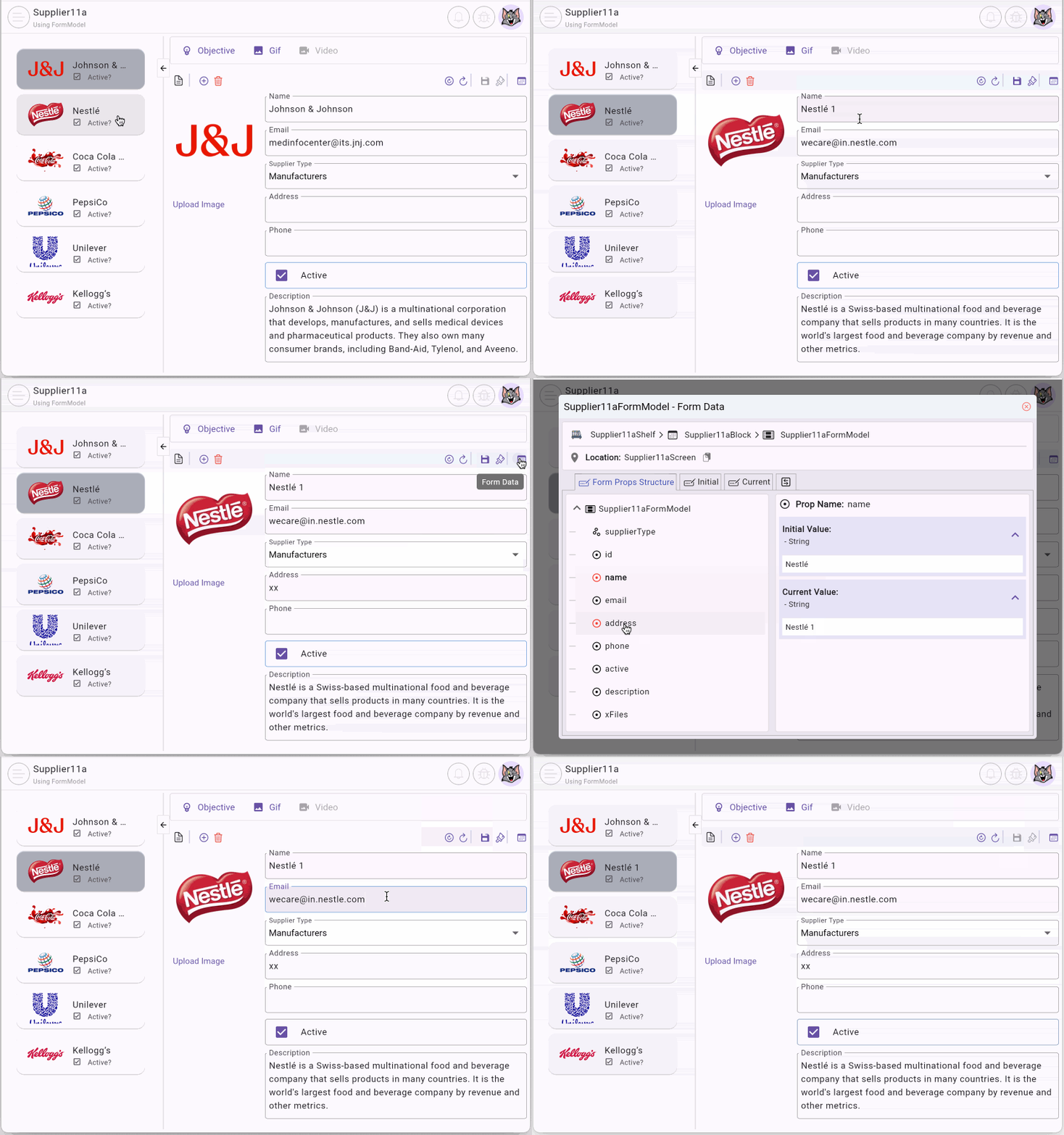
This article is based on the Supplier11a example in the "FlutterArtist Demo" suite. Before diving into the source code, let's observe how this form operates on a live interface:
No ADS
Example Scenario: Demo11a
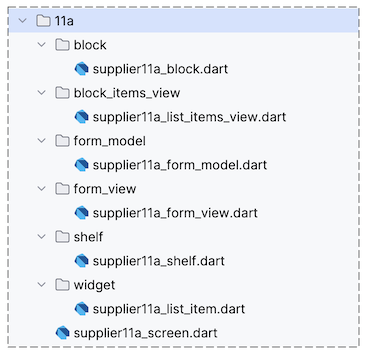
In this example, we build a coordinated screen with two main functional areas:
- The left side: Displays a list of Suppliers via a ListView (Supplier11aListItemsView).
- The right side: Is a specialized FormView (Supplier11aFormView), allowing users to view and directly modify the information of the currently selected supplier.
The input components on the FormView include:
- FormBuilderTextField(s): Text input fields allowing users to fill in the supplier's name, email, address, phone number, etc.
- FormBuilderDropdown: A dropdown menu enabling users to select a Supplier Type from a predefined list.
- ...
- Download FlutterArtist Demo
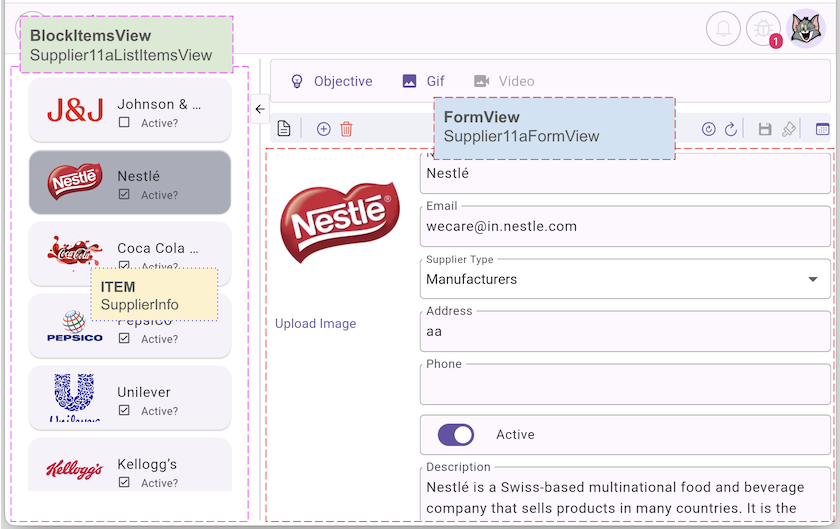
1. Structure of the example
Before we begin coding, we need to look at the overall structure of this example, which will be explained in detail in the following sections.
UI Components:
2. Supplier11aShelf
The Supplier11aShelf class acts as the "backbone" where we declare the link between the Block and the FormModel.
supplier11a_shelf.dart
class Supplier11aShelf extends Shelf {
  @override
  ShelfStructure defineShelfStructure() {
    return ShelfStructure(
      filterModels: {},
      blocks: [
        Supplier11aBlock(
          name: Supplier11aBlock.blkName,
          description: null,
          config: BlockConfig(),
          filterModelName: null,
          formModel: Supplier11aFormModel(),
          childBlocks: [],
        ),
      ],
    );
  }

  Supplier11aBlock findSupplier11aBlock() {
    return findBlock(Supplier11aBlock.blkName) as Supplier11aBlock;
  }
}
3. Supplier11aFormModel
In FlutterArtist, FormModel is a data model that contains multiple properties. FormView is the UI component responsible for displaying data from the FormModel and allowing users to input values for properties or select options from predefined sets.
| |
The FormModel class uses four Generic parameters, of which ID and ITEM_DETAIL are the two most important. The other two parameters, FORM_INPUT and FORM_RELATED_DATA, are not used in this example, so we will replace them with the default types EmptyFormInput and EmptyFormRelatedData.
supplier11a_form_model.dart
class Supplier11aFormModel
    extends
        FormModel<
          int, //
          SupplierData,
          EmptyFormInput,
          EmptyAdditionalFormRelatedData
> {
@override
FormModelStructure defineFormModelStructure() {
return FormModelStructure(
simplePropDefs: [
SimpleFormPropDef<int>(propName: "id"),
SimpleFormPropDef<String>(propName: "name"),
SimpleFormPropDef<String>(propName: "email"),
SimpleFormPropDef<String>(propName: "address"),
SimpleFormPropDef<String>(propName: "phone"),
SimpleFormPropDef<bool>(propName: "active"),
SimpleFormPropDef<String>(propName: "description"),
// dynamic or List<XFile>
SimpleFormPropDef<dynamic>(propName: "xFiles"),
],
multiOptPropDefs: [
// Multi Option Single Selection Prop.
MultiOptFormPropDef<SupplierTypeInfo>.singleSelection(
propName: 'supplierType',
),
],
);
}
...
}The defineFormModelStructure() method allows you to define the structure of the form, including:
- The properties and data types of each property.
- The relationship between properties
SimpleFormProp | This represents a simple property. On the FormView, the user will enter a value for this property type through FormBuilderTextField, FormBuilderCheckbox, etc. |
MultiOptFormProp | 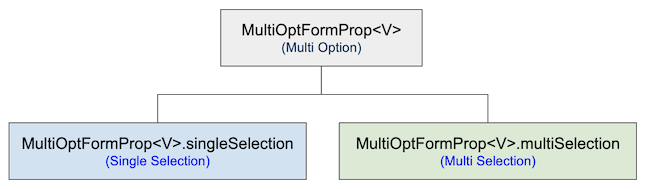 This is a property with multiple options that users can select one or more of. On a FormView, you can use one of the UI Components below to display this type of data.
Properties of this type can be independent of each other or have a parent-child relationship. |
No ADS
The Debug Form Model Inspector is a visual tool that allows you to observe the properties, state, and data of a Form Model. This tool can be opened via a button on the BlockControlBar or through code.
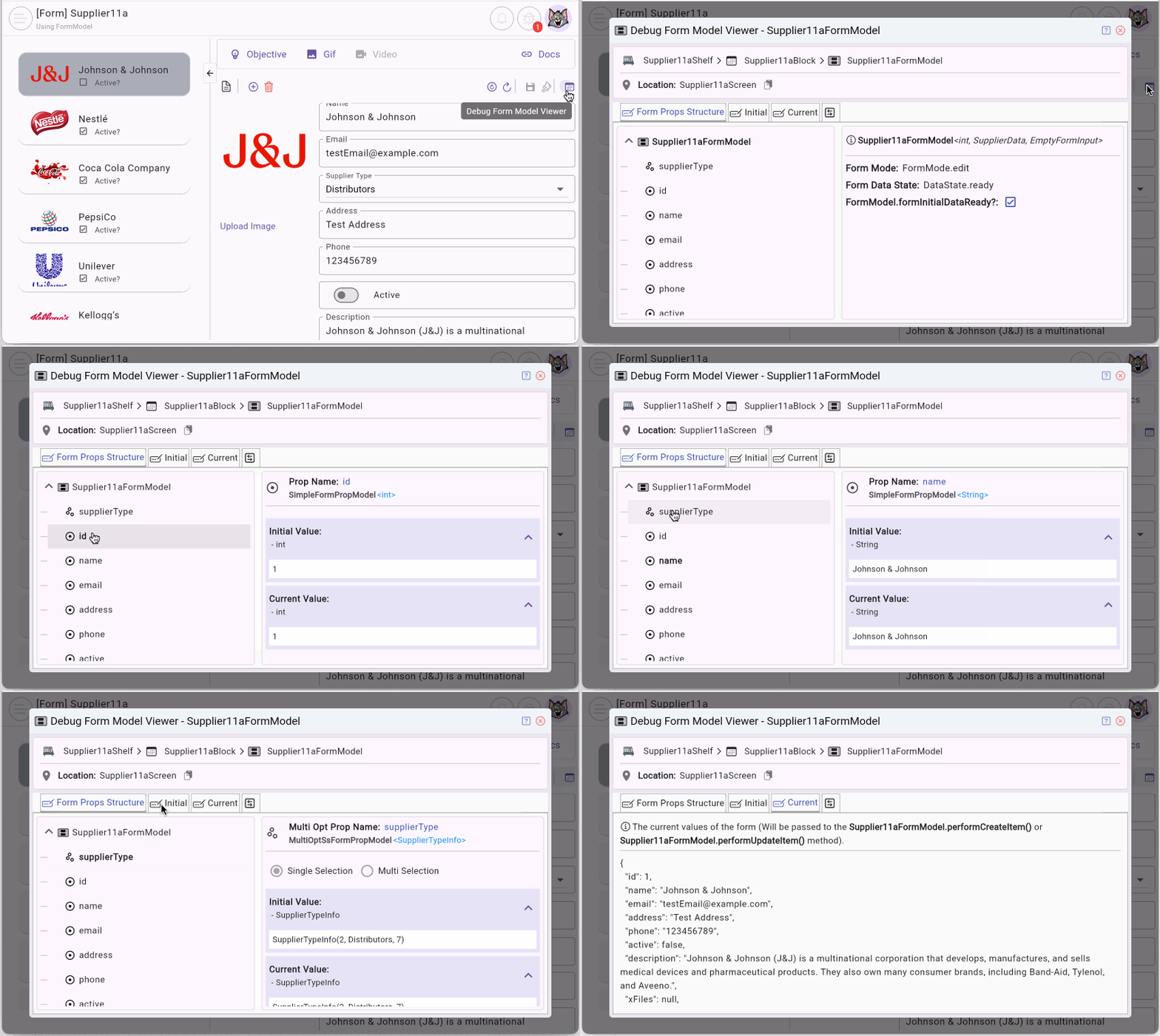
You can learn more about Debug Form Model Inspector in the article below.
FormModel.performLoadMultiOptPropXData()
The performLoadMultiOptPropXData() method is used to load data for each MultiOptFormProp. The process follows a specific order: root MultiOptFormProp(s) are loaded first, followed by the leaf MultiOptFormProp(s).
Note: Child MultiOptFormProp(s) are only loaded if the user has selected an option on the parent MultiOptFormProp.
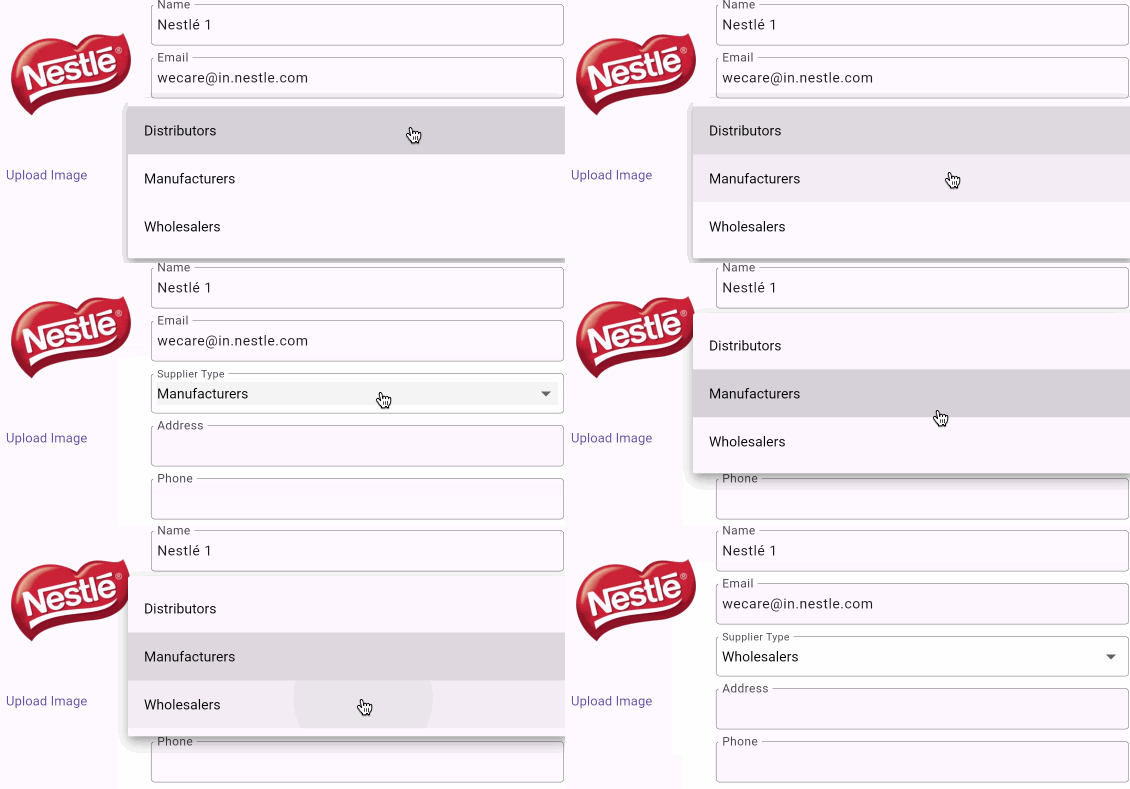
@override
Future<XData?> performLoadMultiOptPropXData({
  required String multiOptPropName,
  required SelectionType selectionType,
  required Object? parentMultiOptPropValue,
  required EmptyFormInput? formInput,
  required SupplierData? itemDetail,
  required EmptyAdditionalFormRelatedData formRelatedData,
}) async {
  if (multiOptPropName == "supplierType") {
    ApiResult<SupplierTypeInfoPage> result = await _supplierTypeRestProvider
        .queryAll();
    // IMPORTANT:
    result.throwIfError();
    // IMPORTANT: Generics should be declared explicitly.
    return ListXData<int, SupplierTypeInfo>.fromPageData(
      pageData: result.data,
      getItemId: (item) => item.id,
    );
  }
  return null;
}
- FlutterArtist ApiResult
- FlutterArtist XData
FormModel.extractSimplePropValuesFromItemDetail()
This method is automatically invoked by the library to convert ITEM_DETAIL into values for SimpleFormProp(s).
@override
Map<String, dynamic>? extractSimplePropValuesFromItemDetail({
  required Object? parentBlockCurrentItemId,
  required SupplierData itemDetail,
  required EmptyAdditionalFormRelatedData formRelatedData,
}) {
  return {
    "id": itemDetail.id,
    "name": itemDetail.name,
    "email": itemDetail.email,
    "address": itemDetail.address,
    "phone": itemDetail.phone,
    "active": itemDetail.active,
    "description": itemDetail.description,
    "xFiles": null,
  };
}
FormModel.extractMultiOptPropValueFromItemDetail()
The extractMultiOptPropValueFromItemDetail() method is automatically called by the library to convert ITEM_DETAIL into the value for each MultiOptFormProp with the name given by the parameter.
@override
OptValueWrap? extractMultiOptPropValueFromItemDetail({
  required String multiOptPropName,
  required SelectionType selectionType,
  required XData multiOptPropXData,
  required Object? parentMultiOptPropValue,
  required SupplierData itemDetail,
  required EmptyAdditionalFormRelatedData formRelatedData,
}) {
  if (multiOptPropName == "supplierType") {
    return OptValueWrap.single(itemDetail.supplierType);
  }
  return null;
}
FormModel.performCreateItem()
The performCreateItem() method needs to be implemented to call the API to create a new ITEM. This method is called by the library when the user clicks the "SAVE" button on the BlockControlBar and the FormModel is in "creation" mode.
performCreateItem()
@override
Future<ApiResult<SupplierData>> performCreateItem({
  required Map<String, dynamic> formMapData,
}) async {
  return await _supplierRestProvider.createSupplier(formMapData);
}- The parameter formMapData contains the current data of the FormModel, which you can view on the Debug Form Model Inspector.
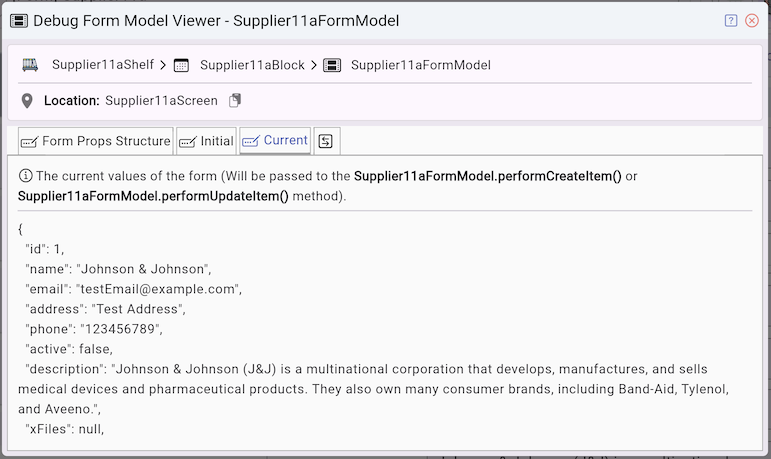
No ADS
FormModel.performUpdateItem()
The performUpdateItem() method needs to be implemented to call the API to update an ITEM. This method is called by the library when the user clicks the "SAVE" button on the BlockControlBar and the FormModel is in "edit" mode.
performUpdateItem()
@override
Future<ApiResult<SupplierData>> performUpdateItem({
  required Map<String, dynamic> formMapData,
}) async {
  return await _supplierRestProvider.updateSupplier(formMapData);
}
4. Supplier11aFormView
FormView is the base class for building form interfaces. When the user interacts with the FormView, the data is transparently updated back into the FormModel.
supplier11a_form_view.dart
class Supplier11aFormView extends FormView<Supplier11aFormModel> {
  const Supplier11aFormView({super.key, required super.formModel});

  @override
  Widget buildContent(BuildContext context) {
    Supplier11aBlock block = formModel.block as Supplier11aBlock;
    SupplierData? supplierData = block.currentItemDetail;
    //
    return LayoutBuilder(
      builder: (BuildContext context, BoxConstraints constraints) {
        if (constraints.constrainWidth() > 460) {
          return Row(
            crossAxisAlignment: CrossAxisAlignment.start,
            mainAxisAlignment: MainAxisAlignment.start,
            children: [
              _buildImageViewerPicker(supplierData),
              SizedBox(width: 10),
              Expanded(child: _buildFormFields()),
            ],
          );
        } else {
          return Column(
            crossAxisAlignment: CrossAxisAlignment.start,
            mainAxisAlignment: MainAxisAlignment.start,
            children: [
              _buildImageViewerPicker(supplierData),
              SizedBox(height: 15),
              _buildFormFields(),
            ],
          );
        }
      },
    );
  }

  Widget _buildImageViewerPicker(SupplierData? supplierData) {
    return ImageViewerPicker(
      keyString: "ImageViewerPicker",
      imageUrl: supplierData?.imageUrl,
      fieldName: 'xFiles',
      label: 'Pick Image:',
    );
  }

  Widget _buildFormFields() {
    return Column(
      mainAxisAlignment: MainAxisAlignment.start,
      crossAxisAlignment: CrossAxisAlignment.start,
      children: [
        FaFormBuilderTextField(
          name: "name",
          labelText: "Name",
          maxLines: 1,
          validator: FormBuilderValidators.compose([
            FormBuilderValidators.required(),
          ]),
          floatingLabelBehavior: FloatingLabelBehavior.always,
        ),
        SizedBox(height: 12),
        FaFormBuilderTextField(
          name: "email",
          maxLines: 1,
          labelText: "Email",
          validator: FormBuilderValidators.compose([
            FormBuilderValidators.required(),
            FormBuilderValidators.email(),
          ]),
          floatingLabelBehavior: FloatingLabelBehavior.always,
        ),
        SizedBox(height: 12),
        FaFormBuilderDropdown(
          name: "supplierType",
          labelText: "Supplier Type",
          items: formModel.getMultiOptPropData("supplierType") ?? [],
          getItemText: (item) => item.name,
          validator: FormBuilderValidators.compose([
            FormBuilderValidators.required(),
          ]),
        ),
        SizedBox(height: 12),
        FaFormBuilderTextField(
          name: "address",
          labelText: "Address",
          floatingLabelBehavior: FloatingLabelBehavior.always,
        ),
        SizedBox(height: 12),
        FaFormBuilderTextField(
          name: "phone",
          maxLines: 1,
          labelText: "Phone",
          floatingLabelBehavior: FloatingLabelBehavior.always,
        ),
        SizedBox(height: 10),
        FaFormBuilderScalableSwitch(
          name: "active",
          title: Text("Active"),
          controlAffinity: ListTileControlAffinity.leading,
        ),
        SizedBox(height: 12),
        FaFormBuilderTextField(
          name: "description",
          labelText: "Description",
          floatingLabelBehavior: FloatingLabelBehavior.always,
        ),
      ],
    );
  }
}
- FlutterArtist Fa FormBuilder
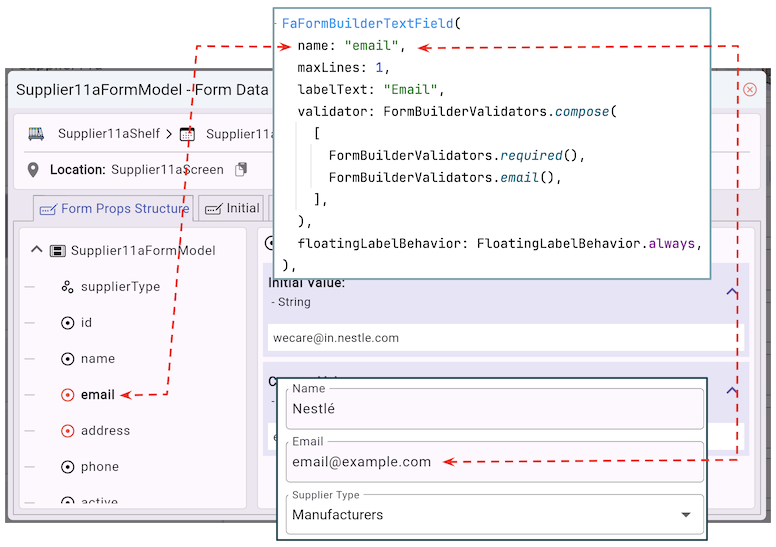
FlutterArtist utilizes the fluttter_fa_form_builder package with utilities such as FaFormBuilderTextField, FaFormBuilderDropdown, etc. The most critical parameter for these utilities is name, which is mapped 1-1 to a FormProp of the same name within the FormModel. Data synchronization between the FormView and the FormModel is completely automatic and transparent, handled by the library.
Note: Instead of using the utilities in fluttter_fa_form_builder, you can directly use the utilities from the community package flutter_form_builder for maximum flexibility and customization according to your specific needs.
No ADS
5. Supplier11aBlock
supplier11a_block.dart
class Supplier11aBlock
    extends
        Block<
          int, //
          SupplierInfo,
          SupplierData,
          EmptyFilterInput,
          EmptyFilterCriteria,
          EmptyFormInput,
          EmptyAdditionalFormRelatedData
        > {
  static const String blkName = "supplier11a-block";

  final supplierRestProvider = SupplierRestProvider();

  Supplier11aBlock({
    required super.name,
    required super.description,
    required super.config,
    required super.filterModelName,
    required super.formModel,
    required super.childBlocks,
  });

  @override
  Future<ApiResult<PageData<SupplierInfo>?>> performQuery({
    required Object? parentBlockCurrentItem,
    required EmptyFilterCriteria filterCriteria,
    required SortableCriteria sortableCriteria,
    required Pageable pageable,
  }) async {
    return await supplierRestProvider.query(pageable: pageable);
  }

  @override
  Future<ApiResult<void>> performDeleteItemById({required int itemId}) async {
    return await supplierRestProvider.delete(itemId);
  }

  @override
  Future<ApiResult<SupplierData>> performLoadItemDetailById({
    required int itemId,
  }) async {
    return await supplierRestProvider.find(supplierId: itemId);
  }

  @override
  SupplierInfo convertItemDetailToItem({required SupplierData itemDetail}) {
    return itemDetail.toSupplierInfo();
  }

  @override
  bool needToKeepItemInList({
    required Object? parentBlockCurrentItemId,
    required EmptyFilterCriteria filterCriteria,
    required SupplierData itemDetail,
  }) {
    return true;
  }

  @override
  EmptyFormInput buildInputForCreationForm({
    required Object? parentBlockCurrentItem,
    required EmptyFilterCriteria filterCriteria,
  }) {
    return EmptyFormInput();
  }

  @override
  Future<EmptyAdditionalFormRelatedData> performLoadAdditionalFormRelatedData({
    required Object? parentBlockCurrentItem,
    required SupplierData? currentItemDetail,
    required EmptyFilterCriteria filterCriteria,
  }) async {
    return EmptyAdditionalFormRelatedData();
  }
}
Block.buildInputForCreationForm()
When a user requests to create a new ITEM through a Form, this method will be automatically called to generate a FORM_INPUT, which will provide suggestions for the Form's initial values.
@override
EmptyFormInput buildInputForCreationForm({
  required Object? parentBlockCurrentItem,
  required EmptyFilterCriteria filterCriteria,
}) {
  return EmptyFormInput();
}
Note: The example you're currently viewing is quite simple, so FORM_INPUT does not play a significant role here. However, if you're interested, you can check the example below about FORM_INPUT:
FormModel.performLoadAdditionalFormRelatedData()
This method is used to load additional form-related data when the available information from parameters such as parentBlockCurrentItem, currentItemDetail, and filterCriteria is insufficient. For example, in some scenarios, you may have companyId from the parameters above, but not companyName. This method helps to load the missing information.
performLoadAdditionalFormRelatedData()
@override
Future<EmptyAdditionalFormRelatedData> performLoadAdditionalFormRelatedData({
  required Object? parentBlockCurrentItem,
  required SupplierData? currentItemDetail,
  required EmptyFilterCriteria filterCriteria,
}) async {
  return EmptyAdditionalFormRelatedData();
}
Block.needToKeepItemInList()
@override
bool needToKeepItemInList({
  required Object? parentBlockCurrentItem,
  required EmptyFilterCriteria filterCriteria,
  required SupplierData itemDetail,
}) {
  return true;
}
The needToKeepItemInList is an abstract method that needs to be implemented in the Block class. It is called automatically when a user successfully creates or updates an ITEM. This method checks whether the ITEM provided in the parameters meets the filter criteria and whether it is a child of the current ITEM in the parent Block. If the method returns true, the ITEM will be kept in the list; otherwise, it will be removed from the list.
No ADS
FlutterArtist
- FlutterArtist Debug Network Inspector
- Basic concepts in Flutter Artist
- FlutterArtist Block ex1
- FlutterArtist Filter Example
- FlutterArtist FilterModel MultiOptFilterCriterion ex1
- FlutterArtist FilterInput Example 1
- FlutterArtist Form ex1
- The idea of designing filter models in FlutterArtist
- FlutterArtist FormModel.patchFormFields() Ex1
- FlutterArtist BlockQuickItemUpdateAction Example
- FlutterArtist BlockNumberPagination Ex1
- FlutterArtist GridView Infinite Scroll Example
- FlutterArtist BlockBackendAction Create Multi Items (Example)
- FlutterArtist ListView Infinite Scroll Pagination Example
- FlutterArtist Pagination
- FlutterArtist Sort DropdownSortPanel Example
- FlutterArtist Dio
- FlutterArtist BlockBackendAction Example
- FlutterArtist BackgroundWebDownloadAction Example
- FlutterArtist StorageBackendAction ex1
- FlutterArtist Block External Shelf Event Example
- FlutterArtist Filter FormBuilderMultiDropDown Ex1
- FlutterArtist Master-detail Blocks ex1
- FlutterArtist Scalar ex1
- FlutterArtist Pagination Davi table Infinite Scroll Ex1
- FlutterArtist Filter Tree FormBuilderField ex1
- FlutterArtist Filter FormBuilderRadioGroup ex1
- FlutterArtist Form Parent-child MultiOptFormProp ex1
- FlutterArtist Manual Sorting ReorderableGridView Example
- FlutterArtist Manual Sorting ReorderableListView
- FlutterArtist Scalar External Shelf Event Example
- FlutterArtist Code Flow Inspector
- FlutterArtist Projections
- FlutterArtist Debug Log Viewer
- FlutterArtist start
- FlutterArtist AppConfiguration
- FlutterArtist Debug App Inspector
- FlutterArtist Debug Filter Criteria Inspector
- FlutterArtist Debug Filter Model Inspector
- FlutterArtist Debug Form Model Inspector
- FlutterArtist DebugMenu
- FlutterArtist Debug UI Context Inspector
- FlutterArtist Debug Shelf Structure Inspector
- FlutterArtist Context Provider Views
- FlutterArtist FilterModelStructure ex1
- FlutterArtist FilterModelStructure ex2
- FlutterArtist FilterModelStructure ex3
- FlutterArtist Internal Shelf Event ex1
- FlutterArtist Deferring External Shelf Events Example
- FlutterArtist Face
- Overview of FlutterArtist Theme
- FlutterArtist Theme Design Tokens Architecture
- FlutterArtist Themes FaColorUtils
- Flutter Artist Theme - Create a custom theme
Show More