
FlutterArtist BlockQuickItemCreationAction (Example)
In FlutterArtist, BlockQuickItemCreationAction is a way to help you quickly create an ITEM and add it to a Block without using a Form. Basically, its operation is very similar to BlockQuickItemUpdateAction, which was covered in the article below:
BlockQuickItemCreationAction
abstract class BlockQuickItemCreationAction<
    ID extends Object, //
    ITEM extends Identifiable<ID>,
    ITEM_DETAIL extends Identifiable<ID>> extends Action {
  const BlockQuickItemCreationAction({
    required super.needToConfirm,
    required super.actionInfo,
  });

  Future<ApiResult<ITEM_DETAIL>> performQuickCreateItem({
    required Object? parentBlockItem,
  });
}
BlockQuickItemCreationAction is executed by a Block to quickly create an ITEM_DETAIL, and the subsequent processing steps are similar to how a user creates a new item via a Form.
Example Scenario: Demo42a
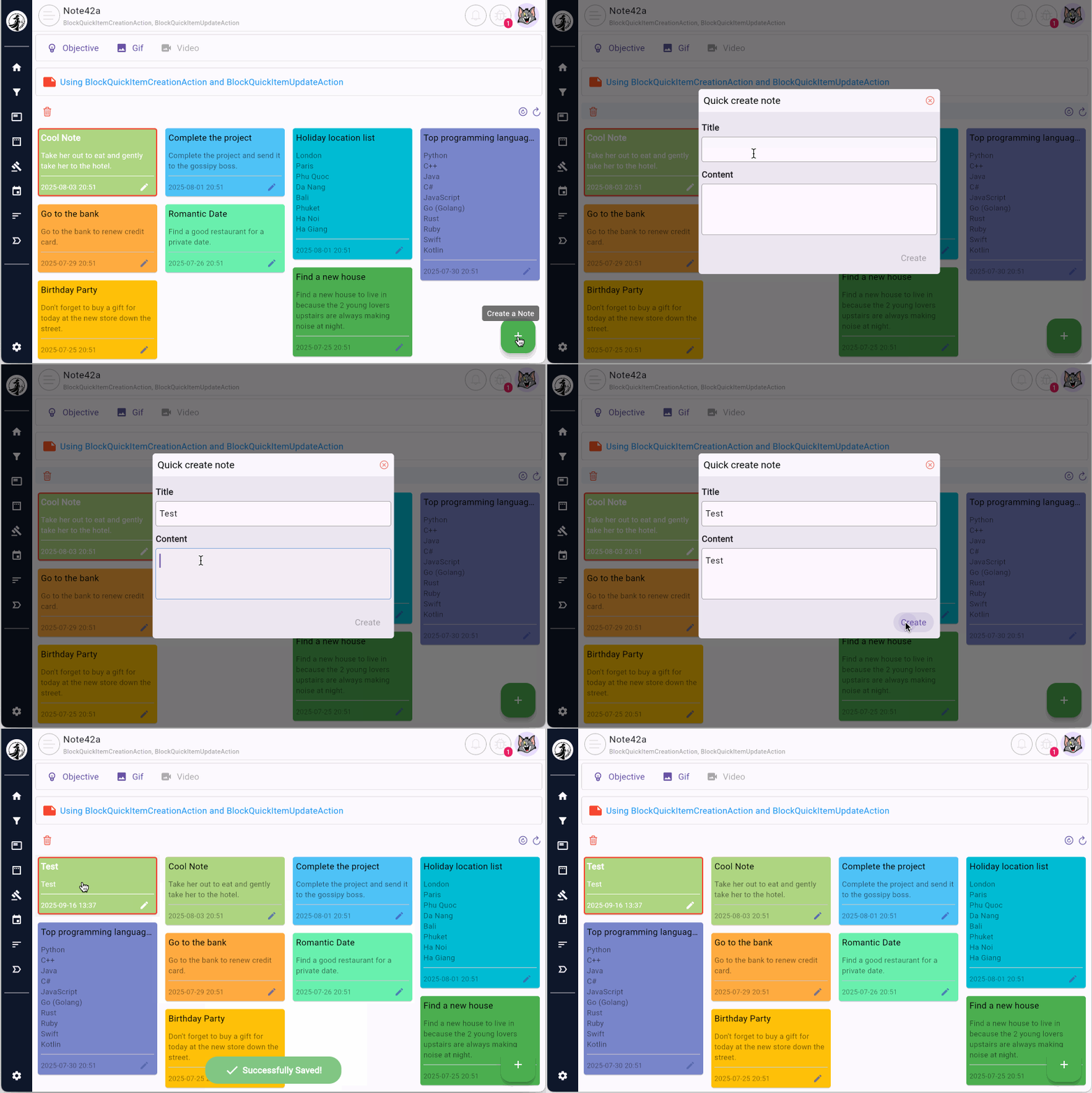
The main screen of the example displays a list of user Notes on a StaggeredGrid. The user clicks the "+" button to open a Dialog containing 2 TextField(s) to enter the title and content of the note. Then, they click the "Create" button to create the note.
Note that what you see on the Dialog is not a traditional Form; it simply consists of 2 TextField(s) to quickly gather information from the user.
No ADS
The title and content entered by the user in the Dialog are passed as parameters when creating a Note42aQuickCreateItemAction.
var createAction = Note42aQuickCreateItemAction(
  title: "Note Title",
  content: "Note Content",
  needToConfirm: true,
  actionInfo: 'Create a new note',
);1. Structure of the example
In this example, the notes are displayed using StaggeredGrid, a widget provided by the flutter_staggered_grid_view library.
pubspec.yaml
dependencies:
  flutter_staggered_grid_view: ^0.7.0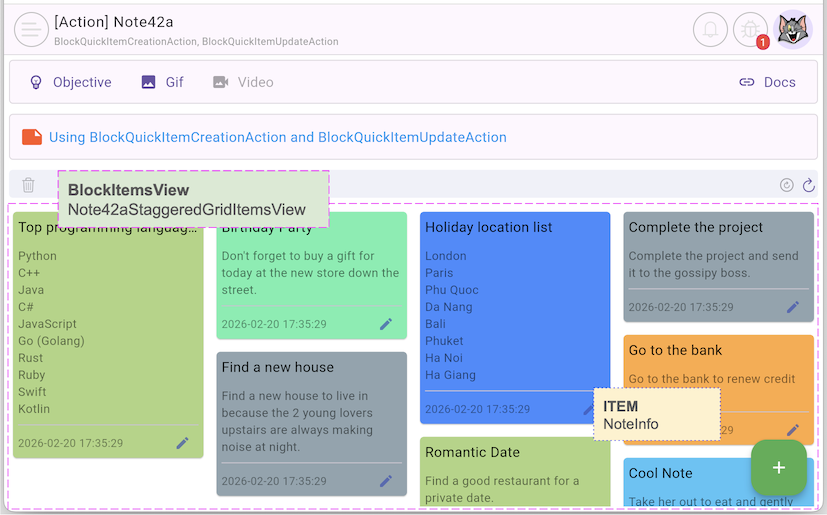
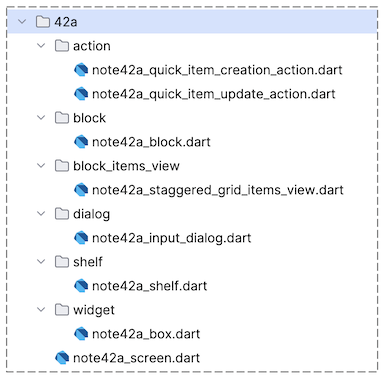
2. BlockQuickItemCreationAction
First, we create the Note42aQuickItemCreationAction class, extending BlockQuickItemCreationAction:
note42a_quick_item_creation_action.dart
class Note42aQuickItemCreationAction
    extends BlockQuickItemCreationAction<int, NoteInfo, NoteData> {
  final String title;
  final String content;

  final _noteRestProvider = NoteRestProvider();

  Note42aQuickItemCreationAction({
    required this.title,
    required this.content,
    required super.needToConfirm,
    required super.actionInfo,
  });

  @override
  Future<ApiResult<NoteData>> performQuickCreateItem({
    required Object? parentBlockItem,
  }) async {
    return await _noteRestProvider.quickCreateNote(
      title: title,
      content: content,
    );
  }

  @override
  CustomConfirmation? createCustomConfirmation() {
    return null;
  }
}
Take a look at the FILTER_CRITERIA parameter in the definition of the BlockQuickItemCreationAction class. This parameter plays an important role: it can both provide input values for creating a new ITEM and determine whether the newly created ITEM should remain in the Block’s list. However, in the simple example shown here, FILTER_CRITERIA does not yet clearly demonstrate this role.
Note42aQuickItemCreationAction | BlockQuickItemCreationAction |
BlockQuickItemCreationAction.performQuickCreateItem()
The performQuickCreateItem() method of BlockQuickItemCreationAction plays a similar role to the performCreateItem() method of FormModel. Both methods share the same purpose: calling an API to create a new ITEM.
Future<ApiResult<ITEM_DETAIL>> performQuickCreateItem({
  required Object? parentBlockItem
});
No ADS
After entering the title and content in the Dialog, the user clicks the "Create" button. The following code will be executed; in this code, we create a Note42aQuickItemCreationAction object and execute it via the Block:
executeQuickItemCreationAction()
var createAction = Note42aQuickItemCreationAction(
  title: title,
  content: content,
  needToConfirm: false,
  actionInfo: 'Create a new note',
);
//
BlockQuickItemCreationResult result = await widget.note42aBlock
    .executeQuickItemCreationAction(action: createAction);
if (result.successForFirst && context.mounted) {
  Navigator.of(context).pop();
}
- FlutterArtist FormModel.saveForm()
- FlutterArtist Block.executeQuickActionCreateItem()
- FlutterArtist Block.executeQuickActionUpdateItem()
3. Note42aShelf
Note42aShelf has a simple structure. It contains only a single Block and does not involve any FormModel.
note42a_shelf.dart
class Note42aShelf extends Shelf {
  @override
  ShelfStructure defineShelfStructure() {
    return ShelfStructure(
      filterModels: {},
      blocks: [
        Note42aBlock(
          name: Note42aBlock.blkName,
          description: null,
          config: BlockConfig(),
          filterModelName: null,
          formModel: null,
          childBlocks: [],
        ),
      ],
    );
  }

  Note42aBlock findNote42aBlock() {
    return findBlock(Note42aBlock.blkName) as Note42aBlock;
  }
}
4. Note42aBlock
note42a_block.dart
class Note42aBlock
    extends
        Block<
          int,
          NoteInfo, // ITEM
          NoteData, // ITEM_DETAIL
          EmptyFilterInput,
          EmptyFilterCriteria,
          EmptyFormInput,
          EmptyAdditionalFormRelatedData
        > {
  static const String blkName = "note42a-block";

  final _noteRestProvider = NoteRestProvider();

  Note42aBlock({
    required super.name,
    required super.description,
    required super.config,
    required super.filterModelName,
    required super.formModel,
    required super.childBlocks,
  });

  @override
  Future<ApiResult<PageData<NoteInfo>?>> performQuery({
    required Object? parentBlockCurrentItem,
    required EmptyFilterCriteria filterCriteria,
    required SortableCriteria sortableCriteria,
    required Pageable pageable,
  }) async {
    final result = await _noteRestProvider.queryAll();
    return ApiResult.createPageDataResultFromListDataResult(result);
  }

  @override
  Future<ApiResult<ListData<NoteInfo>?>> performQueryByItemIds({
    required Object? parentBlockCurrentItem,
    required EmptyFilterCriteria filterCriteria,
    required SortableCriteria sortableCriteria,
    required List<int> itemIds,
  }) {
    throw UnimplementedError();
  }

  @override
  Future<ApiResult<void>> performDeleteItemById({required int itemId}) async {
    return await _noteRestProvider.delete(itemId);
  }

  @override
  Future<ApiResult<NoteData>> performLoadItemDetailById({
    required int itemId,
  }) async {
    return await _noteRestProvider.find(noteId: itemId);
  }

  @override
  NoteInfo convertItemDetailToItem({required NoteData itemDetail}) {
    return itemDetail.toNoteInfo();
  }

  @override
  bool needToKeepItemInList({
    required Object? parentBlockCurrentItemId,
    required EmptyFilterCriteria filterCriteria,
    required NoteData itemDetail,
  }) {
    return true;
  }

  @override
  EmptyFormInput buildInputForCreationForm({
    required Object? parentBlockCurrentItem,
    required EmptyFilterCriteria filterCriteria,
  }) {
    return EmptyFormInput();
  }

  @override
  Future<EmptyAdditionalFormRelatedData> performLoadAdditionalFormRelatedData({
    required Object? parentBlockCurrentItem,
    required NoteData? currentItemDetail,
    required EmptyFilterCriteria filterCriteria,
  }) async {
    return EmptyAdditionalFormRelatedData();
  }
}
5. Note42aStaggeredGridItemsView
Note42aStaggeredGridItemsView displays ITEM(s) on a StaggeredGrid — a powerful widget from the flutter_staggered_grid_view package. Unlike traditional grids, StaggeredGrid allows cells of varying sizes to interweave artistically, creating a modern and engaging "masonry" interface, similar to the layout popularized by Pinterest.
To use this feature, you need to add the following dependency to your project:
pubspec.yaml
dependencies:
  flutter_staggered_grid_view: ^0.7.0
note42a_staggered_grid_items_view.dart
class Note42aStaggeredGridItemsView extends BlockItemsView<Note42aBlock> {
  const Note42aStaggeredGridItemsView({required super.block, super.key});

  @override
  Widget buildContent(BuildContext context) {
    final List<NoteInfo> items = block.items;
    final int itemCount = items.length;
    //
    return LayoutBuilder(
      builder: (BuildContext context, BoxConstraints constraints) {
        final int boxWidth = 200;
        int crossAxisCount = (constraints.constrainWidth() / boxWidth).toInt();
        //
        return MasonryGridView.count(
          itemCount: itemCount,
          crossAxisCount: crossAxisCount,
          mainAxisSpacing: 5,
          crossAxisSpacing: 5,
          itemBuilder: (context, index) {
            NoteInfo noteInfo = items[index];
            bool selected = block.isCurrentItem(noteInfo);
            //
            return Note42aBox(
              noteInfo: noteInfo,
              selected: selected,
              onNoteBoxPressed: (NoteInfo noteInfo) {
                _onNotePressed(noteInfo);
              },
              onEditNoteBtnPressed: (NoteInfo noteInfo) {
                _onEditNoteBtnPressed(context, noteInfo);
              },
            );
          },
        );
      },
    );
  }

  Future<void> _onNotePressed(NoteInfo noteInfo) async {
    // Write Log:
    FlutterArtist.codeFlowLogger.addMethodCall(
      ownerClassInstance: this,
      currentStackTrace: StackTrace.current,
      parameters: null,
    );
    await block.refreshItemAndSetAsCurrent(item: noteInfo);
  }

  Future<void> _onEditNoteBtnPressed(
    BuildContext context,
    NoteInfo noteInfo,
  ) async {
    // Write Log:
    FlutterArtist.codeFlowLogger.addMethodCall(
      ownerClassInstance: this,
      currentStackTrace: StackTrace.current,
      parameters: null,
    );
    await showNote42aInputDialog(context, note42aBlock: block, note: noteInfo);
  }
}
No ADS