
FlutterArtist GridView Infinite Scroll Example
Infinite Scroll Pagination is a modern design technique where content is dynamically loaded as the user scrolls down, rather than being split into static pages. Instead of clicking through page numbers, users enjoy a seamless and uninterrupted flow of information. This method is especially effective for data-heavy applications or social media platforms, where the goal is to encourage continuous exploration.
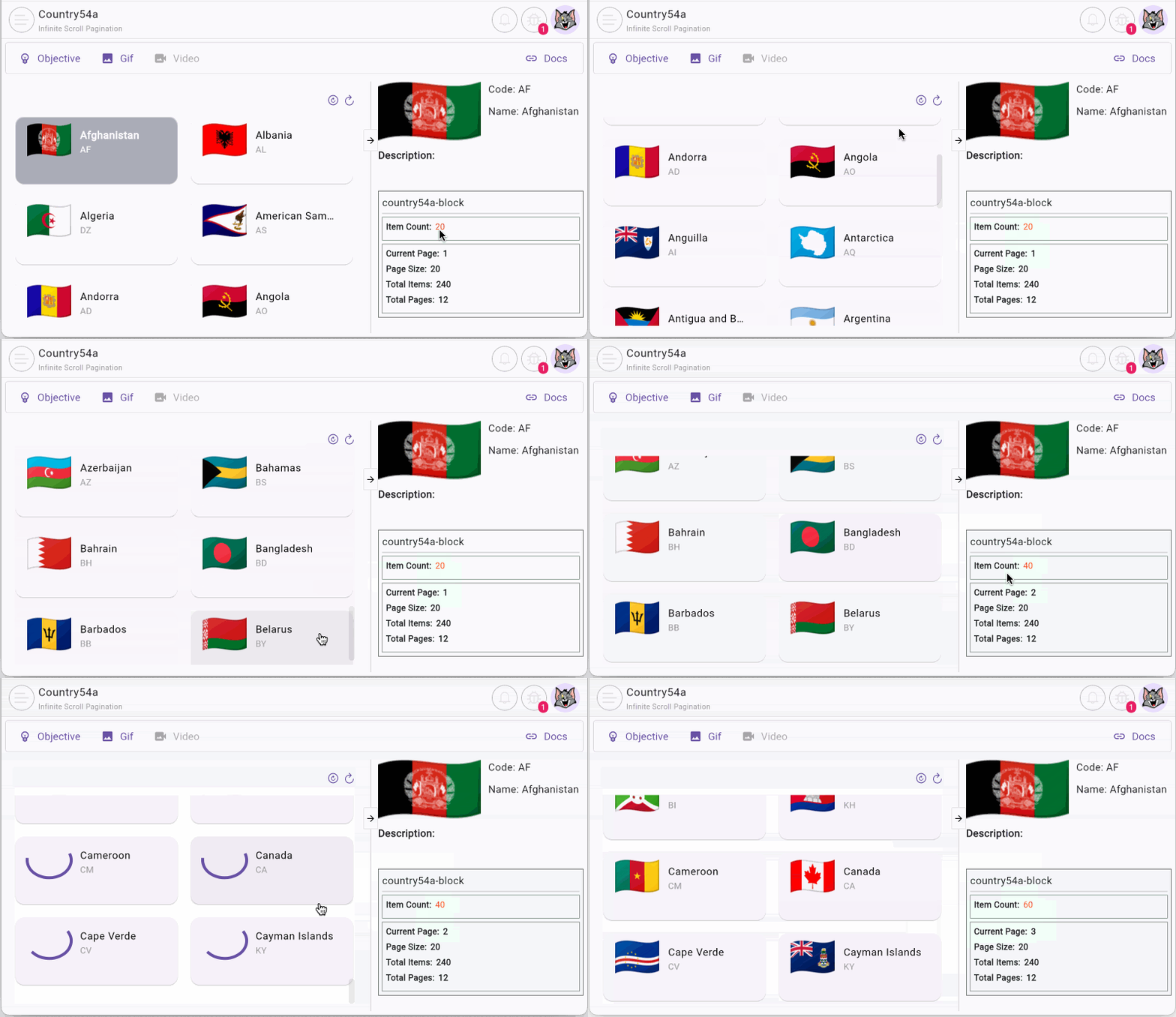
In this article, we will implement an infinite scroll pagination example using GridView combined with the FlutterArtist ecosystem. This article is based on the Demo54a example from the FlutterArtist Demo.
No ADS
- Flutter GridView with custom SliverGridDelegate
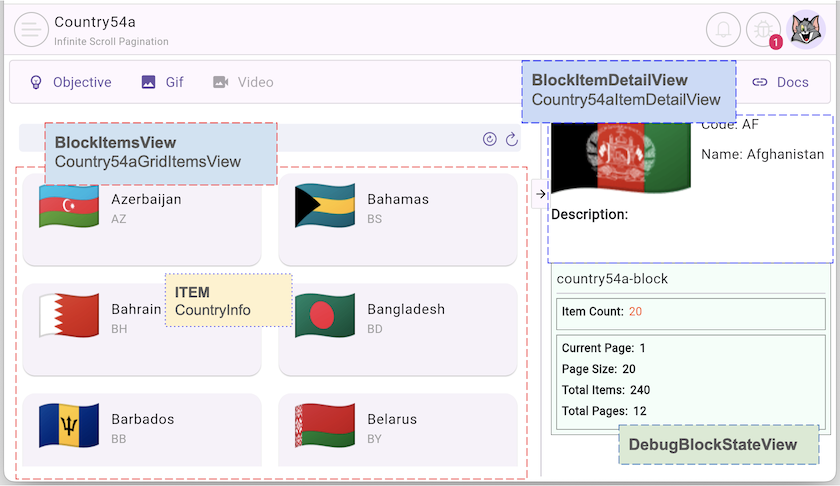
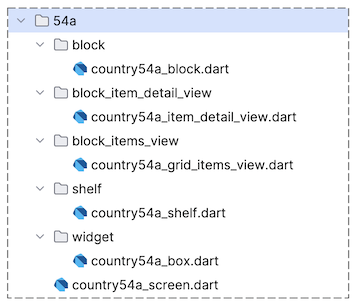
2. Country54aShelf
The structure of Country54aShelf is straightforward, containing a single Block. The key point to notice is the pageable parameter within BlockConfig, which allows you to define the maximum number of records (pageSize) to be fetched in each request.
country54a_shelf.dart
class Country54aShelf extends Shelf {
  @override
  ShelfStructure defineShelfStructure() {
    return ShelfStructure(
      filterModels: {},
      blocks: [
        Country54aBlock(
          name: Country54aBlock.blkName,
          description: null,
          config: BlockConfig(
            pageable: Pageable(pageSize: 20),
          ),
          filterModelName: null,
          formModel: null,
          childBlocks: [],
        ),
      ],
    );
  }

  Country54aBlock findCountry54aBlock() {
    return findBlock(Country54aBlock.blkName) as Country54aBlock;
  }
}
3. Infinite scrolling on GridView
To realize this feature, we wrap the GridView inside a NotificationListener<ScrollEndNotification>. When the user scrolls to the bottom of the list, a notification is dispatched. Based on this signal, the system automatically triggers the loading of the next data segment.
NotificationListener<ScrollEndNotification>(
  // IMPORTANT ScrollEndNotification:
  onNotification: _onScrollEndNotification,
  child: GridView.builder(
    itemCount: block.items.length,
    itemBuilder: (BuildContext context, int index) {
      CountryInfo item = block.items[index];
      return Country54aBox(
        countryInfo: item,
        selected: block.isCurrentItem(item),
        onCountryPressed: _onCountry54aPressed,
      );
    },
    ...
  ),
);
No ADS
The secret lies in how we handle the scroll notification. We need to check if the user has reached the bottom (maxScrollExtent) and if the system has any remaining pages to load via PaginationInfo
_onScrollEndNotification()
bool _onScrollEndNotification(ScrollEndNotification notification) {
  PaginationInfo? pagination = block.paginationInfo;
  if (pagination == null) {
    return false;
  }
  if (notification.metrics.pixels == notification.metrics.maxScrollExtent &&
      pagination.currentPage < pagination.totalPages) {
    _loadMore();
    return true;
  }
  return false;
}
Finally, the _loadMore() method invokes block.queryMore(). This powerful FlutterArtist method automatically fetches additional data and appends it to the current list.
_loadMore()
Future<void> _loadMore() async {
  await block.queryMore();
}
View the full code:
country54a_grid_items_view.dart
class Country54aGridItemsView extends BlockItemsView<Country54aBlock> {
  const Country54aGridItemsView({
    required super.block,
    super.key,
  });

  @override
  Widget buildContent(BuildContext context) {
    return NotificationListener<ScrollEndNotification>(
      // IMPORTANT ScrollEndNotification:
      onNotification: _onScrollEndNotification,
      child: GridView.builder(
        itemCount: block.items.length,
        // Custom SliverGridDelegate (See Tutorial).
        gridDelegate: const ChildFixedMainExtentAndMinCrossExtentSGD(
          crossAxisSpacing: 10,
          mainAxisSpacing: 10,
          childMainAxisExtent: 100, // height
          minChildCrossAxisExtent: 220, // width
        ),
        itemBuilder: (BuildContext context, int index) {
          CountryInfo item = block.items[index];
          return Country54aBox(
            countryInfo: item,
            selected: block.isCurrentItem(item),
            onCountryPressed: _onCountry54aPressed,
          );
        },
      ),
    );
  }

  bool _onScrollEndNotification(ScrollEndNotification notification) {
    PaginationInfo? pagination = block.paginationInfo;
    if (pagination == null) {
      return false;
    }
    if (notification.metrics.pixels == notification.metrics.maxScrollExtent &&
        pagination.currentPage < pagination.totalPages) {
      _loadMore();
      return true;
    }
    return false;
  }

  Future<void> _loadMore() async {
    await block.queryMore();
  }

  Future<void> _onCountry54aPressed(CountryInfo countryInfo) async {
    // Write Log:
    FlutterArtist.codeFlowLogger.addMethodCall(
      ownerClassInstance: this,
      currentStackTrace: StackTrace.current,
      parameters: null,
    );
    await block.refreshItemAndSetAsCurrent(
      item: countryInfo,
    );
  }
}
- Flutter GridView with custom SliverGridDelegate
No ADS
FlutterArtist
- FlutterArtist Debug Network Inspector
- Basic concepts in Flutter Artist
- FlutterArtist Block ex1
- FlutterArtist Filter Example
- FlutterArtist FilterModel MultiOptFilterCriterion ex1
- FlutterArtist FilterInput Example 1
- FlutterArtist Form ex1
- The idea of designing filter models in FlutterArtist
- FlutterArtist FormModel.patchFormFields() Ex1
- FlutterArtist BlockQuickItemUpdateAction Example
- FlutterArtist BlockNumberPagination Ex1
- FlutterArtist GridView Infinite Scroll Example
- FlutterArtist BlockBackendAction Create Multi Items (Example)
- FlutterArtist ListView Infinite Scroll Pagination Example
- FlutterArtist Pagination
- FlutterArtist Sort DropdownSortPanel Example
- FlutterArtist Dio
- FlutterArtist BlockBackendAction Example
- FlutterArtist BackgroundWebDownloadAction Example
- FlutterArtist StorageBackendAction ex1
- FlutterArtist Block External Shelf Event Example
- FlutterArtist Filter FormBuilderMultiDropDown Ex1
- FlutterArtist Master-detail Blocks ex1
- FlutterArtist Scalar ex1
- FlutterArtist Pagination Davi table Infinite Scroll Ex1
- FlutterArtist Filter Tree FormBuilderField ex1
- FlutterArtist Filter FormBuilderRadioGroup ex1
- FlutterArtist Form Parent-child MultiOptFormProp ex1
- FlutterArtist Manual Sorting ReorderableGridView Example
- FlutterArtist Manual Sorting ReorderableListView
- FlutterArtist Scalar External Shelf Event Example
- FlutterArtist Code Flow Inspector
- FlutterArtist Projections
- FlutterArtist Debug Log Viewer
- FlutterArtist start
- FlutterArtist AppConfiguration
- FlutterArtist Debug App Inspector
- FlutterArtist Debug Filter Criteria Inspector
- FlutterArtist Debug Filter Model Inspector
- FlutterArtist Debug Form Model Inspector
- FlutterArtist DebugMenu
- FlutterArtist Debug UI Context Inspector
- FlutterArtist Debug Shelf Structure Inspector
- FlutterArtist Context Provider Views
- FlutterArtist FilterModelStructure ex1
- FlutterArtist FilterModelStructure ex2
- FlutterArtist FilterModelStructure ex3
- FlutterArtist Internal Shelf Event ex1
- FlutterArtist Deferring External Shelf Events Example
- FlutterArtist Face
- Overview of FlutterArtist Theme
- FlutterArtist Theme Design Tokens Architecture
- FlutterArtist Themes FaColorUtils
- Flutter Artist Theme - Create a custom theme
Show More