
FlutterArtist BlockBackendAction Create Multi Items (Example)
In enterprise application architecture (Enterprise UI), executing bulk record creation tasks (Bulk/Multi Creation) is a frequently occurring business requirement. To handle this challenge with absolute integrity, efficiency, and to guarantee that the data displayed on the screen strictly matches the active filters, FlutterArtist provides the BlockBackendAction class.
BlockBackendAction
abstract class BlockBackendAction<ID extends Object> extends Action {
  late final BlockBackendActionConfig _config;

  BlockBackendActionConfig get config => _config;

  BlockBackendAction({
    required super.needToConfirm,
    required super.actionInfo,
  }) {
    _config = defineActionConfig();
  }

  BlockBackendActionConfig defineActionConfig();

  Future<ApiResult<ListData<ID>?>> performBackendOperation({
    required Object? parentBlockItem,
  });

  ID? suggestNewCurrentItemId({required List<ID> itemIds});
}
The Twin-Phase Data Synchronization Process
The operational mechanics of BlockBackendAction are divided into two independent yet flawlessly coordinated phases between the Client and the Server:
BlockBackendAction.performBackendOperation()
Future<ApiResult<ListData<ID>?>> performBackendOperation({
    required Object? parentBlockItem,
});- Phase 1 (Server-Side Execution & ID Footprint): When the action is dispatched, the server performs the background processing logic (e.g., generating bulk records). Upon completion, the Server does not return the entire bulky array of data entities; instead, it only yields a list of the newly created records' unique identifiers via the ApiResult<ListData<ID>> structure.
Block.performQueryByItemIds()
Future<ApiResult<ListData<ITEM>?>> performQueryByItemIds({
  required Object? parentBlockCurrentItem,
  required FILTER_CRITERIA filterCriteria,
  required SortableCriteria sortableCriteria,
  required List<ID> itemIds,
});- Phase 2 (Client-Side Re-Query & Safe Viewport Merging): Immediately after successfully receiving the list of IDs from Phase 1, the framework core of the Client-side Block automatically triggers the performQueryByItemIds method. It uses those exact tracking IDs to query back to the Server, fetching the complete list of full data entities (ITEM).
Core Values of the Solution
By forcing the new data stream through the Block.performQueryByItemIds() method, the additional elements nạp into the screen are guaranteed to:
- Align flawlessly with the current dataset context of the parent Block.
- Comply 100% with the active screen filters (FilterCriteria). If a newly generated background record does not match the active search keyword, it will automatically be filtered out by the engine, keeping the user interface completely accurate.
Example Scenarios Demo25a
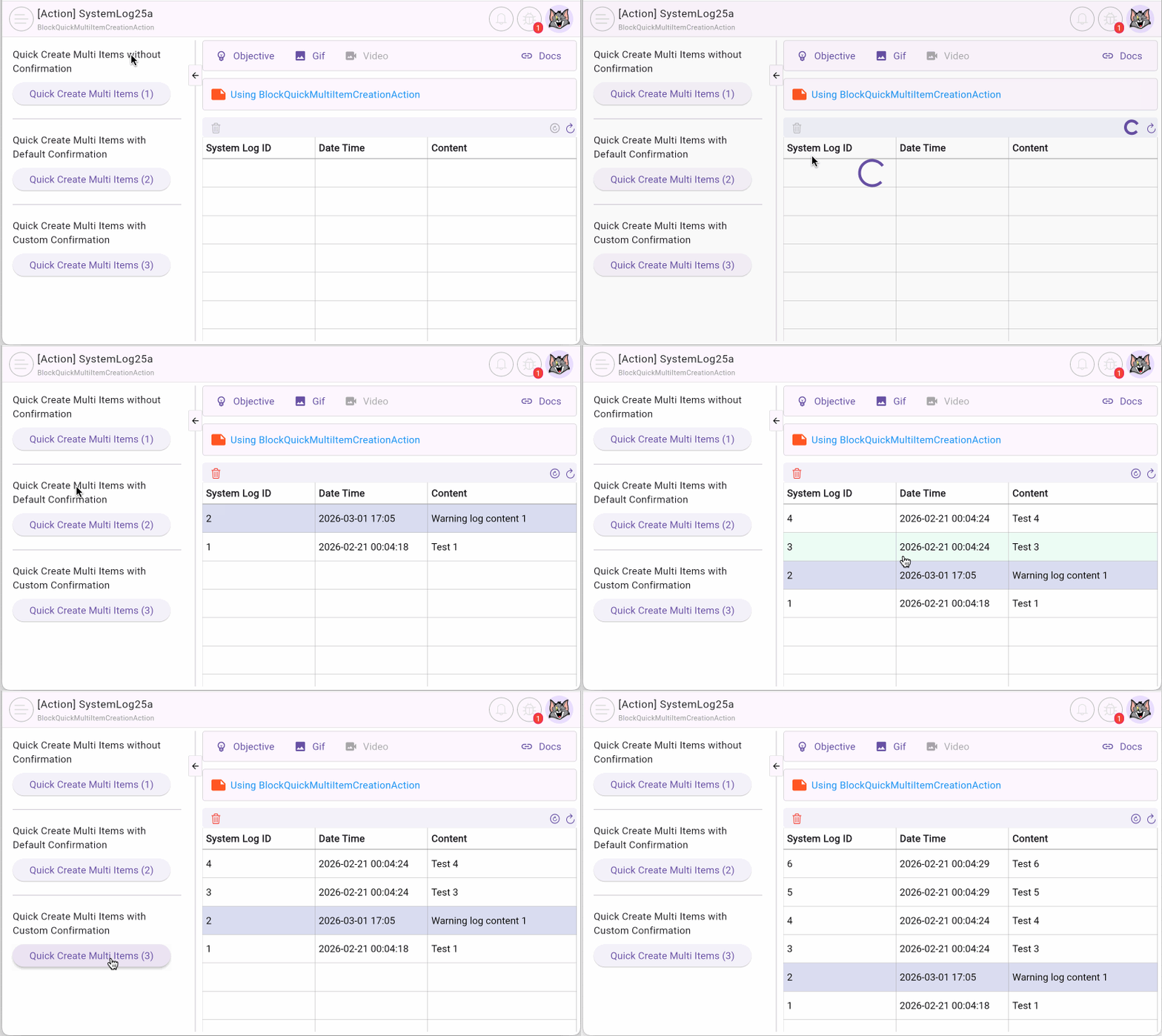
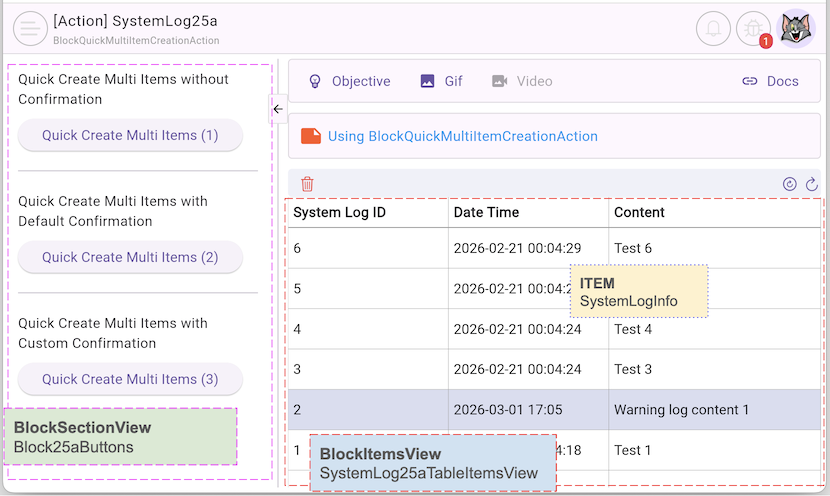
In this article, we will explore the power of the BlockBackendAction class through 3 practical scenarios within the system log structure (SystemLog(s)). The newly generated server-side records will undergo a twin-phase synchronization, automatically evaluating against the active criteria to appear on the data table on the right side of the screen.
No ADS
- Scenario 1: Create Multi Items without Confirmation: The user taps on Button1 on the left side of the screen to execute the action. The system automatically dispatches the background task to generate SystemLog(s), receives the tracking ID footprint, forces the dataset stream through the Block.performQueryByItemIds() pipeline to safely fetch full entities into the Block, and renders them instantly on the table without any intermediate steps.
- Scenario 2: Create Multi Items with Default Confirmation: The user taps on Button2. A default system dialog overlays to request user confirmation for the action. Upon successful confirmation, the twin-phase lifecycle of the BlockBackendAction triggers to generate and synchronize the new SystemLog(s) into the viewport list with absolute integrity.
- Scenario 3: Quick Create Multi Items with Custom Confirmation: The user taps on Button3. A tailor-made custom dialog configured for the logging boundary overlays to request verification. Following confirmation, the framework executes the generation, processes the concrete entities through the evaluation matrix, and renders the matched SystemLog(s) identically to the previous flows.
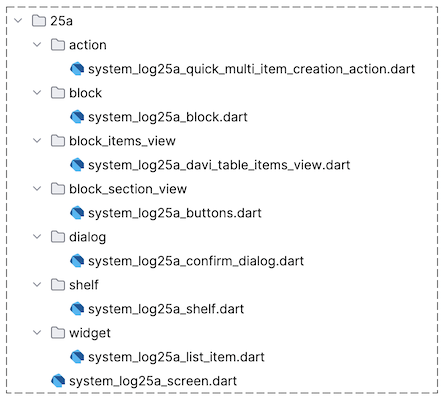
2. SystemLog25aConfirmDialog
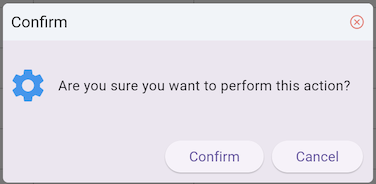
First, we create the SystemLog25aConfirmDialog class to build a custom Dialog, which will be used in the third scenario. Note that this is a simple Dialog for illustration purposes; in a real-world application, you can create more complex and tailored interfaces to match your app's identity.
No ADS
In this code snippet, we use FaAlertDialog – a component within the FlutterArtist ecosystem – to maintain visual consistency (however, you can also directly use Flutter's standard AlertDialog class). A key point to note is that when the user clicks "Confirm", we return true, and when they click "Cancel", we return false via Navigator.pop.
This return value is crucial because our Action will rely on it to decide whether to proceed with the API call to create multiple ITEM(s).
system_log25a_confirm_dialog.dart
class SystemLog25aConfirmDialog extends StatelessWidget {
  const SystemLog25aConfirmDialog({super.key});

  @override
  Widget build(BuildContext context) {
    Size size = calculatePreferredDialogSize(
      context,
      preferredWidth: 400,
      preferredHeight: 120,
    );
    //
    FaAlertDialog alert = FaAlertDialog(
      titleText: "Confirm",
      contentPadding: const EdgeInsets.all(5),
      content: SizedBox(
        width: size.width,
        height: size.height,
        child: Row(
          children: [
            Icon(Icons.settings, size: 40, color: Colors.blue),
            SizedBox(width: 10),
            Expanded(
              child: Text("Are you sure you want to perform this action?"),
            ),
          ],
        ),
      ),
      clipBehavior: Clip.hardEdge,
      actions: [
        ElevatedButton(
            onPressed: () {
              Navigator.pop(context, true);
            },
            child: Text("Confirm")),
        ElevatedButton(
            onPressed: () {
              Navigator.pop(context, false);
            },
            child: Text("Cancel"))
      ],
    );
    return alert;
  }
}
3. SystemLog25aMultiItemCreationBackendAction
Below is the complete source code for the SystemLog25aMultiItemCreationBackendAction class — extended from BlockBackendAction. It is responsible for generating several randomized system log records (SystemLog) specifically for demonstration purposes within this example.
system_log25a_multi_item_creation_backend_action.dart
class SystemLog25aMultiItemCreationBackendAction
    extends BlockBackendAction<int> {
  final bool customConfirmation;

  final _systemLogRestProvider = SystemLogRestProvider();

  SystemLog25aMultiItemCreationBackendAction({
    required super.needToConfirm,
    required super.actionInfo,
    required this.customConfirmation,
  });

  @override
  BlockBackendActionConfig defineActionConfig() {
    return BlockBackendActionConfig(
      viewportSyncStrategy: BlockViewportSyncStrategy.convergeAll,
    );
  }

  @override
  Future<ApiResult<ListData<int>?>> performBackendOperation({
    required Object? parentBlockItem,
  }) async {
    return await _systemLogRestProvider.createMultiSystemLogs();
  }

  @override
  int? suggestNewCurrentItemId({required List<int> itemIds}) {
    return null;
  }

  @override
  CustomConfirmation? createCustomConfirmation() {
    if (!customConfirmation) {
      return null;
    }
    return (BuildContext context) async {
      bool confirm =
          await showDialog(
            context: context,
            builder: (BuildContext context) {
              return SystemLog25aConfirmDialog();
            },
          ) ??
          false;
      return confirm;
    };
  }
}
No ADS
BlockBackendAction.defineActionConfig()
This method allows developers to define the data synchronization strategy directly inside the custom BlockBackendAction. In this example, we configure the supreme strategy convergeAll to command the framework to aggregate both historical and newly generated IDs to scrub away any inconsistent layout rows.
BlockBackendActionConfig
@override
BlockBackendActionConfig defineActionConfig() {
  return BlockBackendActionConfig(
    viewportSyncStrategy: BlockViewportSyncStrategy.convergeAll,
  );
}
BlockViewportSyncStrategy | Description |
convergeAll | The framework aggregates the itemId sequence returned from the BlockBackendAction with the entire list of currently active system itemIds, passing the combined collection into the Block.performQueryByItemIds() method. The resulting list of retrieved ITEMs will then completely replace the active dataset within the Block. |
forceNativeQuery | The framework bypasses specific identifier tracking and actively executes a complete, full-scale re-query from scratch via the native Block.performQuery() method. The newly fetched sequence of ITEMs will then completely overwrite (replace) the existing dataset inside the Block. |
incrementalMerge | The framework exclusively takes the sequence of itemIds generated by the BlockBackendAction and passes them into the Block.performQueryByItemIds() method. The resulting list of fetched full ITEMs is then locally merged (merge) into the Block layout while concurrently pruning and removing any elements that no longer exist on the server side. |
Advanced Technical Note:A unique defense-in-depth architectural feature of FlutterArtist: The viewportSyncStrategy configured in the BlockBackendActionConfig here is not the final judgment of the runtime framework. The Block possesses a supreme overriding mechanism based on strategy priority levels:- forceNativeQuery > convergeAll > incrementalMergeIf the Block itself is constrained by a stricter system-level rule (requiring a higher minimum baseline), the Framework will automatically override and upgrade the Action's requested strategy to shield the viewport's absolute data integrity.
- FlutterArtist BlockViewportSyncStrategy (***)
createCustomConfirmation()
By default, when you execute a BlockBackendAction, a default dialog is displayed for action confirmation. This method allows you to create a custom confirmation dialog.
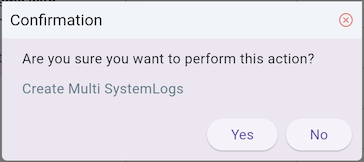
default confirmation dialog
BlockBackendAction.performBackendOperation()
This is the abstract method that must be implemented. It is responsible for invoking the remote API to create records on the server-side and yields a list of tracking identifiers (ID). This sequence of IDs will then be automatically passed by the framework core into the Block.performQueryByItemIds() method to fetch the complete list of full entities (ITEM), ensuring absolute alignment with the active criteria before being injected into the Block.
BlockQuickMultiItemCreationAction is executed via the executeQuickMultiItemCreationAction() method of the Block. Depending on the configuration, there are 3 main execution modes:
Block.executeBackendAction()
BlockBackendAction is dispatched and executed through the executeBackendAction() method of the Block object. Depending on the specific configuration boundaries, we have 3 primary execution strategies based on the confirmation type:
No ADS
Execution without confirmation
The action is executed immediately after clicking the button.
Button1
Future<void> _systemLog25aCreateMultiSystemLogs() async {
  FlutterArtist.codeFlowLogger.addMethodCall(
    ownerClassInstance: this,
    currentStackTrace: StackTrace.current,
    parameters: null,
  );
  //
  var action = SystemLog25aMultiItemCreationBackendAction(
    needToConfirm: false,
    customConfirmation: false,
    actionInfo: 'Create Multi SystemLogs',
  );
  await block.executeBackendAction(
    action: action,
    actionConfirmationType: ActionConfirmationType.custom,
  );
}
Default confirmation dialog
Uses the system's standard confirmation dialog based on actionInfo.
Button2
Future<void> _systemLog25aCreateMultiSystemLogs2() async {
  FlutterArtist.codeFlowLogger.addMethodCall(
    ownerClassInstance: this,
    currentStackTrace: StackTrace.current,
    parameters: null,
  );
  //
  var action = SystemLog25aMultiItemCreationBackendAction(
    needToConfirm: true,
    customConfirmation: false,
    actionInfo: 'Create Multi SystemLogs',
  );
  await block.executeBackendAction(
    action: action,
    actionConfirmationType: ActionConfirmationType.custom,
  );
}
Custom confirmation dialog
Uses the SystemLog25aConfirmDialog that we designed earlier.
Button3
Future<void> _systemLog25aCreateMultiSystemLogs3() async {
  FlutterArtist.codeFlowLogger.addMethodCall(
    ownerClassInstance: this,
    currentStackTrace: StackTrace.current,
    parameters: null,
  );
  //
  var action = SystemLog25aMultiItemCreationBackendAction(
    needToConfirm: true,
    customConfirmation: true,
    actionInfo: 'Create Multi SystemLogs',
  );
  await block.executeBackendAction(
    action: action,
    actionConfirmationType: ActionConfirmationType.custom,
  );
}
4. SystemLog25aBlock
SystemLog25aBlock
class SystemLog25aBlock
    extends
        Block<
          int, //
          SystemLogInfo,
          SystemLogData,
          EmptyFilterInput,
          EmptyFilterCriteria,
          EmptyFormInput,
          EmptyAdditionalFormRelatedData
        > {
  static const String blkName = "system-log25a-block";

  final systemLogRestProvider = SystemLogRestProvider();

  SystemLog25aBlock({
    required super.name,
    required super.description,
    required super.config,
    required super.filterModelName,
    required super.formModel,
    required super.childBlocks,
  });

  @override
  Future<ApiResult<ListData<SystemLogInfo>?>> performQueryByItemIds({
    required Object? parentBlockCurrentItem,
    required EmptyFilterCriteria filterCriteria,
    required SortableCriteria sortableCriteria,
    required List<int> itemIds,
  }) async {
    return await systemLogRestProvider.queryByIds(ids: itemIds);
  }

  @override
  Future<ApiResult<PageData<SystemLogInfo>?>> performQuery({
    required Object? parentBlockCurrentItem,
    required EmptyFilterCriteria filterCriteria,
    required SortableCriteria sortableCriteria,
    required Pageable pageable,
  }) async {
    // Return empty list:
    return await systemLogRestProvider.query(pageable: pageable);
  }

  @override
  Future<ApiResult<void>> performDeleteItemById({required int itemId}) async {
    return await systemLogRestProvider.delete(itemId);
  }

  @override
  Future<ApiResult<SystemLogData>> performLoadItemDetailById({
    required int itemId,
  }) async {
    return await systemLogRestProvider.find(systemLogId: itemId);
  }

  @override
  SystemLogInfo convertItemDetailToItem({required SystemLogData itemDetail}) {
    return itemDetail.toSystemLogInfo();
  }

  @override
  bool needToKeepItemInList({
    required Object? parentBlockCurrentItemId,
    required EmptyFilterCriteria filterCriteria,
    required SystemLogData itemDetail,
  }) {
    return true;
  }

  @override
  EmptyFormInput buildInputForCreationForm({
    required Object? parentBlockCurrentItem,
    required EmptyFilterCriteria filterCriteria,
  }) {
    return EmptyFormInput();
  }

  @override
  Future<EmptyAdditionalFormRelatedData> performLoadAdditionalFormRelatedData({
    required Object? parentBlockCurrentItem,
    required SystemLogData? currentItemDetail,
    required EmptyFilterCriteria filterCriteria,
  }) async {
    return EmptyAdditionalFormRelatedData();
  }
}
No ADS
FlutterArtist
- FlutterArtist Debug Network Inspector
- Basic concepts in Flutter Artist
- FlutterArtist Block ex1
- FlutterArtist Filter Example
- FlutterArtist FilterModel MultiOptFilterCriterion ex1
- FlutterArtist FilterInput Example 1
- FlutterArtist Form ex1
- The idea of designing filter models in FlutterArtist
- FlutterArtist FormModel.patchFormFields() Ex1
- FlutterArtist BlockQuickItemUpdateAction Example
- FlutterArtist BlockNumberPagination Ex1
- FlutterArtist GridView Infinite Scroll Example
- FlutterArtist BlockBackendAction Create Multi Items (Example)
- FlutterArtist ListView Infinite Scroll Pagination Example
- FlutterArtist Pagination
- FlutterArtist Sort DropdownSortPanel Example
- FlutterArtist Dio
- FlutterArtist BlockBackendAction Example
- FlutterArtist BackgroundWebDownloadAction Example
- FlutterArtist StorageBackendAction ex1
- FlutterArtist Block External Shelf Event Example
- FlutterArtist Filter FormBuilderMultiDropDown Ex1
- FlutterArtist Master-detail Blocks ex1
- FlutterArtist Scalar ex1
- FlutterArtist Pagination Davi table Infinite Scroll Ex1
- FlutterArtist Filter Tree FormBuilderField ex1
- FlutterArtist Filter FormBuilderRadioGroup ex1
- FlutterArtist Form Parent-child MultiOptFormProp ex1
- FlutterArtist Manual Sorting ReorderableGridView Example
- FlutterArtist Manual Sorting ReorderableListView
- FlutterArtist Scalar External Shelf Event Example
- FlutterArtist Code Flow Inspector
- FlutterArtist Projections
- FlutterArtist Debug Log Viewer
- FlutterArtist start
- FlutterArtist AppConfiguration
- FlutterArtist Debug App Inspector
- FlutterArtist Debug Filter Criteria Inspector
- FlutterArtist Debug Filter Model Inspector
- FlutterArtist Debug Form Model Inspector
- FlutterArtist DebugMenu
- FlutterArtist Debug UI Context Inspector
- FlutterArtist Debug Shelf Structure Inspector
- FlutterArtist Context Provider Views
- FlutterArtist FilterModelStructure ex1
- FlutterArtist FilterModelStructure ex2
- FlutterArtist FilterModelStructure ex3
- FlutterArtist Internal Shelf Event ex1
- FlutterArtist Deferring External Shelf Events Example
- FlutterArtist Face
- Overview of FlutterArtist Theme
- FlutterArtist Theme Design Tokens Architecture
- FlutterArtist Themes FaColorUtils
- Flutter Artist Theme - Create a custom theme
Show More