
FlutterArtist BlockQuickMultiItemCreationAction Example
In FlutterArtist, you can quickly create multiple ITEM(s) simultaneously and add them to a Block without using a Form. Basically, the usage of BlockQuickMultiItemCreationAction is quite similar to BlockQuickItemCreationAction, with the core difference lying in their primary execution methods.
BlockQuickMultiItemCreationAction
abstract class BlockQuickMultiItemCreationAction<
    ID extends Object, //
    ITEM extends Identifiable<ID>,
    ITEM_DETAIL extends Identifiable<ID>,
    FILTER_CRITERIA extends FilterCriteria> extends Action {
  const BlockQuickMultiItemCreationAction({
    required super.needToConfirm,
    required super.actionInfo,
  });

  Future<ApiResult<PageData<ITEM>>> performQuickCreateMultiItems({
    required Object? parentBlockItem,
    required FILTER_CRITERIA filterCriteria,
  });
}
The performQuickCreateItem() method returns a single ITEM_DETAIL, whereas performQuickCreateMultiItems() returns a list of ITEM(s) encapsulated within a PageData object.
/// BlockQuickItemCreationAction
Future<ApiResult<ITEM_DETAIL>> performQuickCreateItem({
 required Object? parentBlockItem,
 required FILTER_CRITERIA filterCriteria,
});

/// BlockQuickMultiItemCreationAction
Future<ApiResult<PageData<ITEM>>> performQuickCreateMultiItems({
  required Object? parentBlockItem,
  required FILTER_CRITERIA filterCriteria,
});
Example Scenarios Demo25a
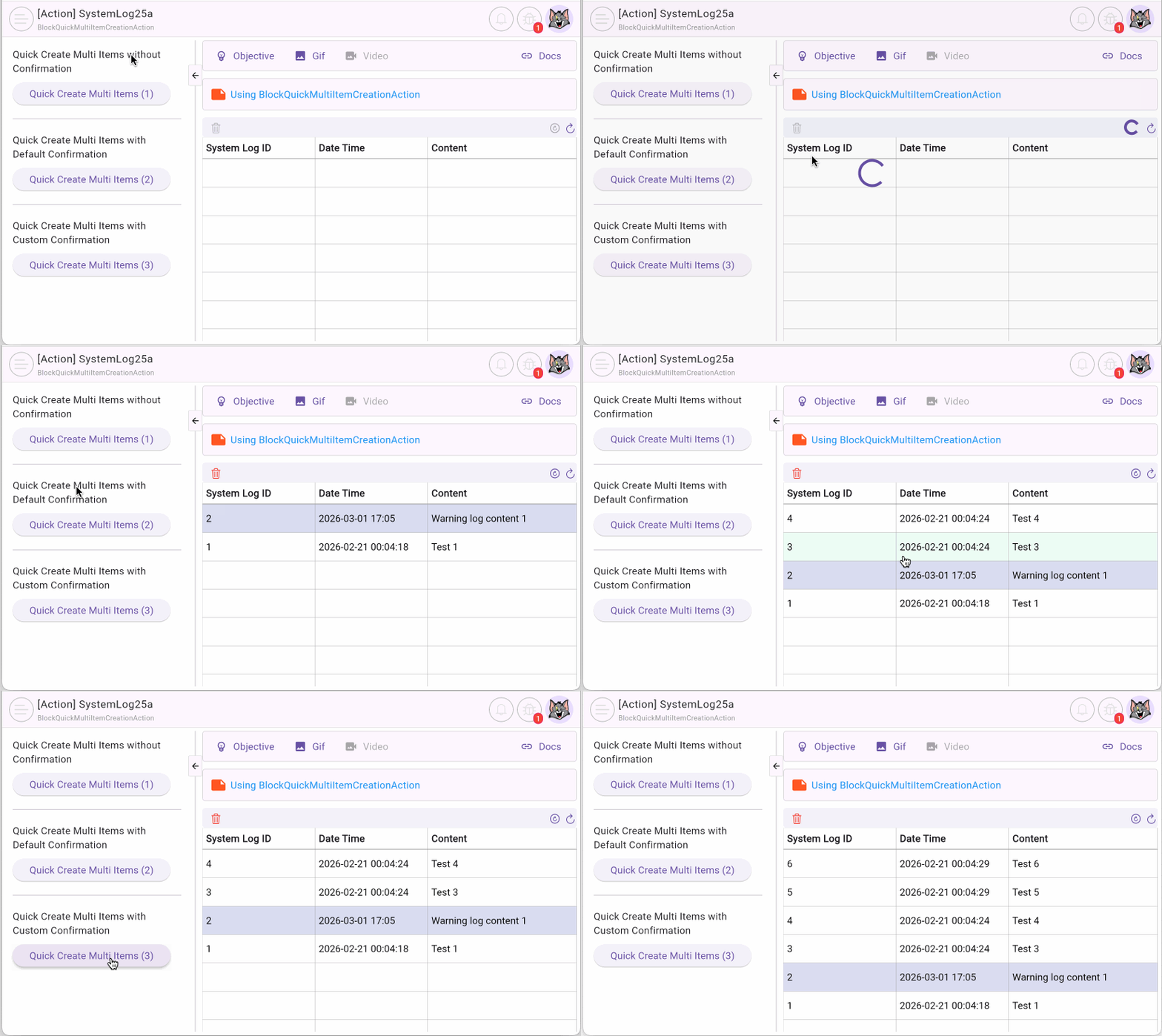
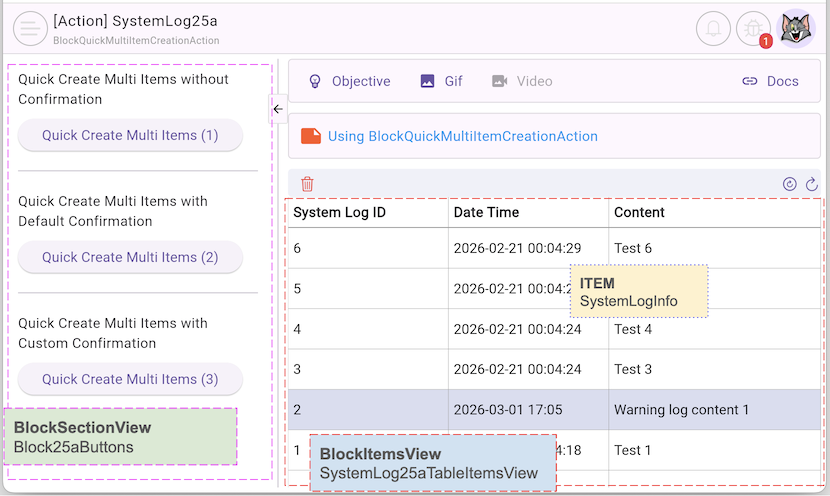
In this article, we will explore the power of multi-item creation through 3 practical scenarios involving SystemLog(s). The newly created records will automatically appear on a data table on the right side of the screen.
No ADS
- Scenario 1: The user clicks Button1 on the left to execute the action. The system automatically generates SystemLog(s), adds them to the Block, and displays them on the table instantly without any intermediate steps.
- Scenario 2: The user clicks Button2. A default Dialog appears, asking for confirmation. Upon confirmation, new SystemLog(s) are created and updated in the list.
- Scenario 3: The user clicks Button3. A custom Dialog appears to request confirmation. Subsequently, the system proceeds to generate and display the SystemLog(s), similar to the previous scenarios.
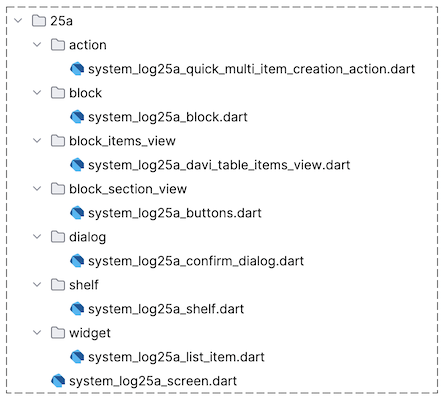
2. SystemLog25aConfirmDialog
First, we create the SystemLog25aConfirmDialog class to build a custom Dialog, which will be used in the third scenario. Note that this is a simple Dialog for illustration purposes; in a real-world application, you can create more complex and tailored interfaces to match your app's identity.
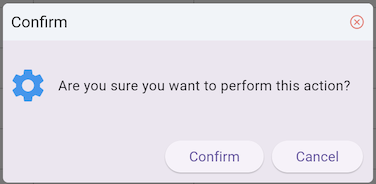
In this code snippet, we use FaAlertDialog – a component within the FlutterArtist ecosystem – to maintain visual consistency (however, you can also directly use Flutter's standard AlertDialog class). A key point to note is that when the user clicks "Confirm", we return true, and when they click "Cancel", we return false via Navigator.pop.
This return value is crucial because our Action will rely on it to decide whether to proceed with the API call to create multiple ITEM(s).
system_log25a_confirm_dialog.dart
class SystemLog25aConfirmDialog extends StatelessWidget {
  const SystemLog25aConfirmDialog({super.key});

  @override
  Widget build(BuildContext context) {
    Size size = calculatePreferredDialogSize(
      context,
      preferredWidth: 400,
      preferredHeight: 120,
    );
    //
    FaAlertDialog alert = FaAlertDialog(
      titleText: "Confirm",
      contentPadding: const EdgeInsets.all(5),
      content: SizedBox(
        width: size.width,
        height: size.height,
        child: Row(
          children: [
            Icon(Icons.settings, size: 40, color: Colors.blue),
            SizedBox(width: 10),
            Expanded(
              child: Text("Are you sure you want to perform this action?"),
            ),
          ],
        ),
      ),
      clipBehavior: Clip.hardEdge,
      actions: [
        ElevatedButton(
            onPressed: () {
              Navigator.pop(context, true);
            },
            child: Text("Confirm")),
        ElevatedButton(
            onPressed: () {
              Navigator.pop(context, false);
            },
            child: Text("Cancel"))
      ],
    );
    return alert;
  }
}
3. SystemLog25aQuickMultiItemCreationAction
Next, we create the SystemLog25aQuickMultiItemCreationAction class, extending BlockQuickMultiItemCreationAction to implement the actual business logic of the action – generating random SystemLogInfo(s) (for demonstration purposes in this example).
system_log25a_quick_multi_item_creation_action.dart
class SystemLog25aQuickMultiItemCreationAction
    extends
        BlockQuickMultiItemCreationAction<
          int, //
          SystemLogInfo,
          SystemLogData,
          EmptyFilterCriteria
        > {
  final bool customConfirmation;

  final _systemLogRestProvider = SystemLogRestProvider();

  SystemLog25aQuickMultiItemCreationAction({
    required super.needToConfirm,
    required super.actionInfo,
    required this.customConfirmation,
  });

  @override
  Future<ApiResult<PageData<SystemLogInfo>>> performQuickCreateMultiItems({
    required Object? parentBlockItem,
    required EmptyFilterCriteria filterCriteria,
  }) async {
    return await _systemLogRestProvider.createMultiSystemLogs();
  }

  @override
  CustomConfirmation? createCustomConfirmation() {
    if (!customConfirmation) {
      return null;
    }
    return (BuildContext context) async {
      bool confirm =
          await showDialog(
            context: context,
            builder: (BuildContext context) {
              return SystemLog25aConfirmDialog();
            },
          ) ??
          false;
      return confirm;
    };
  }
}
No ADS
createCustomConfirmation()
By default, when you execute a QuickAction, a default dialog is displayed for action confirmation. This method allows you to create a custom confirmation dialog.
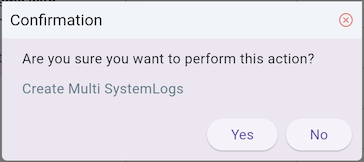
default confirmation dialog
performQuickCreateMultiItems()
This is the abstract method that must be implemented. It is responsible for calling an API to create and return a list of ITEM(s). These new items will then be automatically added to the Block's current list.
BlockQuickMultiItemCreationAction is executed via the executeQuickMultiItemCreationAction() method of the Block. Depending on the configuration, there are 3 main execution modes:
Execution without confirmation
The action is executed immediately after clicking the button.
var action = SystemLog25aQuickMultiItemCreationAction(
  needToConfirm: false,
  customConfirmation: false,
  actionInfo: 'Create Multi SystemLogs',
);
await block.executeQuickMultiItemCreationAction(
  action: action,
);
Default confirmation dialog
Uses the system's standard confirmation dialog based on actionInfo.
var action = SystemLog25aQuickMultiItemCreationAction(
  needToConfirm: true,
  customConfirmation: false,
  actionInfo: 'Create Multi SystemLogs',
);
await block.executeQuickMultiItemCreationAction(
  action: action,
);
Custom confirmation dialog
Uses the SystemLog25aConfirmDialog that we designed earlier.
var action = SystemLog25aQuickMultiItemCreationAction(
  needToConfirm: true,
  customConfirmation: true,
  actionInfo: 'Create Multi SystemLogs',
);
await block.executeQuickMultiItemCreationAction(
  action: action,
);
No ADS
FlutterArtist
- FlutterArtist Debug Network Inspector
- Basic concepts in Flutter Artist
- FlutterArtist Block ex1
- FlutterArtist Filter Example
- FlutterArtist FilterModel MultiOptFilterCriterion ex1
- FlutterArtist FilterInput Example 1
- FlutterArtist Form ex1
- The idea of designing filter models in FlutterArtist
- FlutterArtist FormModel.patchFormFields() Ex1
- FlutterArtist BlockQuickItemUpdateAction Example
- FlutterArtist BlockNumberPagination Ex1
- FlutterArtist GridView Infinite Scroll Example
- FlutterArtist BlockQuickMultiItemCreationAction Example
- FlutterArtist ListView Infinite Scroll Pagination Example
- FlutterArtist Pagination
- FlutterArtist Sort DropdownSortPanel Example
- FlutterArtist Dio
- FlutterArtist BlockBackendAction Example
- FlutterArtist BackgroundWebDownloadAction Example
- FlutterArtist StorageBackendAction ex1
- FlutterArtist Block External Shelf Event Example
- FlutterArtist Filter FormBuilderMultiDropDown Ex1
- FlutterArtist Master-detail Blocks ex1
- FlutterArtist Scalar ex1
- FlutterArtist Pagination Davi table Infinite Scroll Ex1
- FlutterArtist Filter Tree FormBuilderField ex1
- FlutterArtist Filter FormBuilderRadioGroup ex1
- FlutterArtist Form Parent-child MultiOptFormProp ex1
- FlutterArtist Manual Sorting ReorderableGridView Example
- FlutterArtist Manual Sorting ReorderableListView
- FlutterArtist Scalar External Shelf Event Example
- FlutterArtist Code Flow Inspector
- FlutterArtist Projections
- FlutterArtist Debug Log Viewer
- FlutterArtist start
- FlutterArtist AppConfiguration
- FlutterArtist Debug App Inspector
- FlutterArtist Debug Filter Criteria Inspector
- FlutterArtist Debug Filter Model Inspector
- FlutterArtist Debug Form Model Inspector
- FlutterArtist DebugMenu
- FlutterArtist Debug UI Context Inspector
- FlutterArtist Debug Shelf Structure Inspector
- FlutterArtist Context Provider Views
- FlutterArtist FilterModelStructure ex1
- FlutterArtist FilterModelStructure ex2
- FlutterArtist FilterModelStructure ex3
- FlutterArtist Internal Shelf Event ex1
- FlutterArtist Deferring External Shelf Events Example
- FlutterArtist Face
- Overview of FlutterArtist Theme
- FlutterArtist Theme Design Tokens Architecture
- FlutterArtist Themes FaColorUtils
- Flutter Artist Theme - Create a custom theme
Show More