
FlutterArtist BlockBackendAction Example
In FlutterArtist, a BlockBackendAction is the logic that executes an action on the server side (such as creating, modifying, or deleting resources) and is performed by a Block.
BlockBackendAction
final action = AddContributors98aBlockBackendAction(
  projectId: projectId,
  needToConfirm: true,
  actionInfo: 'Add Multi Contributors',
);
await contributorBlock.executeBackendAction(
  actionConfirmationType: ActionConfirmationType.custom,
  action: action,
);
Note: Similar to QuickAction or data-modifying operations performed via a Form, BlockBackendAction can emit events both within and outside the Shelf. However, this example does not focus on the event mechanism; instead, it demonstrates how to execute a BlockBackendAction. After execution, the Block is automatically re-queried based on the BlockBackendAction’s configuration.
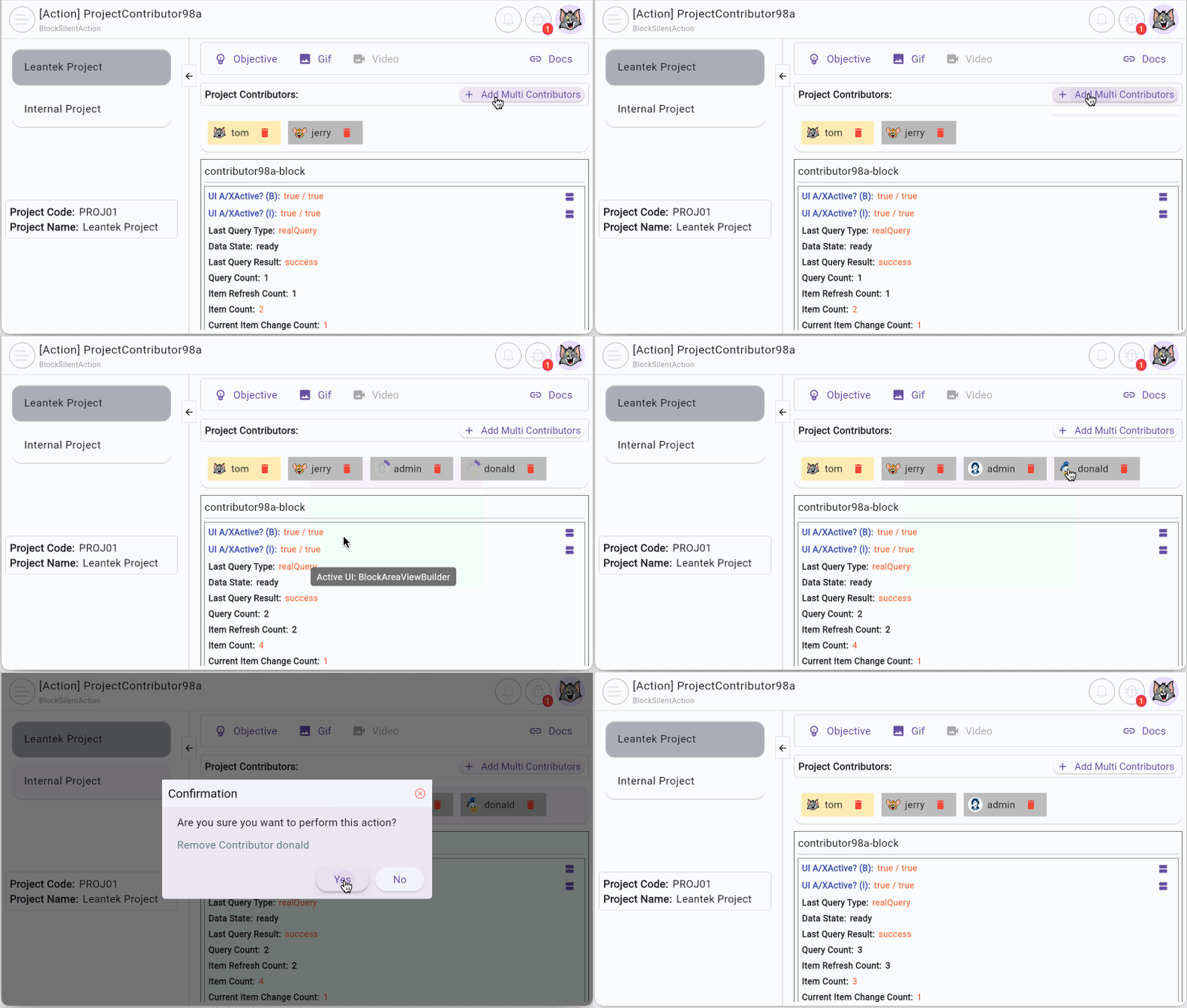
Comparison: QuickAction vs. BackendAction
To use them effectively, we must distinguish between the two response mechanisms after execution:
BlockQuickItemCreationAction
- When creating an ITEM, if successful, the object is "injected" directly into the Block's current list. The user sees the result instantly without a re-query API call.
// An action to create a Product.
var action = ProductBlockItemCreationAction(data);
productBlock.executeItemCreationAction(action);

// If success:
//  New created Product is added to ProductBlock automatically.
//  No need to re-query.
No ADS
BlockBackendAction
- Ideal for operations that significantly alter data structures on the Server. Upon success, the Block automatically triggers a re-query to ensure the UI data perfectly matches the actual Database state.
// An action to create a Product.
var action = ProductBackendAction(data);
productBlock.executeBackendAction(action);

// If success:
//  ProductBlock will be re-queried (Based on config)
Real-world Scenario: Demo98a
In this example, we have two Block(s): Project98aBlock and Contributor98aBlock, which have a parent-child relationship. Select a project from the list on the left, and you will see a list of contributors on the right. We will create two BlockBackendAction(s) to add and remove contributors from the project.
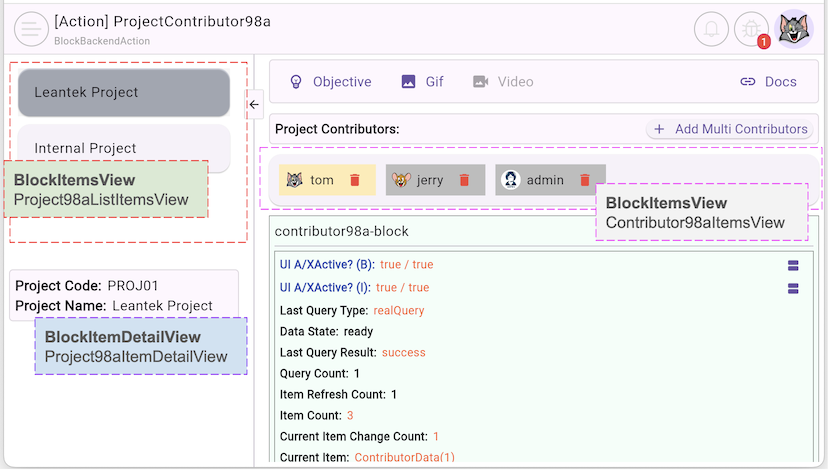
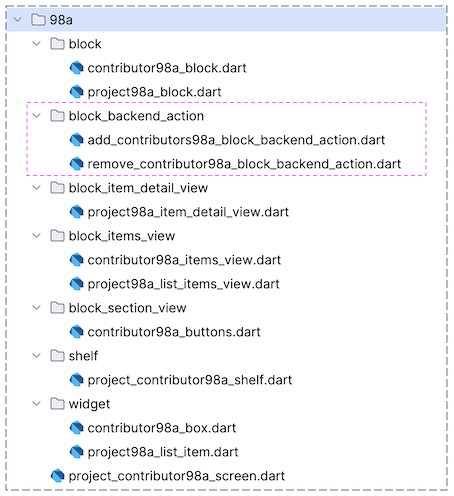
2. ProjectContributor98aShelf
project_contributor98a_shelf.dart
class ProjectContributor98aShelf extends Shelf {
  @override
  ShelfStructure defineShelfStructure() {
    return ShelfStructure(
      filterModels: {},
      blocks: [
        Project98aBlock(
          name: Project98aBlock.blkName,
          description: null,
          config: BlockConfig(),
          filterModelName: null,
          formModel: null,
          childBlocks: [
            Contributor98aBlock(
              name: Contributor98aBlock.blkName,
              description: null,
              config: BlockConfig(),
              filterModelName: null,
              formModel: null,
              childBlocks: null,
            ),
          ],
        ),
      ],
    );
  }

  Project98aBlock findProject98aBlock() {
    return findBlock(Project98aBlock.blkName) as Project98aBlock;
  }

  Contributor98aBlock findContributor98aBlock() {
    return findBlock(Contributor98aBlock.blkName) as Contributor98aBlock;
  }
}
3. BlockBackendAction
First, let's look at the complete code of AddContributors98aBlockBackendAction; the most important property of this class is projectId.
AddContributors98aBlockBackendAction
class AddContributors98aBlockBackendAction
    extends BlockBackendAction<int, dynamic> {
  final _contributorRestProvider = ContributorRestProvider();

  final int projectId;

  AddContributors98aBlockBackendAction({
    required this.projectId,
    required super.needToConfirm,
    required super.actionInfo,
  });

  @override
  Future<ApiResult<dynamic>> performBackendOperation() async {
    return await _contributorRestProvider.addMultiContributors(projectId);
  }

  @override
  int? suggestNewCurrentItemId({required data}) {
    return null;
  }

  @override
  CustomConfirmation? createCustomConfirmation() {
    return null;
  }

  @override
  BlockBackendActionConfig initDefaultConfig() {
    return BlockBackendActionConfig(
      afterBackendAction: AfterBlockBackendAction.query,
    );
  }
}- Its performBackendOperation() method calls an API to add two contributors to the project (Simple Demo Scenario).
The suggestNewCurrentItemId() method extracts an ITEM_ID from the result of the performBackendOperation() method, with the purpose of suggesting which ITEM will be set as the current item after the Block is re-queryed. This method is only practical when this BackendAction is used to create ITEM(s) in the Backend.
Here's how to create and execute AddContributors98aBlockBackendAction:
_addMultiContributor()
Future<void> _addMultiContributor() async {
  FlutterArtist.codeFlowLogger.addMethodCall(
    ownerClassInstance: this,
    currentStackTrace: StackTrace.current,
    parameters: null,
  );
  int? projectId = block.parentBlockCurrentItemId as int?;
  if (projectId == null) {
    return;
  }
  final action = AddContributors98aBlockBackendAction(
    projectId: projectId,
    needToConfirm: true,
    actionInfo: 'Add Multi Contributors',
  );
  await block.executeBackendAction(
    actionConfirmationType: ActionConfirmationType.custom,
    action: action,
  );
}
Remove a Contributor from the project:

RemoveContributor98aBlockBackendAction
class RemoveContributor98aBlockBackendAction
    extends BlockBackendAction<int, dynamic> {
  final _contributorRestProvider = ContributorRestProvider();

  final ContributorInfo contributor;

  RemoveContributor98aBlockBackendAction({
    required this.contributor,
    required super.needToConfirm,
    required super.actionInfo,
  });

  @override
  Future<ApiResult<dynamic>> performBackendOperation() async {
    return await _contributorRestProvider.delete(contributor.id);
  }

  @override
  int? suggestNewCurrentItemId({required data}) {
    return null;
  }

  @override
  CustomConfirmation? createCustomConfirmation() {
    return null;
  }

  @override
  BlockBackendActionConfig initDefaultConfig() {
    return BlockBackendActionConfig(
      afterBackendAction: AfterBlockBackendAction.query,
    );
  }
}
No ADS
FlutterArtist
- FlutterArtist Debug Network Inspector
- Basic concepts in Flutter Artist
- FlutterArtist Block ex1
- FlutterArtist Filter Example
- FlutterArtist FilterModel MultiOptFilterCriterion ex1
- FlutterArtist FilterInput Example 1
- FlutterArtist Form ex1
- The idea of designing filter models in FlutterArtist
- FlutterArtist FormModel.patchFormFields() Ex1
- FlutterArtist BlockQuickItemUpdateAction Example
- FlutterArtist BlockNumberPagination Ex1
- FlutterArtist GridView Infinite Scroll Example
- FlutterArtist BlockBackendAction Create Multi Items (Example)
- FlutterArtist ListView Infinite Scroll Pagination Example
- FlutterArtist Pagination
- FlutterArtist Sort DropdownSortPanel Example
- FlutterArtist Dio
- FlutterArtist BlockBackendAction Example
- FlutterArtist BackgroundWebDownloadAction Example
- FlutterArtist StorageBackendAction ex1
- FlutterArtist Block External Shelf Event Example
- FlutterArtist Filter FormBuilderMultiDropDown Ex1
- FlutterArtist Master-detail Blocks ex1
- FlutterArtist Scalar ex1
- FlutterArtist Pagination Davi table Infinite Scroll Ex1
- FlutterArtist Filter Tree FormBuilderField ex1
- FlutterArtist Filter FormBuilderRadioGroup ex1
- FlutterArtist Form Parent-child MultiOptFormProp ex1
- FlutterArtist Manual Sorting ReorderableGridView Example
- FlutterArtist Manual Sorting ReorderableListView
- FlutterArtist Scalar External Shelf Event Example
- FlutterArtist Code Flow Inspector
- FlutterArtist Projections
- FlutterArtist Debug Log Viewer
- FlutterArtist start
- FlutterArtist AppConfiguration
- FlutterArtist Debug App Inspector
- FlutterArtist Debug Filter Criteria Inspector
- FlutterArtist Debug Filter Model Inspector
- FlutterArtist Debug Form Model Inspector
- FlutterArtist DebugMenu
- FlutterArtist Debug UI Context Inspector
- FlutterArtist Debug Shelf Structure Inspector
- FlutterArtist Context Provider Views
- FlutterArtist FilterModelStructure ex1
- FlutterArtist FilterModelStructure ex2
- FlutterArtist FilterModelStructure ex3
- FlutterArtist Internal Shelf Event ex1
- FlutterArtist Deferring External Shelf Events Example
- FlutterArtist Face
- Overview of FlutterArtist Theme
- FlutterArtist Theme Design Tokens Architecture
- FlutterArtist Themes FaColorUtils
- Flutter Artist Theme - Create a custom theme
Show More