
FlutterArtist BackgroundWebDownloadAction Example
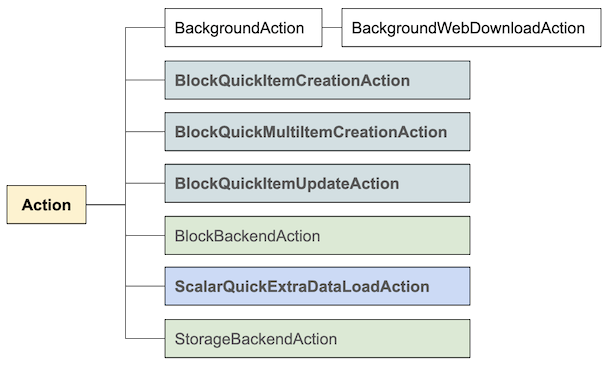
BackgroundWebDownloadAction is a built-in class in FlutterArtist that facilitates downloading binary data requiring browser-based authentication, specifically designed for Flutter Web applications.
BackgroundWebDownloadAction
abstract class BackgroundWebDownloadAction extends BackgroundAction {
  final String fileName;

  BackgroundWebDownloadAction({
    required this.fileName,
    required super.needToConfirm,
    required super.actionInfo,
  });

  Future<ApiResult<List<int>?>> performDownload();

  // Other codes..
}
Example Scenario: Demo17a
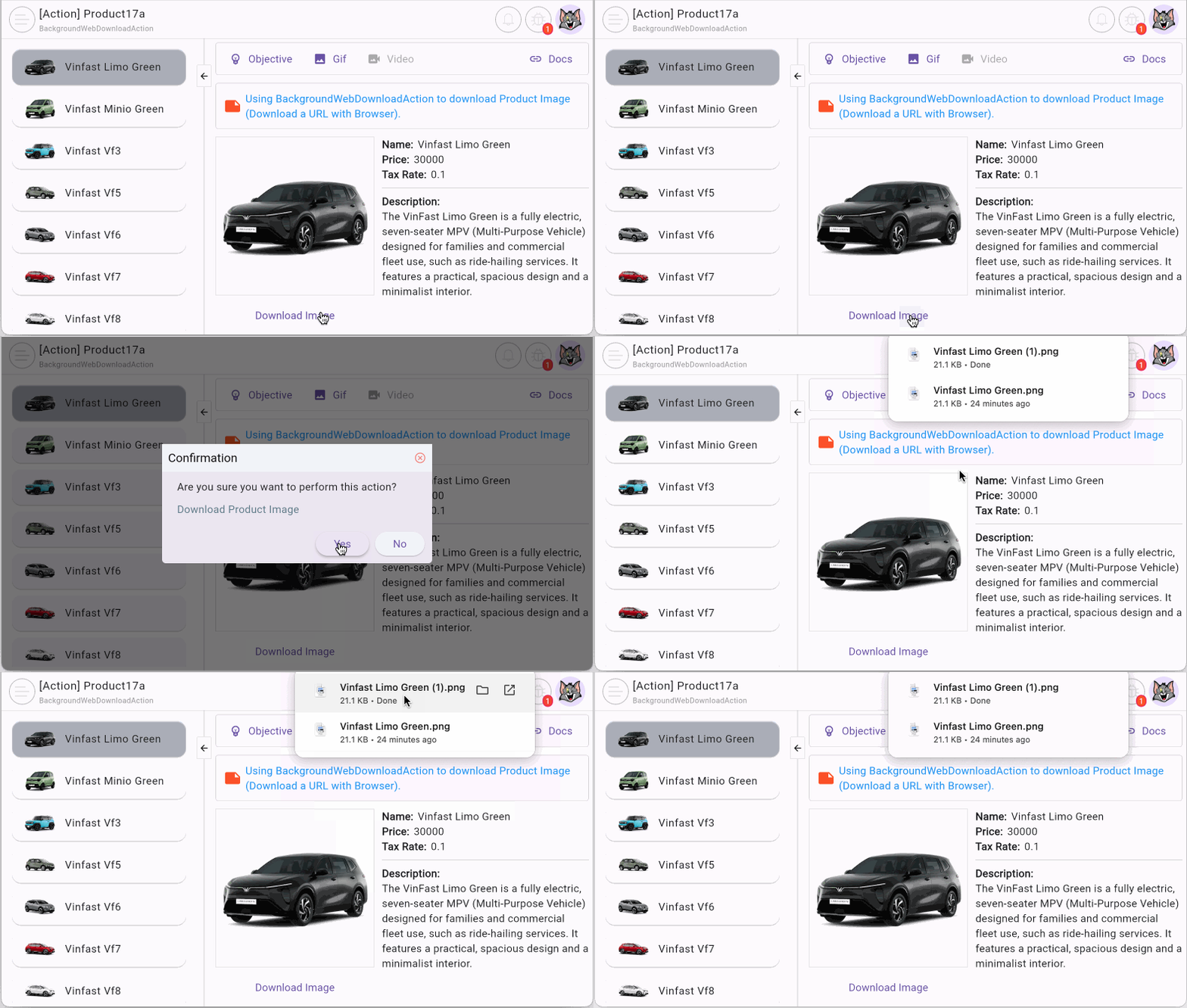
The main screen of the example displays a product list. Users click on a product to view its details, then click the Download button to download the product image.
You might wonder why such a complex BackgroundWebDownloadAction is needed just to download an image. The answer lies in security. If the image data is protected, you must send an authenticated download request. The combination of BackgroundWebDownloadAction and FlutterArtistDio enables you to handle this seamlessly.
- Download FlutterArtist Demo
- FlutterArtist Action (***)
1. BackgroundWebDownloadAction
First, we create the UrlDownloadHelper class with a downloadUrl() method that accepts a URL and returns binary data.
url_download_helper.dart
class UrlDownloadHelper {
  Future<ApiResult<List<int>?>> downloadUrl(String url) async {
    ApiResult<List<int>?> result =
        await flutterArtistDio4Download.binaryGet(url);
    return result;
  }
}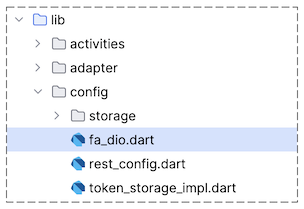
In the code above, flutterArtistDio4Download is a FlutterArtistDio instance used for binary data transmission. In the FlutterArtist Demo, this object is pre-configured in "config/api_client.dart". For your own projects, follow the guide to create a similar object here:
DownloadProduct17aImageAction
Now, we extend BackgroundWebDownloadAction to define the product image download action:
download_product17a_image_action.dart
///
/// Download a URL with Browser.
///
class DownloadProduct17aImageAction extends BackgroundWebDownloadAction {
  final String downloadUrl;

  final urlDownloadHelper = UrlDownloadHelper();

  DownloadProduct17aImageAction({
    required this.downloadUrl,
    required super.fileName,
    required super.needToConfirm,
    required super.actionInfo,
  });

  @override
  Future<ApiResult<List<int>?>> performDownload() async {
    return await urlDownloadHelper.downloadUrl(downloadUrl);
  }

  @override
  CustomConfirmation? createCustomConfirmation() {
    return null;
  }
}
Make sure the "Download" button only appears when there is a current product and the imageUrl is not null.
if (productData != null && productData.imageUrl != null)
  TextButton(
    onPressed: () {
      _downloadImage(
        productName: productData.name,
        imageUrl: productData.imageUrl!,
      );
    },
    child: Text("Download Image"),
  ),
When the user clicks the button, the _downloadImage() method is called. Here, we create a DownloadProduct17aImageAction instance and execute it via the backgroundExecutor.
void _downloadImage({
  required String productName,
  required String imageUrl,
}) {
  FlutterArtist.codeFlowLogger.addMethodCall(
    ownerClassInstance: this,
    currentStackTrace: StackTrace.current,
    parameters: null,
  );
  //
  final action = DownloadProduct17aImageAction(
    downloadUrl: imageUrl,
    fileName: "$productName.png",
    needToConfirm: true,
    actionInfo: 'Download Product Image',
  );
  FlutterArtist.backgroundExecutor.executeBackgroundAction(
    action: action,
  );
}
No ADS
FlutterArtist
- FlutterArtist Debug Network Inspector
- Basic concepts in Flutter Artist
- FlutterArtist Block ex1
- FlutterArtist Filter Example
- FlutterArtist FilterModel MultiOptFilterCriterion ex1
- FlutterArtist FilterInput Example 1
- FlutterArtist Form ex1
- The idea of designing filter models in FlutterArtist
- FlutterArtist FormModel.patchFormFields() Ex1
- FlutterArtist BlockQuickItemUpdateAction Example
- FlutterArtist BlockNumberPagination Ex1
- FlutterArtist GridView Infinite Scroll Example
- FlutterArtist BlockBackendAction Create Multi Items (Example)
- FlutterArtist ListView Infinite Scroll Pagination Example
- FlutterArtist Pagination
- FlutterArtist Sort DropdownSortPanel Example
- FlutterArtist Dio
- FlutterArtist BlockBackendAction Example
- FlutterArtist BackgroundWebDownloadAction Example
- FlutterArtist StorageBackendAction ex1
- FlutterArtist Block External Shelf Event Example
- FlutterArtist Filter FormBuilderMultiDropDown Ex1
- FlutterArtist Master-detail Blocks ex1
- FlutterArtist Scalar ex1
- FlutterArtist Pagination Davi table Infinite Scroll Ex1
- FlutterArtist Filter Tree FormBuilderField ex1
- FlutterArtist Filter FormBuilderRadioGroup ex1
- FlutterArtist Form Parent-child MultiOptFormProp ex1
- FlutterArtist Manual Sorting ReorderableGridView Example
- FlutterArtist Manual Sorting ReorderableListView
- FlutterArtist Scalar External Shelf Event Example
- FlutterArtist Code Flow Inspector
- FlutterArtist Projections
- FlutterArtist Debug Log Viewer
- FlutterArtist start
- FlutterArtist AppConfiguration
- FlutterArtist Debug App Inspector
- FlutterArtist Debug Filter Criteria Inspector
- FlutterArtist Debug Filter Model Inspector
- FlutterArtist Debug Form Model Inspector
- FlutterArtist DebugMenu
- FlutterArtist Debug UI Context Inspector
- FlutterArtist Debug Shelf Structure Inspector
- FlutterArtist Context Provider Views
- FlutterArtist FilterModelStructure ex1
- FlutterArtist FilterModelStructure ex2
- FlutterArtist FilterModelStructure ex3
- FlutterArtist Internal Shelf Event ex1
- FlutterArtist Deferring External Shelf Events Example
- FlutterArtist Face
- Overview of FlutterArtist Theme
- FlutterArtist Theme Design Tokens Architecture
- FlutterArtist Themes FaColorUtils
- Flutter Artist Theme - Create a custom theme
Show More