
FlutterArtist Master-detail Blocks ex1
Master-Details is a fundamental and crucial feature of FlutterArtist. When we began implementing ideas from Oracle Forms, this feature was one of the most significant focal points. Master-Details allows developers to present and manage data from "one-to-many" relationships between two database tables (equivalent to the Block concept).
This enables users to query a primary record and then automatically view all related detailed records, facilitating activities such as inserting, updating, and deleting records in both Master and Detail Blocks through a single coordinated user interface.
Please make sure you have reviewed the simplest example of a Block below before continuing with this article:
- Download FlutterArtist Demo
- Giới thiệu về FlutterArtist
- FlutterArtist Davi Table (***)
Example Scenario: Demo08a
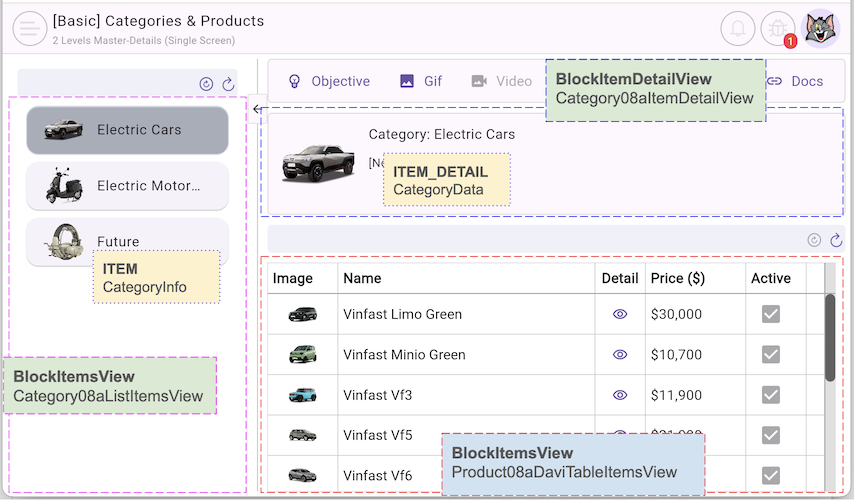
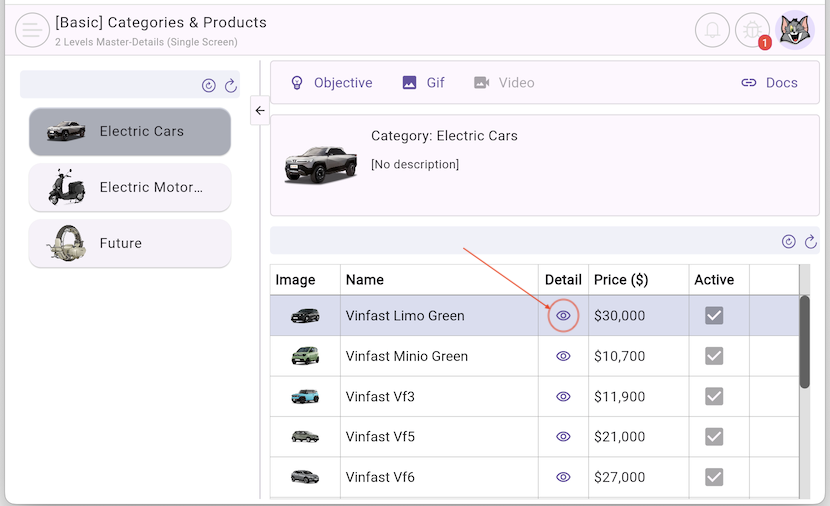
In this article, we will explore how to implement a Shelf with 2 Block(s) that have a parent-child relationship, using the classic relationship between "Category" and "Product".
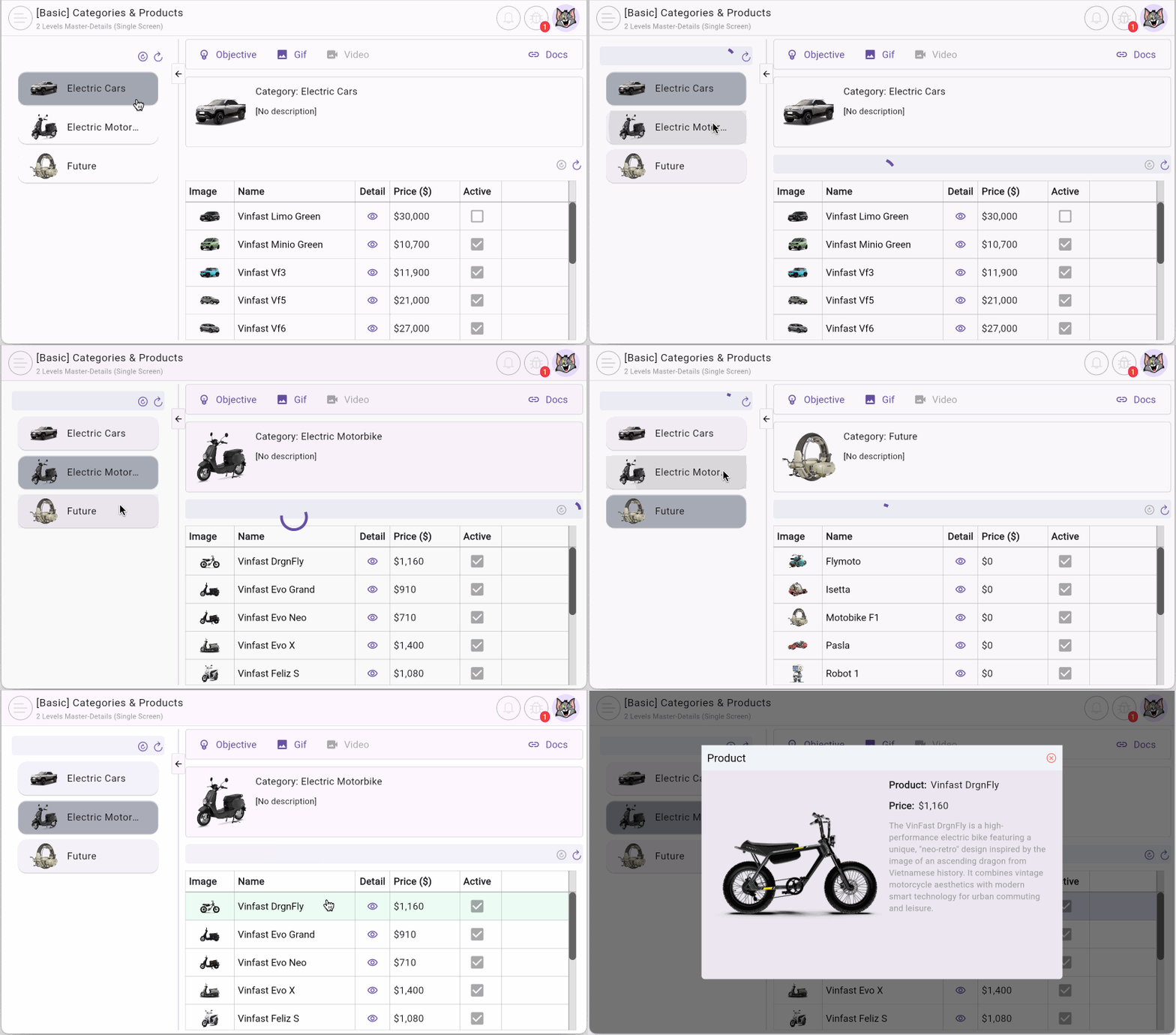
The left side of the main screen in this example displays a list of "categories". When a user selects a category to view, its detailed information is displayed on the top right, while the list of related products appears immediately below.
The highlight of this example is that when the user switches interest to a different category, the product list is automatically reloaded according to the category the user has just selected.
No ADS
Why is Master-Details powerful?
The power of this mechanism lies in Automatic Synchronization. You don't need to manually write code to listen for change events in the Master Block and then trigger a load command for the Detail Block. FlutterArtist automatically manages this data flow, ensuring that detailed data always belongs to the current parent record.
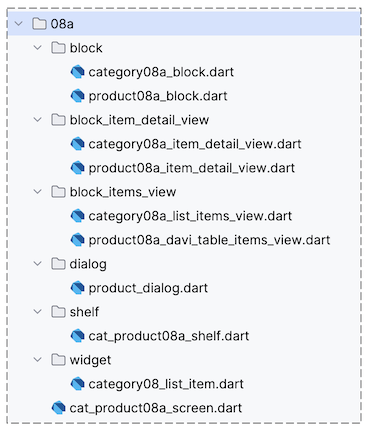
2. CatProduct08aShelf
In FlutterArtist, the relationship between Block(s) is explicitly defined within the Shelf structure. A Block can be configured to contain a list of child Block(s), creating a complete data hierarchy.
No ADS
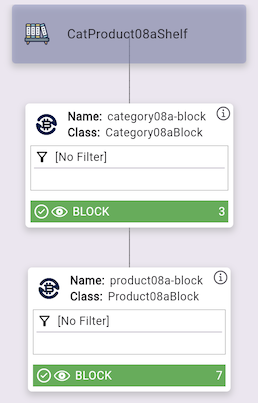
cat_product08a_shelf.dart
class CatProduct08aShelf extends Shelf {
  @override
  ShelfStructure defineShelfStructure() {
    return ShelfStructure(
      description: null,
      filterModels: {},
      blocks: [
        Category08aBlock(
          name: Category08aBlock.blkName,
          description: null,
          config: BlockConfig(),
          filterModelName: null,
          formModel: null,
          childBlocks: [
            Product08aBlock(
              name: Product08aBlock.blkName,
              description: null,
              config: BlockConfig(),
              filterModelName: null,
              formModel: null,
              childBlocks: [],
            ),
          ],
        ),
      ],
    );
  }

  Category08aBlock findCategory08aBlock() {
    return findBlock(Category08aBlock.blkName) as Category08aBlock;
  }

  Product08aBlock findProduct08aBlock() {
    return findBlock(Product08aBlock.blkName) as Product08aBlock;
  }
}
Registering CatProduct08aShelf
Although it may seem like a repetitive reminder, this step is crucial: Don't forget to register your CatProduct08aShelf with FlutterArtist Storage. Only when registered can the system manage the lifecycle and coordination between the Block(s).
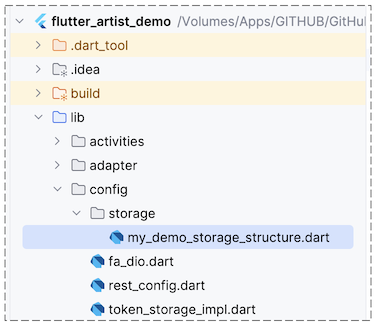
MyDemoAppConfiguration (*)
class MyDemoAppConfiguration extends AppConfiguration {

  @override
  void registerShelves() {
    FlutterArtist.storage.registerShelf(() => CatProduct08aShelf());
    ...
  }
  ...
}Once the Shelf is registered, you can easily access CatProduct08aShelf and its components from anywhere in the application. This helps completely decouple data management logic from the UI code.
CatProduct08aShelf shelf = FlutterArtist.storage.findShelf();
Category08aBlock categoryBlock = shelf.findCategory08aBlock();
Product08aBlock productBlock = shelf.findProduct08aBlock();
3. Category08Block
Below is the implementation code for Category08aBlock. It serves a dual role: as a Master Block and as a root Block. In this example, since there is no involvement of filters or forms, the parameters FILTER_INPUT, FILTER_CRITERIA, FORM_INPUT, and FORM_RELATED_DATA are simply replaced with default types (EmptyXxx).
category08a_block.dart
class Category08aBlock
    extends
        Block<
          int, //
          CategoryInfo,
          CategoryData,
          EmptyFilterInput,
          EmptyFilterCriteria,
          EmptyFormInput,
          EmptyAdditionalFormRelatedData
        > {
  static const String blkName = "category08a-block";

  final categoryRestProvider = CategoryRestProvider();

  Category08aBlock({
    required super.name,
    required super.description,
    required super.config,
    required super.filterModelName,
    required super.formModel,
    required super.childBlocks,
  });

  @override
  Future<ApiResult<PageData<CategoryInfo>?>> performQuery({
    required Object? parentBlockCurrentItem,
    required EmptyFilterCriteria filterCriteria,
    required SortableCriteria sortableCriteria,
    required Pageable pageable,
  }) async {
    return await categoryRestProvider.query(pageable: pageable);
  }

  @override
  Future<ApiResult<void>> performDeleteItemById({required int itemId}) {
    throw UnimplementedError();
  }

  @override
  Future<ApiResult<CategoryData>> performLoadItemDetailById({
    required int itemId,
  }) async {
    return await categoryRestProvider.find(categoryId: itemId);
  }

  @override
  CategoryInfo convertItemDetailToItem({required CategoryData itemDetail}) {
    return itemDetail;
  }

  @override
  bool needToKeepItemInList({
    required Object? parentBlockCurrentItemId,
    required EmptyFilterCriteria filterCriteria,
    required CategoryData itemDetail,
  }) {
    return true;
  }

  @override
  EmptyFormInput buildInputForCreationForm({
    required Object? parentBlockCurrentItem,
    required EmptyFilterCriteria filterCriteria,
  }) {
    return EmptyFormInput();
  }

  @override
  Future<EmptyAdditionalFormRelatedData> performLoadAdditionalFormRelatedData({
    required Object? parentBlockCurrentItem,
    required CategoryData? currentItemDetail,
    required EmptyFilterCriteria filterCriteria,
  }) async {
    return EmptyAdditionalFormRelatedData();
  }
}
- FlutterArtist Block.extractParentBlockItemId()
4. Product08aBlock
In principle, there is little difference in coding between a parent Block and a child Block. The necessary condition for a child Block to be queried is that the parent Block must have a current ITEM.
If the parent Block has no current item, the child Block is automatically set to DataState.none with an empty ITEM(s) list, and its performQuery() method will not be invoked.
No ADS
- FlutterArtist Block DataState
Block.performQuery()
Let's examine the performQuery() method of Product08aBlock. When this method is executed, the library guarantees that the parentBlockCurrentItem parameter is always non-null.
Product08aBlock.performQuery()
@override
Future<ApiResult<PageData<ProductInfo>?>> performQuery({
  required Object? parentBlockCurrentItem,
  required EmptyFilterCriteria filterCriteria,
  required SortableCriteria sortableCriteria,
  required Pageable pageable,
}) async {
  // Because Product08aBlock is the child-block of Category08aBlock
  // parentBlockCurrentItem is guaranteed not null.
  CategoryInfo parentItem = parentBlockCurrentItem as CategoryInfo;
  //
  return await productRestProvider.queryByCategoryId(
    categoryId: parentItem.id,
    pageable: pageable,
  );
}
The ID of the parent Block's current ITEM serves as the basis (foreign key) for querying the corresponding ITEM(s) of the child Block.
return await productRestProvider.queryByCategoryId(
  categoryId: parentItem.id,
  pageable: pageable,
);
Block.resolveParentBlockItemId()
The Product08aBlock.resolveParentBlockItemId() method is used to extract the categoryId from a ProductInfo object.
This method is called for each ProductInfo you have just queried. It acts as a "control gate" to ensure that those ProductInfo(s) genuinely match the parent Block's (Category08aBlock) currentItem. If the data returned from the API does not match, they will be discarded from the list to ensure data integrity on the UI.
@override
Object resolveParentBlockItemId({required ProductInfo fromThisBlockItem}) {
  return fromThisBlockItem.categoryId;
}
See the article below for a more detailed explanation of the Block.resolveParentBlockItemId() method:
- FlutterArtist Block.extractParentBlockItemId()
No ADS
The full source code of Product08aBlock:
product08a_block.dart
class Product08aBlock
    extends
        Block<
          int, //
          ProductInfo,
          ProductData,
          EmptyFilterInput,
          EmptyFilterCriteria,
          EmptyFormInput,
          EmptyAdditionalFormRelatedData
        > {
  static const String blkName = "product08a-block";

  final productRestProvider = ProductRestProvider();

  Product08aBlock({
    required super.name,
    required super.description,
    required super.config,
    required super.filterModelName,
    required super.formModel,
    required super.childBlocks,
  });

  @override
  bool isItemDeletionAllowed({required ProductInfo item}) {
    return false;
  }

  @override
  Future<ApiResult<PageData<ProductInfo>?>> performQuery({
    required Object? parentBlockCurrentItem,
    required EmptyFilterCriteria filterCriteria,
    required SortableCriteria sortableCriteria,
    required Pageable pageable,
  }) async {
    // Because Product08aBlock is the child-block of Category08aBlock
    // parentBlockCurrentItem is guaranteed not null.
    CategoryInfo parentItem = parentBlockCurrentItem as CategoryInfo;
    //
    return await productRestProvider.queryByCategoryId(
      categoryId: parentItem.id,
      pageable: pageable,
    );
  }

  @override
  Future<ApiResult<void>> performDeleteItemById({required int itemId}) async {
    return await productRestProvider.delete(itemId);
  }

  @override
  Future<ApiResult<ProductData>> performLoadItemDetailById({
    required int itemId,
  }) async {
    return await productRestProvider.find(productId: itemId);
  }

  @override
  ProductInfo convertItemDetailToItem({required ProductData itemDetail}) {
    return itemDetail.toProductInfo();
  }

  @override
  Object resolveParentBlockItemId({required ProductInfo item}) {
    return item.categoryId;
  }

  @override
  bool needToKeepItemInList({
    required Object? parentBlockCurrentItemId,
    required EmptyFilterCriteria filterCriteria,
    required ProductData itemDetail,
  }) {
    return true;
  }

  @override
  EmptyFormInput buildInputForCreationForm({
    required Object? parentBlockCurrentItem,
    required EmptyFilterCriteria filterCriteria,
  }) {
    return EmptyFormInput();
  }

  @override
  Future<EmptyAdditionalFormRelatedData> performLoadAdditionalFormRelatedData({
    required Object? parentBlockCurrentItem,
    required ProductData? currentItemDetail,
    required EmptyFilterCriteria filterCriteria,
  }) async {
    return EmptyAdditionalFormRelatedData();
  }
}
5. Product08aDaviTableItemsView
Product08aDaviTableItemsView is a class extending BlockItemsView to display the list of ProductInfo(s) on a Davi table (this is a powerful table library available on pub.dev; the full source code for Product08aDaviTableItemsView is available in the FlutterArtist Demo).
product08a_davi_table_items_view.dart
class Product08aDaviTableItemsView extends BlockItemsView<Product08aBlock> {
  const Product08aDaviTableItemsView({required super.block, super.key});

  ...
} 
No ADS
Each row on the Davi table is designed with a Button that allows you to view the product's detailed information in a Dialog.
To achieve this, you must set the ProductInfo clicked by the user as the current ITEM, while placing the Product08aItemDetailView inside the Dialog you are about to open.
_showProductDetail()
Future<void> _showProductDetail(
  BuildContext context,
  ProductInfo product,
) async {
  // Product08aBlock block:
  if (!block.isCurrentItem(product)) {
    BlockSetCurrentItemResult result = await block
        .refreshItemAndSetAsCurrent(item: product);
    if (!result.successForAll) {
      return;
    }
  }
  Product08aDialog.showProduct08aDialog(context);
}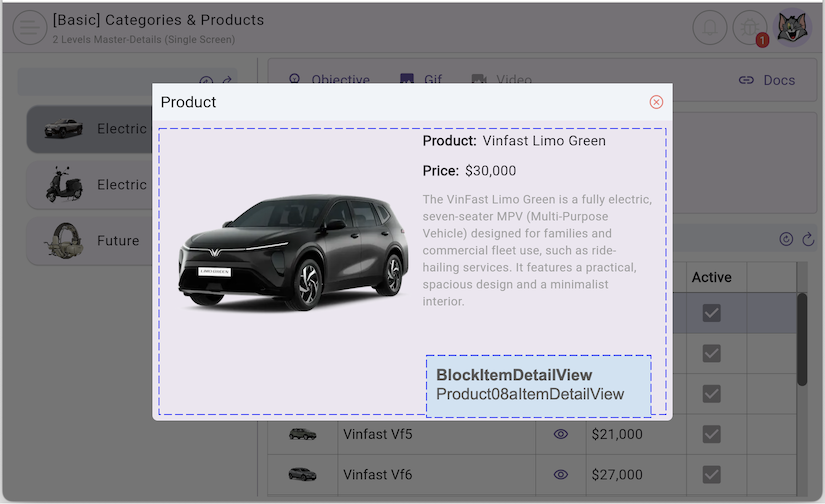
The Product08aDialog class acts as a wrapper for the Product08aItemDetailView. Thanks to the separation of logic and UI, the detail View inside will automatically synchronize with data from the product08aBlock.
product08a_dialog.dart
class Product08aDialog extends StatelessWidget {
  const Product08aDialog({super.key});

  @override
  Widget build(BuildContext context) {
    CatProduct08aShelf shelf = FlutterArtist.storage.findShelf();
    Product08aBlock product08aBlock = shelf.findProduct08aBlock();

    Widget dialog = FaAlertDialog(
      titleText: "Product",
      content: SizedBox(
        width: 480,
        height: 280,
        child: Product08aItemDetailView(block: product08aBlock),
      ),
    );
    return dialog;
  }

  // Static Method:
  static Future<void> showProduct08aDialog(BuildContext context) async {
    await showDialog(
      context: context,
      builder: (BuildContext context) {
        return Product08aDialog();
      },
    );
  }
}
No ADS
FlutterArtist
- FlutterArtist Debug Network Inspector
- Basic concepts in Flutter Artist
- FlutterArtist Block ex1
- FlutterArtist Filter Example
- FlutterArtist FilterModel MultiOptFilterCriterion ex1
- FlutterArtist FilterInput Example 1
- FlutterArtist Form ex1
- The idea of designing filter models in FlutterArtist
- FlutterArtist FormModel.patchFormFields() Ex1
- FlutterArtist BlockQuickItemUpdateAction Example
- FlutterArtist BlockNumberPagination Ex1
- FlutterArtist GridView Infinite Scroll Example
- FlutterArtist BlockBackendAction Create Multi Items (Example)
- FlutterArtist ListView Infinite Scroll Pagination Example
- FlutterArtist Pagination
- FlutterArtist Sort DropdownSortPanel Example
- FlutterArtist Dio
- FlutterArtist BlockBackendAction Example
- FlutterArtist BackgroundWebDownloadAction Example
- FlutterArtist StorageBackendAction ex1
- FlutterArtist Block External Shelf Event Example
- FlutterArtist Filter FormBuilderMultiDropDown Ex1
- FlutterArtist Master-detail Blocks ex1
- FlutterArtist Scalar ex1
- FlutterArtist Pagination Davi table Infinite Scroll Ex1
- FlutterArtist Filter Tree FormBuilderField ex1
- FlutterArtist Filter FormBuilderRadioGroup ex1
- FlutterArtist Form Parent-child MultiOptFormProp ex1
- FlutterArtist Manual Sorting ReorderableGridView Example
- FlutterArtist Manual Sorting ReorderableListView
- FlutterArtist Scalar External Shelf Event Example
- FlutterArtist Code Flow Inspector
- FlutterArtist Projections
- FlutterArtist Debug Log Viewer
- FlutterArtist start
- FlutterArtist AppConfiguration
- FlutterArtist Debug App Inspector
- FlutterArtist Debug Filter Criteria Inspector
- FlutterArtist Debug Filter Model Inspector
- FlutterArtist Debug Form Model Inspector
- FlutterArtist DebugMenu
- FlutterArtist Debug UI Context Inspector
- FlutterArtist Debug Shelf Structure Inspector
- FlutterArtist Context Provider Views
- FlutterArtist FilterModelStructure ex1
- FlutterArtist FilterModelStructure ex2
- FlutterArtist FilterModelStructure ex3
- FlutterArtist Internal Shelf Event ex1
- FlutterArtist Deferring External Shelf Events Example
- FlutterArtist Face
- Overview of FlutterArtist Theme
- FlutterArtist Theme Design Tokens Architecture
- FlutterArtist Themes FaColorUtils
- Flutter Artist Theme - Create a custom theme
Show More