
FlutterArtist Filter FormBuilderRadioGroup ex1
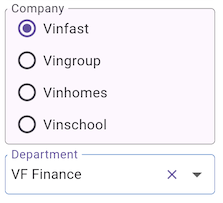
In previous tutorials, we commonly used Dropdown for the "Company" criterion. However, depending on UX requirements or UI space, you can easily switch to a RadioGroup. In this Demo32a example, we demonstrate the true power of FlutterArtist: changing the UI component (Widget) does not affect the core logic of the FilterModel at all.
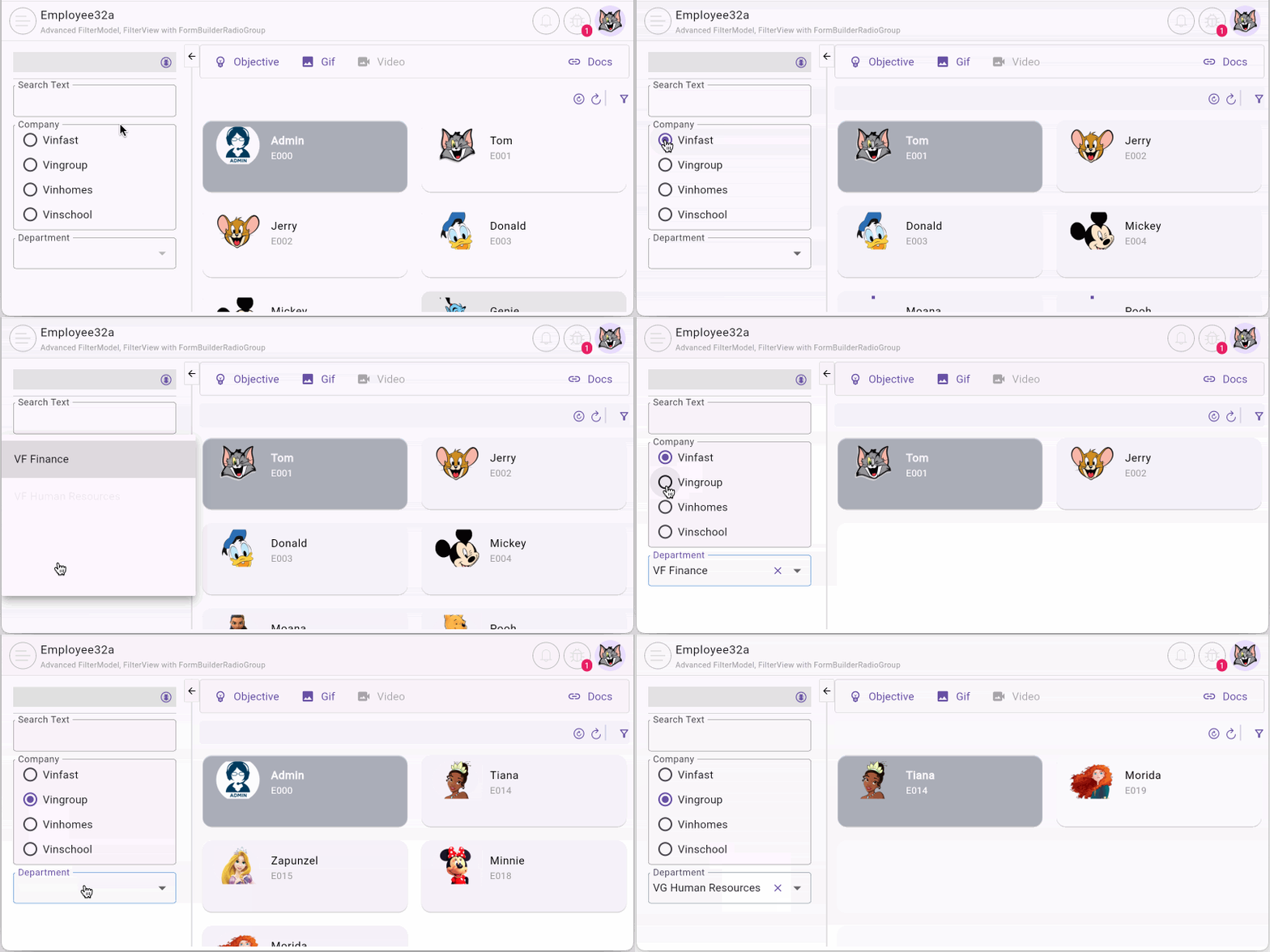
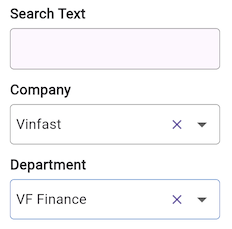
The only difference here is replacing FormBuilderDropdown with FormBuilderRadioGroup. Both serve the same purpose: providing data for the "company~" criterion, proving the perfect decoupling of UI and logic.
Note: The example in this article is a variation of Demo03a—a filter with two parent-child criteria, "Company/Department" where users select via Dropdown. For a more detailed explanation of the basic operating mechanisms, please refer back to the Demo03a example.
- Download FlutterArtist Demo
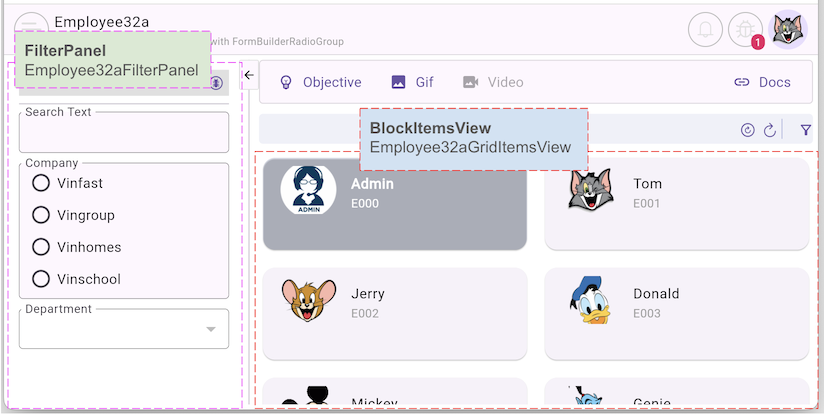
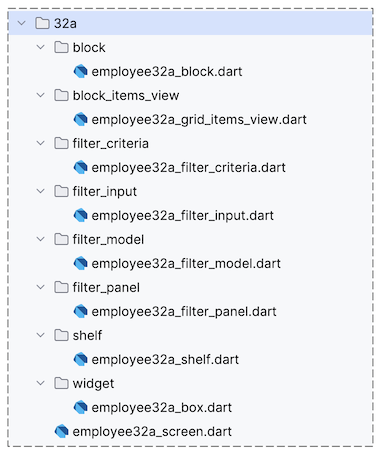
2. Employee32aShelf
employee32a_shelf.dart
class Employee32aShelf extends Shelf {
  @override
  ShelfStructure defineShelfStructure() {
    return ShelfStructure(
      filterModels: {
        Employee32aFilterModel.filterName: Employee32aFilterModel(),
      },
      blocks: [
        Employee32aBlock(
          name: Employee32aBlock.blkName,
          description: null,
          config: BlockConfig(),
          filterModelName: Employee32aFilterModel.filterName,
          formModel: null,
          childBlocks: [],
        ),
      ],
    );
  }

  Employee32aFilterModel findEmployee32aFilterModel() {
    return findFilterModel(Employee32aFilterModel.filterName)
        as Employee32aFilterModel;
  }

  Employee32aBlock findEmployee32aBlock() {
    return findBlock(Employee32aBlock.blkName) as Employee32aBlock;
  }
}
3. Employee32aFilterModel
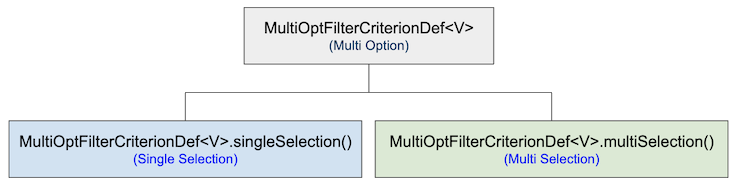
Employee32aFilterModel.defineFilterModelStructure()
@override
FilterModelStructure defineFilterModelStructure() {
  return FilterModelStructure(
    criteriaStructure: FilterCriteriaStructure(
      simpleCriterionDefs: [
        SimpleFilterCriterionDef<String>(criterionBaseName: "searchText"),
      ],
      multiOptCriterionDefs: [
        MultiOptFilterCriterionDef<CompanyInfo>.singleSelection(
          criterionBaseName: "company",
          fieldName: 'companyId',
          toFieldValue: (CompanyInfo? rawValue) {
            return SimpleVal.ofInt(rawValue?.id);
          },
          children: [
            MultiOptFilterCriterionDef<DepartmentInfo>.singleSelection(
              criterionBaseName: "department",
              fieldName: 'departmentId',
              toFieldValue: (DepartmentInfo? rawValue) {
                return SimpleVal.ofInt(rawValue?.id);
              },
            ),
          ],
        ),
      ],
    ),
    conditionStructure: FilterConditionStructure(
      connector: FilterConnector.and,
      conditionDefs: [
        FilterConditionDef.simple(
          tildeCriterionName: "searchText~",
          operator: FilterOperator.containsIgnoreCase,
        ),
        FilterConditionDef.simple(
          tildeCriterionName: "company~",
          operator: FilterOperator.equalTo,
        ),
        FilterConditionDef.simple(
          tildeCriterionName: "department~",
          operator: FilterOperator.equalTo,
        ),
      ],
    ),
  );
}
FilterModel.performLoadMultiOptCriterionXData()
The performLoadMultiOptTildeCriterionXData() method is called sequentially for each MultiOptTildeFilterCriterion to load data for it. The rule here is that the root criteria will be loaded first, followed by the child criteria, and finally the leaf criteria.
No ADS
performLoadMultiOptTildeCriterionXData()
@override
Future<XData?> performLoadMultiOptTildeCriterionXData({
  required String multiOptTildeCriterionName,
  required String multiOptCriterionBaseName,
  required Object? parentMultiOptTildeCriterionValue,
  required SelectionType selectionType,
  required EmptyFilterInput? filterInput,
}) async {
  if (multiOptTildeCriterionName == "company~") {
    ApiResult<CompanyInfoPage> result = await _companyProvider.queryAll();
    // Throw ApiError
    result.throwIfError();
    //
    CompanyInfoPage? companyInfoPage = result.data;
    if (companyInfoPage == null) {
      return null;
    }
    return ListXData<int, CompanyInfo>.fromPageData(
      pageData: companyInfoPage,
      getItemId: (item) => item.id,
    );
  } else if (multiOptTildeCriterionName == "department~") {
    //
    // Because "department" is child of "company".
    // So [parentMultiOptTildeCriterionValue] value is definitely non-null,
    // this guaranteed by the library.
    //
    CompanyInfo company = parentMultiOptTildeCriterionValue as CompanyInfo;
    ApiResult<DepartmentInfoPage> result = await _departmentProvider
        .queryAllByCompanyId(companyId: company.id);
    result.throwIfError();
    //
    return ListXData<int, DepartmentInfo>.fromPageData(
      pageData: result.data,
      getItemId: (item) => item.id,
    );
  }
  return null;
}
FilterModel.createNewFilterCriteria()
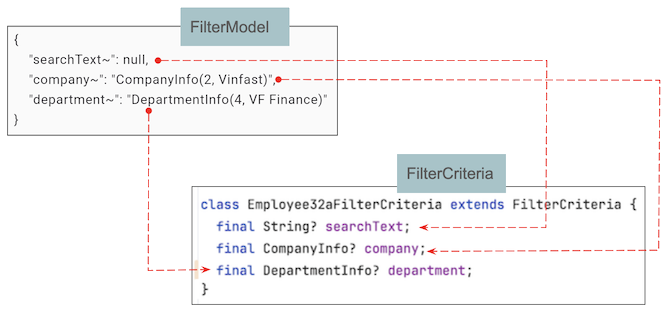
No ADS
createNewFilterCriteria()
@override
Employee32aFilterCriteria createNewFilterCriteria({
  required Map<String, dynamic> tildeCriteriaMap,
}) {
  return Employee32aFilterCriteria(
    searchText: tildeCriteriaMap["searchText~"],
    company: tildeCriteriaMap["company~"],
    department: tildeCriteriaMap["department~"],
  );
}4. Employee32aFilterCriteria
employee32a_filter_criteria.dart
class Employee32aFilterCriteria extends FilterCriteria {
  final String? searchText;
  final CompanyInfo? company;
  final DepartmentInfo? department;

  Employee32aFilterCriteria({
    required this.searchText,
    required this.company,
    required this.department,
  });
}5. Employee32aBlock
Employee32aBlock.performQuery()
@override
Future<ApiResult<PageData<EmployeeInfo>?>> performQuery({
  required Object? parentBlockCurrentItem,
  required Employee32aFilterCriteria filterCriteria,
  required SortableCriteria sortableCriteria,
  required Pageable pageable,
}) async {
  return await employeeRestProvider.query(
    pageable: pageable,
    searchText: filterCriteria.searchText,
    companyId: filterCriteria.company?.id,
    departmentId: filterCriteria.department?.id,
  );
}
6. Employee32aFilterPanel
Take a look at the buildContent method below. You will see how we use FormBuilderRadioGroup to display the company list. The amazing part is that the configuration—from loading data via filterModel.getMultiOptTildeCriterionData to handling the onChanged event — remains consistent with our previous patterns.
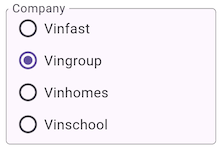
FaFormBuilderRadioGroup<CompanyInfo>(
  name: "company~",
  orientation: OptionsOrientation.vertical,
  labelText: "Company",
  getItemText: (item) => item.name,
  options: filterModel.getMultiOptTildeCriterionData("company~") ?? [],
  onChanged: _onSelectCompany,
),
This reinforces a key design philosophy of FlutterArtist: The library doesn't care which View you use to display data (Dropdown, RadioGroup, or even a TreeView). As long as you provide the correct tildeCriterionName, the system will automatically coordinate the data and query logic accurately.
No ADS
View the full code of Employee32aFilterPanel:
employee32a_filter_panel.dart
class Employee32aFilterPanel extends FilterPanel<Employee32aFilterModel> {
  const Employee32aFilterPanel({required super.filterModel, super.key});

  @override
  Widget buildContent(BuildContext context) {
    return Column(
      mainAxisAlignment: MainAxisAlignment.start,
      crossAxisAlignment: CrossAxisAlignment.start,
      children: [
        buildFilterBar(context),
        const Divider(),
        FaFormBuilderTextField(
          name: "searchText~",
          labelText: "Search Text",
          maxLines: 1,
          floatingLabelBehavior: FloatingLabelBehavior.always,
          onChanged: (String? text) {
            _onSearchText32aChange(text);
          },
        ),
        const SizedBox(height: 10),
        FaFormBuilderRadioGroup<CompanyInfo>(
          name: "company~",
          orientation: OptionsOrientation.vertical,
          labelText: "Company",
          getItemText: (item) => item.name,
          options: filterModel.getMultiOptTildeCriterionData("company~") ?? [],
          onChanged: _onSelectCompany,
        ),
        const SizedBox(height: 10),
        FaFormBuilderDeselectableDropdown<DepartmentInfo>(
          key: const Key("filter-department"),
          name: "department~",
          labelText: "Department",
          floatingLabelBehavior: FloatingLabelBehavior.always,
          // List<DepartmentInfo>:
          items: filterModel.getMultiOptTildeCriterionData("department~") ?? [],
          getItemText: (item) => item.name,
          onChanged: _onChangeDepartment,
        ),
      ],
    );
  }

  Future<void> _onSearchText32aChange(String? searchText) async {
    FlutterArtist.codeFlowLogger.addMethodCall(
      ownerClassInstance: this,
      currentStackTrace: StackTrace.current,
      parameters: {"searchText": searchText},
    );
    //
    await filterModel.queryAll();
  }

  Future<void> _onSelectCompany(CompanyInfo? company) async {
    FlutterArtist.codeFlowLogger.addMethodCall(
      ownerClassInstance: this,
      currentStackTrace: StackTrace.current,
      parameters: {"company": company},
    );
    //
    await filterModel.queryAll();
  }

  Future<void> _onChangeDepartment(DepartmentInfo? department) async {
    FlutterArtist.codeFlowLogger.addMethodCall(
      ownerClassInstance: this,
      currentStackTrace: StackTrace.current,
      parameters: {"department": department},
    );
    //
    await filterModel.queryAll();
  }
}
No ADS
FlutterArtist
- FlutterArtist Debug Network Inspector
- Basic concepts in Flutter Artist
- FlutterArtist Block ex1
- FlutterArtist Filter Example
- FlutterArtist FilterModel MultiOptFilterCriterion ex1
- FlutterArtist FilterInput Example 1
- FlutterArtist Form ex1
- The idea of designing filter models in FlutterArtist
- FlutterArtist FormModel.patchFormFields() Ex1
- FlutterArtist BlockQuickItemUpdateAction Example
- FlutterArtist BlockNumberPagination Ex1
- FlutterArtist GridView Infinite Scroll Example
- FlutterArtist BlockBackendAction Create Multi Items (Example)
- FlutterArtist ListView Infinite Scroll Pagination Example
- FlutterArtist Pagination
- FlutterArtist Sort DropdownSortPanel Example
- FlutterArtist Dio
- FlutterArtist BlockBackendAction Example
- FlutterArtist BackgroundWebDownloadAction Example
- FlutterArtist StorageBackendAction ex1
- FlutterArtist Block External Shelf Event Example
- FlutterArtist Filter FormBuilderMultiDropDown Ex1
- FlutterArtist Master-detail Blocks ex1
- FlutterArtist Scalar ex1
- FlutterArtist Pagination Davi table Infinite Scroll Ex1
- FlutterArtist Filter Tree FormBuilderField ex1
- FlutterArtist Filter FormBuilderRadioGroup ex1
- FlutterArtist Form Parent-child MultiOptFormProp ex1
- FlutterArtist Manual Sorting ReorderableGridView Example
- FlutterArtist Manual Sorting ReorderableListView
- FlutterArtist Scalar External Shelf Event Example
- FlutterArtist Code Flow Inspector
- FlutterArtist Projections
- FlutterArtist Debug Log Viewer
- FlutterArtist start
- FlutterArtist AppConfiguration
- FlutterArtist Debug App Inspector
- FlutterArtist Debug Filter Criteria Inspector
- FlutterArtist Debug Filter Model Inspector
- FlutterArtist Debug Form Model Inspector
- FlutterArtist DebugMenu
- FlutterArtist Debug UI Context Inspector
- FlutterArtist Debug Shelf Structure Inspector
- FlutterArtist Context Provider Views
- FlutterArtist FilterModelStructure ex1
- FlutterArtist FilterModelStructure ex2
- FlutterArtist FilterModelStructure ex3
- FlutterArtist Internal Shelf Event ex1
- FlutterArtist Deferring External Shelf Events Example
- FlutterArtist Face
- Overview of FlutterArtist Theme
- FlutterArtist Theme Design Tokens Architecture
- FlutterArtist Themes FaColorUtils
- Flutter Artist Theme - Create a custom theme
Show More