
FlutterArtist Projections
In FlutterArtist, creating, updating, or deleting an ITEM within a Block occurs frequently. This event must be notified to Block(s) on other Shelf(s) to ensure data consistency.
Suppose you are working with ITEM(s) in a SingleProductBlock:
- SingleProductBlock<.., ProductDetail, ProductDetail,..>
ProductDetail
class ProductDetail {
  final int id;
  final String name;
  final double price;
  final String? description;
}
When a change occurs, SingleProductBlock emits an Event(ProductDetail) outside of its Shelf.
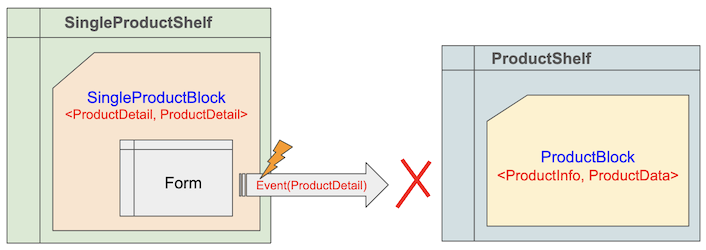
However, at ProductShelf (another Shelf), the ProductBlock—which listens for Event(ProductInfo) and Event(ProductData)—will not receive the signal from SingleProductBlock. Consequently, it does not automatically re-query the data.
ProductInfo & ProductData
class ProductInfo {
  final int id;
  final String name;
}

class ProductData {
  final int id;
  final String name;
  final double price;
}
No ADS
To solve the problem mentioned above, you have two solutions.
This is logically inconsistent because ProductInfo, ProductData, and ProductDetail sharing the same ID all represent a single data entity; they only differ in the level of detail provided.
Solution 1:
Add the Event(ProductInfo) or Event(ProductData), or both, to the list of events that SingleProductBlock can emit. This is like telling SingleProductBlock to speak a language that ProductBlock can understand.
SingleProductBlock Definition
SingleProductBlock(
  config: BlockConfig(
    emitExternalShelfEvents: [
      Event(ProductInfo), // <-----
      Event(ProductData), // <-----
      Event(ProductDetail),
    ],
    ...
  ),
  ...
),
Solution 2:
Add the Event(ProductDetail) event to the list of events that ProductBlock can listen to. This is like telling ProductBlock to learn the language that SingleProductBlock is speaking.
ProductBlock Definition
ProductBlock(
  config: BlockConfig(
    onExternalShelfEvents: const ExternalShelfEventBlockRecipient(
      blockLevelReactionOn: [
         Event(ProductInfo),
         Event(ProductData),
         Event(SupplierData), // <-----
      ],
    ),
  ),
),
While both methods are straightforward to implement, in large-scale projects, they require modifications in multiple places and can easily lead to omissions.
FlutterArtist introduced the concept of "Projection Family" to group classes that represent the same data entity but differ only in the amount of information they contain.
1. Projection Family
In FlutterArtist, a "Projection Family" is a collection of Dart classes that represent the same data entity, but vary in the amount of information they provide. In essence, whether you are looking at a "summary" or a "detailed" version, they are one and the same.
ProductInfo, ProductData, ProductDetail
class ProductInfo {
  final int id;
  final String name;
}

class ProductData {
  final int id;
  final String name;
  final double price;
}

class ProductDetail {
  final int id;
  final String name;
  final double price;
  final String? description;
}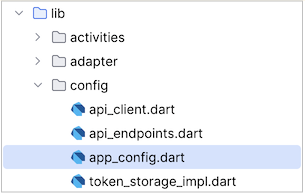
Let’s examine how Projection Families are centrally defined within AppConfiguration:
app_config.dart
class MyDemoAppConfiguration extends AppConfiguration {
  @override
  List<ProjectionFamily> projectionFamilies() {
    return [
      ProjectionFamily<int>(
        familyName: 'supplier-projections',
        members: {SupplierInfo, SupplierData},
      ),
      ProjectionFamily<int>(
        familyName: 'album-projections',
        members: {AlbumInfo, AlbumData},
      ),
      ProjectionFamily<int>(
        familyName: 'company-projections',
        members: {CompanyInfo, CompanyData, CompanyTreeItem, CompanyTree},
      ),
    ];
  }
  ...
}
No ADS
By defining ProjectionFamily, once an event is emitted regarding any member of the group, FlutterArtist understands that the event also pertains to all other members.
For instance, with the group:
- ProjectionFamily(members: {ProductInfo, ProductData, ProductDetail})
When you emit an Event(ProductDetail), the system automatically treats it as if you are emitting an Event(ProductInfo) and vice versa.
Suppose SingleProductBlock emits an Event(ProductDetail). | Now, ProductBlock can automatically catch this event because ProductDetail and ProductInfo have been "declared" as part of the same family in AppConfiguration. |
SingleProductBlock Definition | ProductBlock Definition |
Conclusion:
This mechanism eliminates tight coupling between different Block(s). You don't need to worry about which Model another Block is using; as long as they belong to the same Projection Family, synchronization happens silently and accurately.
This not only leads to cleaner code but also ensures your application always maintains the latest data state with minimal maintenance effort.
No ADS
FlutterArtist
- FlutterArtist Debug Network Inspector
- Basic concepts in Flutter Artist
- FlutterArtist Block ex1
- FlutterArtist Filter Example
- FlutterArtist FilterModel MultiOptFilterCriterion ex1
- FlutterArtist FilterInput Example 1
- FlutterArtist Form ex1
- The idea of designing filter models in FlutterArtist
- FlutterArtist FormModel.patchFormFields() Ex1
- FlutterArtist BlockQuickItemUpdateAction Example
- FlutterArtist BlockNumberPagination Ex1
- FlutterArtist GridView Infinite Scroll Example
- FlutterArtist BlockBackendAction Create Multi Items (Example)
- FlutterArtist ListView Infinite Scroll Pagination Example
- FlutterArtist Pagination
- FlutterArtist Sort DropdownSortPanel Example
- FlutterArtist Dio
- FlutterArtist BlockBackendAction Example
- FlutterArtist BackgroundWebDownloadAction Example
- FlutterArtist StorageBackendAction ex1
- FlutterArtist Block External Shelf Event Example
- FlutterArtist Filter FormBuilderMultiDropDown Ex1
- FlutterArtist Master-detail Blocks ex1
- FlutterArtist Scalar ex1
- FlutterArtist Pagination Davi table Infinite Scroll Ex1
- FlutterArtist Filter Tree FormBuilderField ex1
- FlutterArtist Filter FormBuilderRadioGroup ex1
- FlutterArtist Form Parent-child MultiOptFormProp ex1
- FlutterArtist Manual Sorting ReorderableGridView Example
- FlutterArtist Manual Sorting ReorderableListView
- FlutterArtist Scalar External Shelf Event Example
- FlutterArtist Code Flow Inspector
- FlutterArtist Projections
- FlutterArtist Debug Log Viewer
- FlutterArtist start
- FlutterArtist AppConfiguration
- FlutterArtist Debug App Inspector
- FlutterArtist Debug Filter Criteria Inspector
- FlutterArtist Debug Filter Model Inspector
- FlutterArtist Debug Form Model Inspector
- FlutterArtist DebugMenu
- FlutterArtist Debug UI Context Inspector
- FlutterArtist Debug Shelf Structure Inspector
- FlutterArtist Context Provider Views
- FlutterArtist FilterModelStructure ex1
- FlutterArtist FilterModelStructure ex2
- FlutterArtist FilterModelStructure ex3
- FlutterArtist Internal Shelf Event ex1
- FlutterArtist Deferring External Shelf Events Example
- FlutterArtist Face
- Overview of FlutterArtist Theme
- FlutterArtist Theme Design Tokens Architecture
- FlutterArtist Themes FaColorUtils
- Flutter Artist Theme - Create a custom theme
Show More