
lutterArtist Debug Filter Criteria Inspector
Debug Filter Criteria Inspector is a tool that allows you to inspect the filtering criteria used in the most recent data query of a Block or Scalar. This tool can be opened via a button on the BlockControlBar or ScalarControlBar.
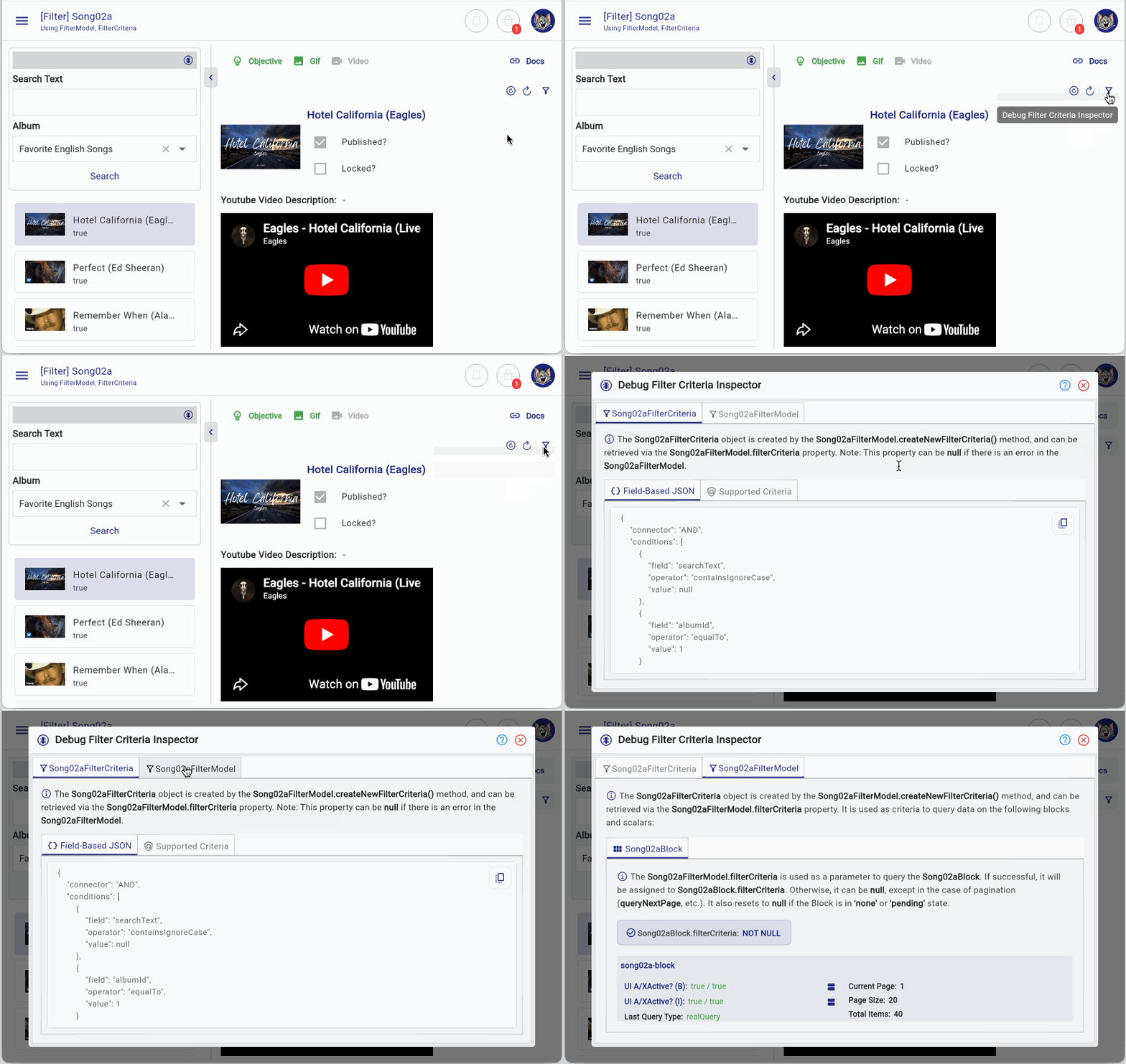
Conditions to show the button
To display the Debug Filter Criteria Inspector button on the BlockControlBar, you need the following configuration:
// Config:
BlockControlBar(
  ...
  config: BlockControlBarConfig(
    ...
    allowDebugFilterCriteriaInspectorButton: true, // <-----
  ),
)
Additionally, you must ensure that: The Block must have an associated FilterModel and the current user must be a systemUser
// The Logged-in user must be systemUser.
ILoggedInUser? loggedInUser = FlutterArtist.loggedInUser;
bool isSystemUser = loggedInUser?.isSystemUser ?? false;
Open Inspector via code
You can also open the Debug Filter Criteria Inspector programmatically:
myBlock.showDebugFilterCriteriaInspector()

myScalar.showDebugFilterCriteriaInspector()

myFilterModel.showDebugFilterModelInspector()1. Debug Filter Criteria Inspector
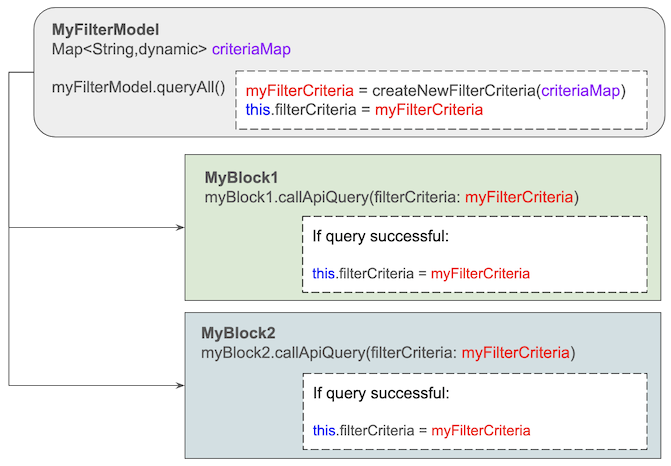
As you may know, in FlutterArtist a FilterModel can be shared across multiple Block(s) and Scalar(s). When you call filterModel.queryAll(), the processing flow will occur as illustrated in the diagram below.
No ADS
Processing Steps
- The method MyFilterModel.createNewFilterCriteria() is invoked to transform criteriaMap into a Dart object (myFilterCriteria). At the same time, myFilterCriteria.fieldBasedJSON is also assigned from MyFilterModel.
- If successful: myFilterModel.filterCriteria = myFilterCriteria
- The myFilterCriteria object will be used to query blocks such as myBlock1 and myBlock2. If the query succeeds, it will be assigned to: myBlock1.filterCriteria and myBlock2.filterCriteria. In case of failure, these properties may be set to null (depending on the scenario, see further explanation below).
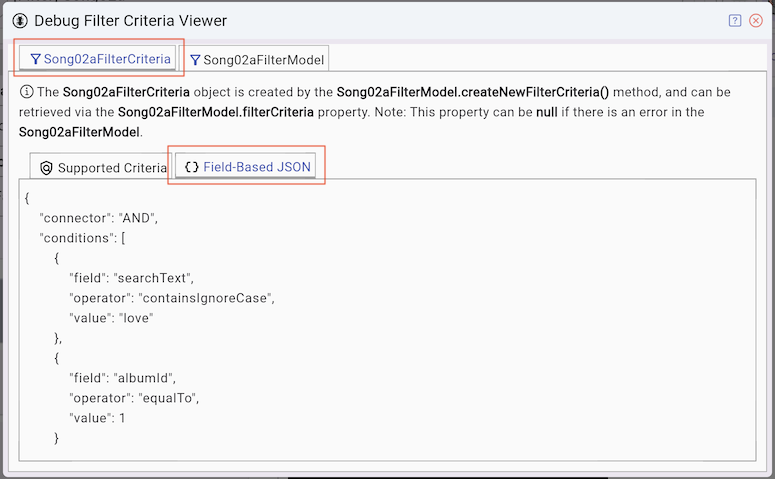
myFilterCriteria.fieldBasedJSON
Basically, fieldBasedJSON alone is sufficient to be sent to the server for querying and filtering data. FlutterArtist uses fieldBasedJSON to determine whether the filtering criteria have changed between queries.
fieldBasedJSON
{
    "connector": "AND",
    "conditions": [
        {
            "field": "searchText",
            "operator": "containsIgnoreCase",
            "value": "love"
        },
        {
            "field": "albumId",
            "operator": "equalTo",
            "value": 1
        }
    ]
}
No ADS
Simplifying Server-Side Logic
For simple applications, sending fieldBasedJSON may introduce unnecessary complexity on the server side. Instead, you can directly map values from the FilterModel to the FilterCriteria object.
class Song02aFilterModel
    extends
        FilterModel<
          EmptyFilterInput, //
          Song02aFilterCriteria
        > {
  ...
  @override
  Song02aFilterCriteria createNewFilterCriteria({
    required Map<String, dynamic> criteriaMap,
  }) {
    return Song02aFilterCriteria(
      album: criteriaMap["album~"], // AlbumInfo?
      searchText: criteriaMap["searchText~"], // String?
    );
  }
}
Then use these values as parameters in your API call:
@override
Future<ApiResult<PageData<SongInfo>?>> performQuery({
  required Object? parentBlockCurrentItem,
  required Song02aFilterCriteria filterCriteria,
  required SortableCriteria sortableCriteria,
  required Pageable pageable,
}) async {
  return await songRestProvider.querySearch(
    pageable: pageable,
    searchText: filterCriteria.searchText,
    albumId: filterCriteria.album?.id,
  );
}
XxxFilterModel
On the XxxFilterModel tab, you can view: All Block(s) and Scalar(s) using this FilterModel and their current states. This helps you debug and track data flow more effectively.
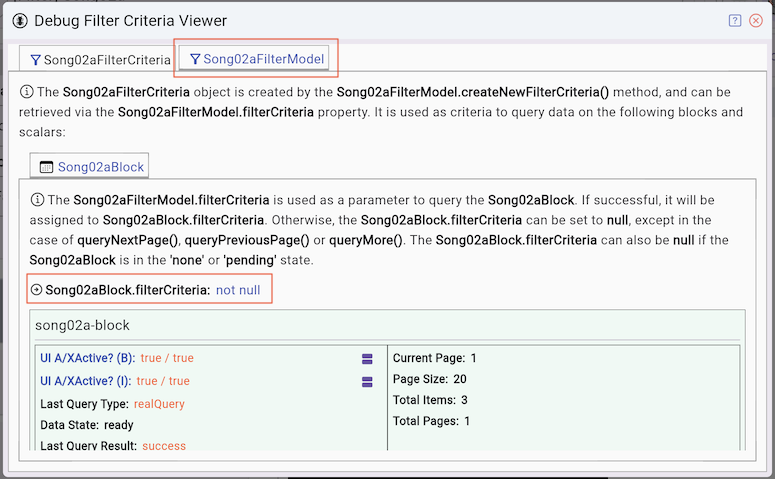
XxxBlock.filterCriteria = null
XxxBlock.filterCriteria may be null in the following scenarios:
- XxxBlock is a child block in the none state (its parent block has no current item).
- XxxBlock is in the pending state because no related UI component is currently visible, so querying it is unnecessary.
- XxxBlock was queried using XxxFilterModel.filterCriteria, but the query failed. If the query succeeds, XxxBlock.filterCriteria will be assigned from XxxFilterModel.filterCriteria.
XxxBlock.filterCriteria != null
XxxBlock.filterCriteria may have a value in the following scenarios:
- XxxBlock was successfully queried using XxxFilterModel.filterCriteria. In this case, XxxBlock.filterCriteria is assigned from XxxFilterModel.filterCriteria.
- XxxBlock was previously queried successfully, and then queried again using methods such as queryNextPage(), queryPreviousPage(), or queryMore(). If these subsequent queries fail, XxxBlock.filterCriteria remains unchanged.
- FlutterArtist Block DataState
No ADS
FlutterArtist
- Basic concepts in Flutter Artist
- FlutterArtist Block ex1
- FlutterArtist Filter Example
- FlutterArtist FilterModel MultiOptFilterCriterion ex1
- FlutterArtist FilterInput Example 1
- FlutterArtist Form ex1
- The idea of designing filter models in FlutterArtist
- FlutterArtist FormModel.patchFormFields() Ex1
- FlutterArtist BlockQuickItemUpdateAction Example
- FlutterArtist BlockNumberPagination Ex1
- FlutterArtist GridView Infinite Scroll Example
- FlutterArtist BlockQuickMultiItemCreationAction Example
- FlutterArtist ListView Infinite Scroll Pagination Example
- FlutterArtist Pagination
- FlutterArtist Sort DropdownSortPanel Example
- FlutterArtist Dio
- FlutterArtist BlockBackendAction Example
- FlutterArtist BackgroundWebDownloadAction Example
- FlutterArtist StorageBackendAction ex1
- FlutterArtist Block External Shelf Event Example
- FlutterArtist Filter FormBuilderMultiDropDown Ex1
- FlutterArtist Master-detail Blocks ex1
- FlutterArtist Scalar ex1
- FlutterArtist Pagination Davi table Infinite Scroll Ex1
- FlutterArtist Filter Tree FormBuilderField ex1
- FlutterArtist Filter FormBuilderRadioGroup ex1
- FlutterArtist Form Parent-child MultiOptFormProp ex1
- FlutterArtist Manual Sorting ReorderableGridView Example
- FlutterArtist Manual Sorting ReorderableListView
- FlutterArtist Scalar External Shelf Event Example
- FlutterArtist Code Flow Viewer
- FlutterArtist Log Viewer
- FlutterArtist config
- FlutterArtist StorageStructure
- FlutterArtist Debug App Inspector
- lutterArtist Debug Filter Criteria Inspector
- FlutterArtist Debug Filter Model Inspector
- FlutterArtist Debug Form Model Inspector
- FlutterArtist DebugMenu
- FlutterArtist Debug UI Context Inspector
- FlutterArtist Debug Shelf Structure Inspector
- FlutterArtist Context Provider Views
- FlutterArtist FilterModelStructure ex1
- FlutterArtist FilterModelStructure ex2
- FlutterArtist FilterModelStructure ex3
- FlutterArtist Internal Shelf Event ex1
- FlutterArtist Deferring External Shelf Events Example
- FlutterArtist Face
- Overview of FlutterArtist Theme
- FlutterArtist Theme Design Tokens Architecture
- FlutterArtist Themes FaColorUtils
- Flutter Artist Theme - Create a custom theme
Show More