
FlutterArtist Debug Form Model Inspector
Debug Form Model Inspector is a tool that allows you to inspect the state and data of a FormModel. This tool can be opened via a button on the BlockControlBar or programmatically via code.
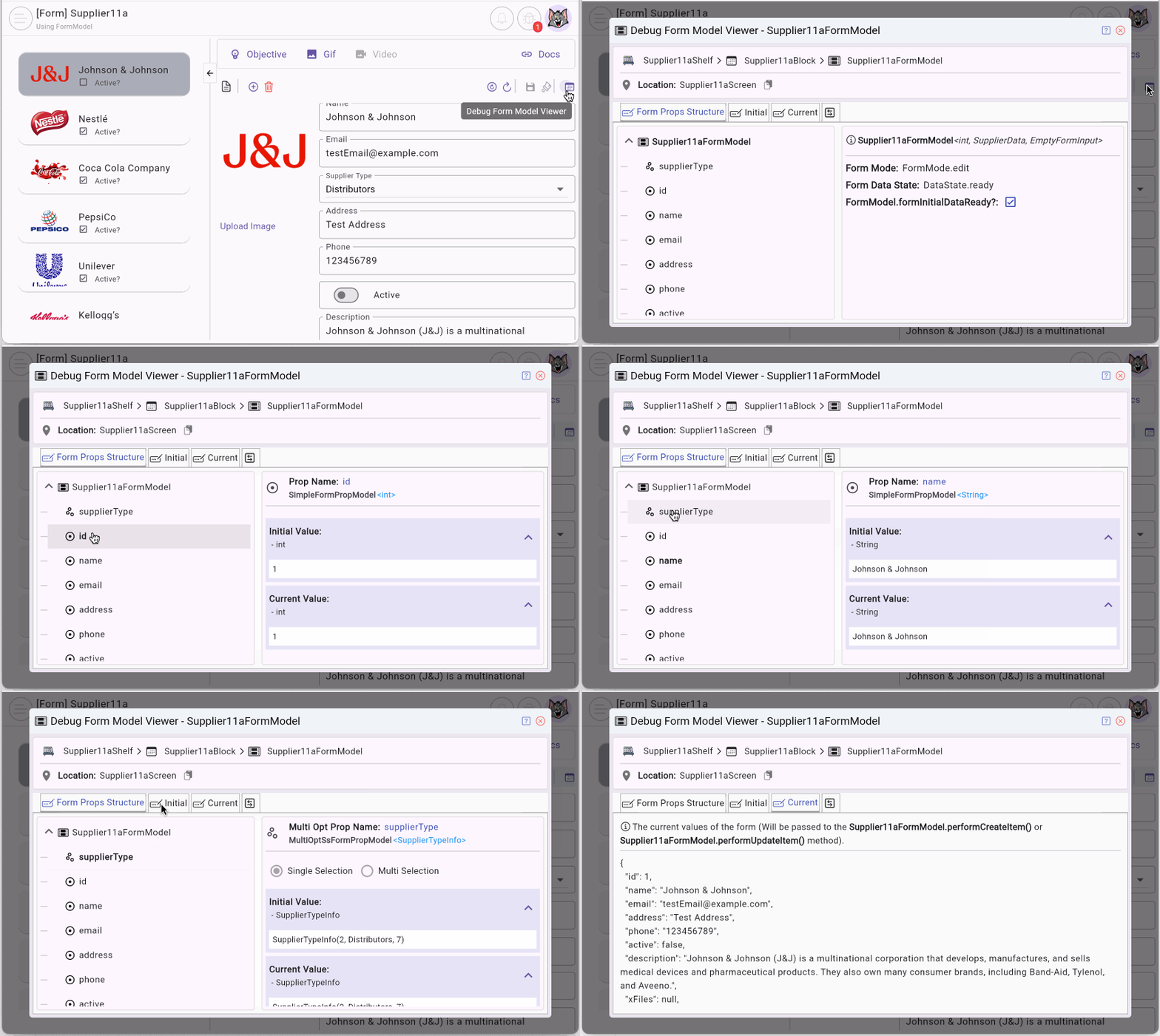
Conditions to show the button
To display the Debug Form Model Inspector button on the BlockControlBar, you need the following configuration:
BlockControlBar(
  ...
  config: BlockControlBarConfig(
    ...
    allowDebugFormModelInspectorButton: true, // <-----
  ),
)
Additionally, it's necessary to ensure that this Block actually has a FormModel and that the user is a systemUser.
ILoggedInUser? loggedInUser = FlutterArtist.loggedInUser;
bool isSystemUser = loggedInUser?.isSystemUser ?? false;
No ADS
Open Inspector via code
You can also open the Debug Form Model Inspector through the code:
myFormModel.showDebugFormModelInspector()1. Debug Form Model Inspector
First, let’s look at a simple example of a FormModel with defined properties.
Supplier11aFormModel
class Supplier11aFormModel
    extends
        FormModel<
          int, //
          SupplierData,
          EmptyFormInput,
          EmptyAdditionalFormRelatedData
        > {

  @override
  FormModelStructure defineFormModelStructure() {
    return FormModelStructure(
      simplePropDefs: [
        SimpleFormPropDef<int>(propName: "id"),
        SimpleFormPropDef<String>(propName: "name"),
        SimpleFormPropDef<String>(propName: "email"),
        SimpleFormPropDef<String>(propName: "address"),
        SimpleFormPropDef<String>(propName: "phone"),
        SimpleFormPropDef<bool>(propName: "active"),
        SimpleFormPropDef<String>(propName: "description"),
        // dynamic or List<XFile>
        SimpleFormPropDef<dynamic>(propName: "xFiles"),
      ],
      multiOptPropDefs: [
        // Multi Option Single Selection Prop.
        MultiOptFormPropDef<SupplierTypeInfo>.singleSelection(
          propName: 'supplierType',
        ),
      ],
    );
  }
  ...
}
In the Debug Form Model Inspector, you can see the data types of these properties and their current values.
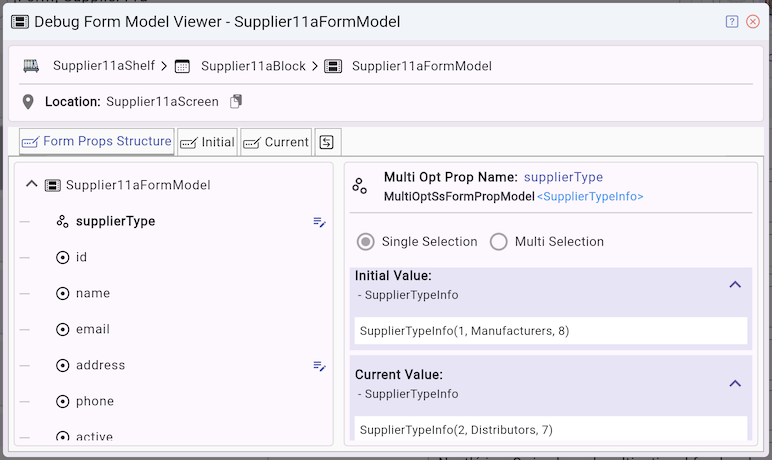
When users input or select values in the FormView, those values are updated in the FormModel. You can observe these changes in real time via the Debug Form Model Inspector.
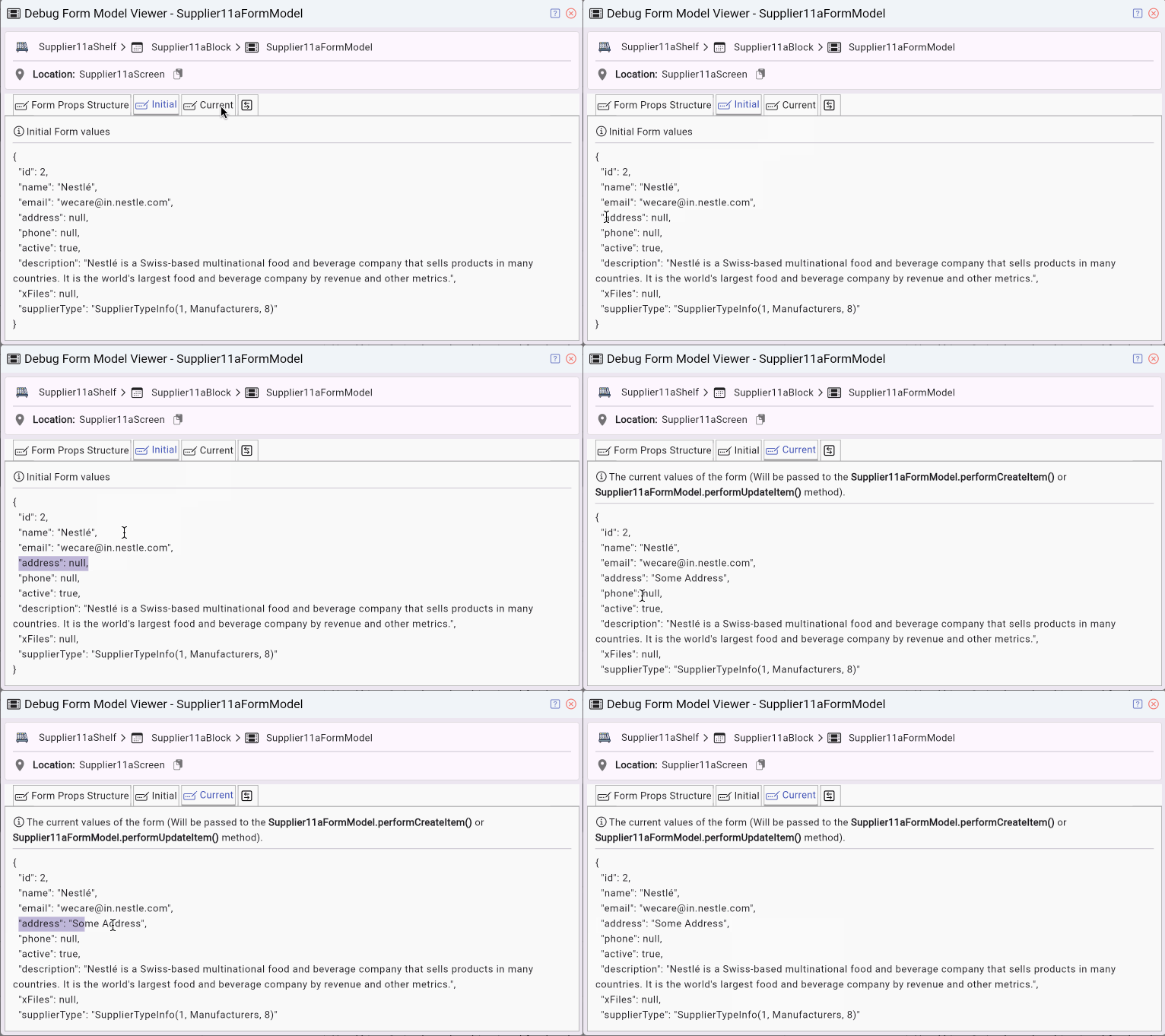
The "dirty" state of a property
The tool also allows you to track the "dirty" state of each property.
- A property is marked as dirty when its value has changed compared to its initial value.
- This is particularly useful for: identifying what the user has modified, deciding whether an update API call is necessary
No ADS
FlutterArtist
- FlutterArtist Debug Network Inspector
- Basic concepts in Flutter Artist
- FlutterArtist Block ex1
- FlutterArtist Filter Example
- FlutterArtist FilterModel MultiOptFilterCriterion ex1
- FlutterArtist FilterInput Example 1
- FlutterArtist Form ex1
- The idea of designing filter models in FlutterArtist
- FlutterArtist FormModel.patchFormFields() Ex1
- FlutterArtist BlockQuickItemUpdateAction Example
- FlutterArtist BlockNumberPagination Ex1
- FlutterArtist GridView Infinite Scroll Example
- FlutterArtist BlockBackendAction Create Multi Items (Example)
- FlutterArtist ListView Infinite Scroll Pagination Example
- FlutterArtist Pagination
- FlutterArtist Sort DropdownSortPanel Example
- FlutterArtist Dio
- FlutterArtist BlockBackendAction Example
- FlutterArtist BackgroundWebDownloadAction Example
- FlutterArtist StorageBackendAction ex1
- FlutterArtist Block External Shelf Event Example
- FlutterArtist Filter FormBuilderMultiDropDown Ex1
- FlutterArtist Master-detail Blocks ex1
- FlutterArtist Scalar ex1
- FlutterArtist Pagination Davi table Infinite Scroll Ex1
- FlutterArtist Filter Tree FormBuilderField ex1
- FlutterArtist Filter FormBuilderRadioGroup ex1
- FlutterArtist Form Parent-child MultiOptFormProp ex1
- FlutterArtist Manual Sorting ReorderableGridView Example
- FlutterArtist Manual Sorting ReorderableListView
- FlutterArtist Scalar External Shelf Event Example
- FlutterArtist Code Flow Inspector
- FlutterArtist Projections
- FlutterArtist Debug Log Viewer
- FlutterArtist start
- FlutterArtist AppConfiguration
- FlutterArtist Debug App Inspector
- FlutterArtist Debug Filter Criteria Inspector
- FlutterArtist Debug Filter Model Inspector
- FlutterArtist Debug Form Model Inspector
- FlutterArtist DebugMenu
- FlutterArtist Debug UI Context Inspector
- FlutterArtist Debug Shelf Structure Inspector
- FlutterArtist Context Provider Views
- FlutterArtist FilterModelStructure ex1
- FlutterArtist FilterModelStructure ex2
- FlutterArtist FilterModelStructure ex3
- FlutterArtist Internal Shelf Event ex1
- FlutterArtist Deferring External Shelf Events Example
- FlutterArtist Face
- Overview of FlutterArtist Theme
- FlutterArtist Theme Design Tokens Architecture
- FlutterArtist Themes FaColorUtils
- Flutter Artist Theme - Create a custom theme
Show More