
Overview of FlutterArtist Themes
When starting with Flutter, many developers tend to hard-code colors, fonts, or styles directly into each widget. However, after a while, modifying the UI becomes a "nightmare." This is where Flutter's Theme system comes to the rescue. FlutterArtist, with its philosophy of simplifying app development, provides several beautiful built-in themes and a robust foundation, allowing you to easily create, implement, or override existing themes.
What exactly is a Theme?
In Flutter, a Theme can be simply understood as a "design rulebook" applied to the entire application. It defines the primary colors, typography, sizing, and visual styles of UI components (widgets). Instead of styling each widget individually, you define the Theme once, and the entire app automatically follows those rules.
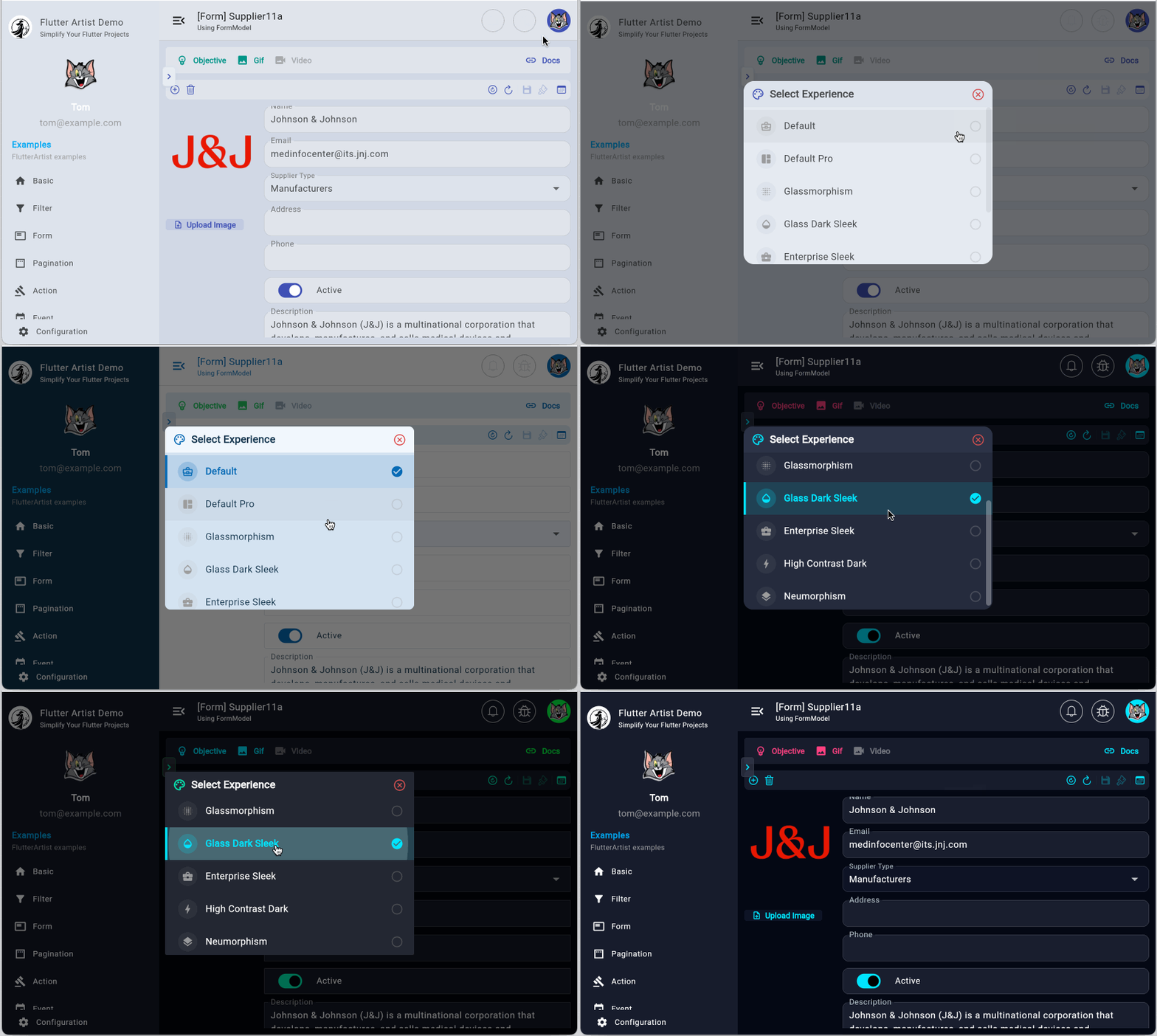
1. What does FlutterArtist support?
FlutterArtist provides a flexible foundation for defining your "design rulebook" via the FaTheme base class. You can easily create a custom class extending this and implement your unique styles by overriding abstract methods. Once your CustomFaTheme is ready, registering it with the system is seamless through the StorageStructure. The system will automatically register it with FaThemeHub at app startup, making them immediately available in the user's selection Dialog.
MyDemoStorageStructure
class MyDemoStorageStructure extends StorageStructure {

  @override
  List<FaTheme> additionalThemes() {
    // Register your custom themes here
    return [CustomFaTheme()];
  }

  // Other configuration code...
} At this point, your CustomFaTheme is available within the FaThemeHub. You can give your users the freedom to choose their favorite look with just a single line of code to display the built-in selection dialog.
// Trigger the theme selection dialog
FlutterArtistTheme.showSelectionDialog(context); 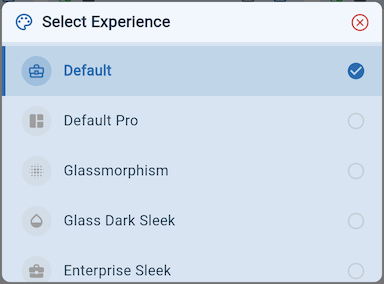
Note: To ensure your app reacts instantly to Theme changes, remember to wrap your application with FlutterArtistTheme to listen for updates.
FlutterArtistTheme
return FlutterArtistTheme(
  builder: (context, themeData) {
    return MaterialApp.router(
      title: "Flutter Artist Demo",
      theme: themeData, // Apply the current theme data
      // Other properties...
    );
  },
);
Advanced Registration
If you prefer to register themes manually at any point during runtime, you can use the register() or registerAll() methods from FaThemeHub.
// Register a single theme
FaThemeHub.instance.register(myNewTheme);

/// Register multiple themes at once
FaThemeHub.instance.registerAll([themeA, themeB]);
Note: If you prefer not to use the built-in FlutterArtist dialog, you can easily build your own custom theme picker (e.g., within a Settings Screen) by retrieving the list of registered themes from FaThemeHub.
final names = FaThemeHub.instance.availableThemeNames;
final FaTheme? themeDef = FaThemeHub.instance.getThemeDefinition(name);
2. Overview of the FaTheme Class
Below is the structure of the FaTheme class, including the key properties that help you master your application's UI:
FaTheme
abstract class FaTheme {
  FaThemeTokens? _tokens;

  String get name;

  IconData get icon;

  Brightness get brightness;

  String? get fontFamily;

  Color get seedColor => Colors.blue;

  FaThemeTokens get tokens {
    if (_tokens != null) {
      return _tokens!;
    }
    _tokens = createThemeTokens();
    return _tokens!;
  }

  FaThemeTokens createThemeTokens() {
     // Code..
  }
}
name | The unique identifier for the Theme. Avoid duplicates; if a conflict occurs, the newly registered Theme will overwrite the existing one in FaThemeHub.
|
icon | The visual icon representing the Theme, making it easy for users to identify and select within the selection Dialog. |
fontFamily | The primary font family applied consistently across the entire system. |
seedColor | The "seed" that allows FlutterArtist (via Material 3 algorithms) to automatically generate a harmonious ColorScheme. Instead of manually defining dozens of colors, the system handles the rest, ensuring standard contrast and aesthetic appeal. |
tokens | Provides access to the design tokens you've defined via the createThemeTokens() method. |
createThemeTokens | The core method where you define detailed rules for specific UI components. |
Check out the article below to learn how to implement a specific CustomFaTheme with detailed explanations:
3. Built-in Themes
If you want your app to have a professional look instantly without the design effort, flutter_artist_vibe_theme is the perfect choice. This is a collection of pre-tuned themes, offering modern and inspiring styles specifically built for the FlutterArtist ecosystem.
To get started, add the package to your pubspec.yaml file:
pubspec.yaml
dependencies:
  # The ultimate theme kit for FlutterArtist
  flutter_artist_vibe_theme: ^latest_version
Next, you need to declare these themes within your StorageStructure. The system will automatically register them with FaThemeHub at app startup, making them immediately available in the user's selection dialog.
StorageStructure
class MyDemoStorageStructure extends StorageStructure {

  @override
  List<FaTheme> additionalThemes() {
    return [
       CustomFaTheme(),
       ...FlutterArtistVibeThemeKit.allThemes
    ];
  }

  // Other configuration...
}
4. FaColorUtils: The Semantic Color System
FaColorUtils is a helper class that provides easy access to the color codes defined within the FaTheme rules. Essentially, you don't need to interact directly with FaTheme or FaThemeTokens. You can stay with the traditional Flutter ThemeData approach or, more simply and intuitively, use the semantic methods provided by FaColorUtils.
// Traditional Flutter approach
final ThemeData theme = Theme.of(context);
final Color labelColor = theme.colorScheme.onSurfaceVariant;

// The FlutterArtist way - Cleaner and more semantic
final Color labelColor = FaColorUtils.dataLabel(context);
When to use Semantic Colors?
The strength of FaColorUtils lies in its purpose-driven design. Instead of asking "What color is this?", you only need to determine "What is this color for?". For instance, labelColor (specifically dataLabel in the code) should be used in cases such as:
dataLabel | Used for descriptive labels in detail views or lists. Examples: "Full Name:", "Order ID:", "Created Date:". It helps clearly distinguish between the "data label" and the "data value". |
infoLabel | Ideal for instructional text, metadata, or static hints within the UI. |
primaryContent | Used for the most critical text content where maximum user focus is required. |
Important: Lifecycle ManagementA "vital" note when using FaColorUtils: Since this class accesses Theme.of(context), it depends on InheritedWidgets. Never call these methods inside initState(), as the context is not yet ready to look up inherited widgets, which will trigger an exception.Solution: Use them in build() or didChangeDependencies().Check out the dedicated FaColorUtils article to dive deeper into customizing color Resolvers and how the system automatically adapts to Light/Dark modes.
No ADS
FlutterArtist
- Basic concepts in Flutter Artist
- FlutterArtist Block ex1
- FlutterArtist Filter Example
- FlutterArtist FilterModel MultiOptFilterCriterion ex1
- FlutterArtist FilterInput Example 1
- FlutterArtist Form ex1
- The idea of designing filter models in FlutterArtist
- FlutterArtist FormModel.patchFormFields() Ex1
- FlutterArtist BlockQuickItemUpdateAction Example
- FlutterArtist BlockNumberPagination Ex1
- FlutterArtist GridView Infinite Scroll Example
- FlutterArtist BlockQuickMultiItemCreationAction Example
- FlutterArtist ListView Infinite Scroll Pagination Example
- FlutterArtist Pagination
- FlutterArtist Sort DropdownSortPanel Example
- FlutterArtist Dio
- FlutterArtist BlockBackendAction Example
- FlutterArtist BackgroundWebDownloadAction Example
- FlutterArtist StorageBackendAction ex1
- FlutterArtist Block External Shelf Event Example
- FlutterArtist Filter FormBuilderMultiDropDown Ex1
- FlutterArtist Master-detail Blocks ex1
- FlutterArtist Scalar ex1
- FlutterArtist Pagination Davi table Infinite Scroll Ex1
- FlutterArtist Filter Tree FormBuilderField ex1
- FlutterArtist Filter FormBuilderRadioGroup ex1
- FlutterArtist Form Parent-child MultiOptFormProp ex1
- FlutterArtist Manual Sorting ReorderableGridView Example
- FlutterArtist Manual Sorting ReorderableListView
- FlutterArtist Scalar External Shelf Event Example
- FlutterArtist Code Flow Viewer
- FlutterArtist Log Viewer
- FlutterArtist config
- FlutterArtist StorageStructure
- FlutterArtist Debug Storage Viewer
- FlutterArtist DebugMenu
- FlutterArtist Debug UI Components Viewer
- FlutterArtist Debug Shelf Structure Viewer
- FlutterArtist Context Provider Views
- FlutterArtist FilterModelStructure ex1
- FlutterArtist FilterModelStructure ex2
- FlutterArtist FilterModelStructure ex3
- FlutterArtist Internal Shelf Event ex1
- FlutterArtist Deferring External Shelf Events Example
- FlutterArtist DropdownSortPanel
- Overview of FlutterArtist Themes
- FlutterArtist Themes
- FlutterArtist Themes FaColorUtils
Show More